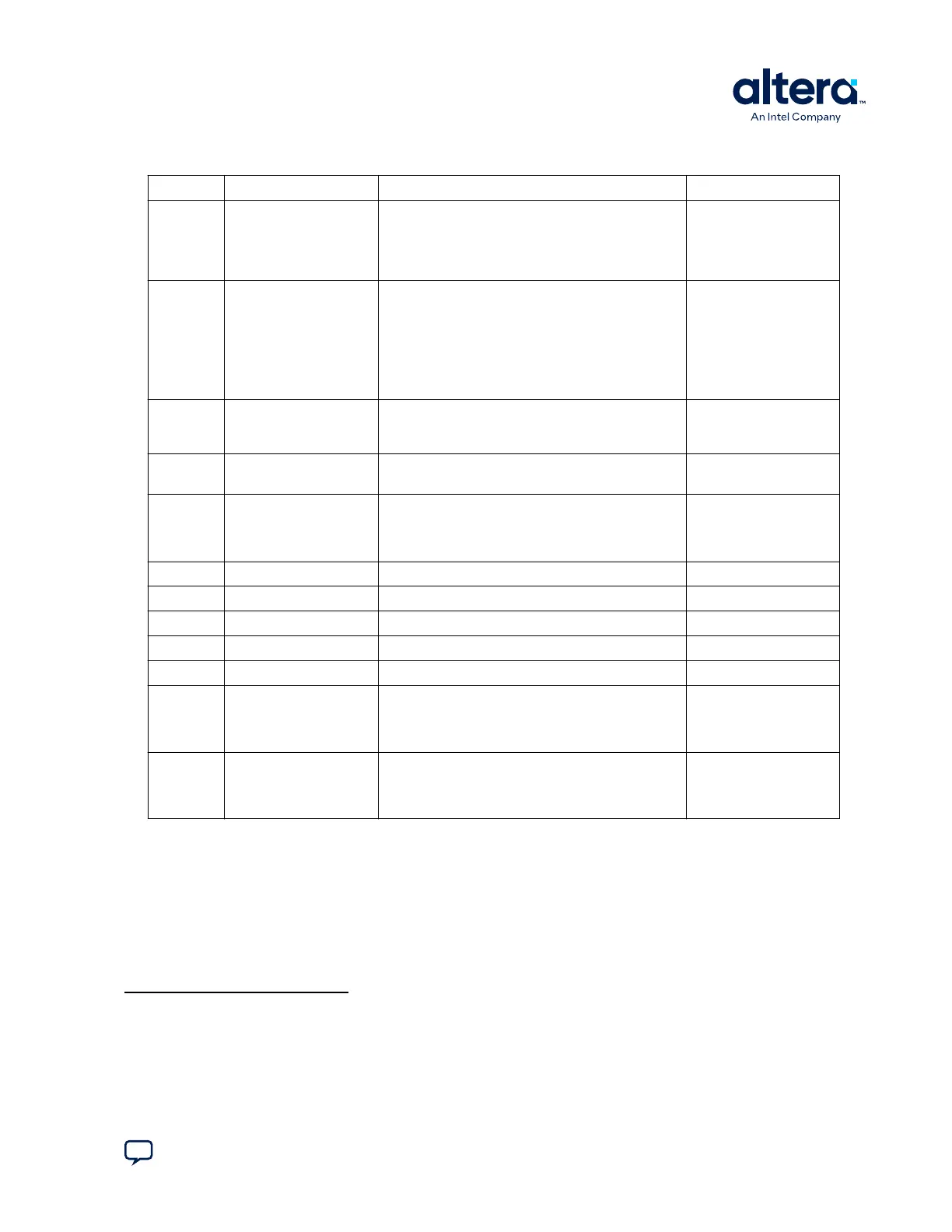
Table 11. Default Jumper Settings for Power Solution 1 Board
Switch Board Label Function Default Position
J5 9V • SHORT—Powers the CFI flash memory device
using a 9 V supply for fast write in
manufacturing.
• OPEN—Powers CFI flash memory from the default
3 V supply.
OPEN
J6 JTAG HPS SEL • SHORT—Controls the HPS from the onboard Intel
FPGA Download Cable II JTAG master.
• OPEN—Controls the HPS from Mictor-based JTAG
master, such as DSTREAM* or Lauterbach*
programming cables. Also, set SW4.1 to ON to
remove the onboard Intel FPGA Download Cable
II from driving the HPS JTAG input port in this
mode.
SHORT
J7 JTAG SEL • SHORT—The Intel FPGA Download Cable II is the
source of the JTAG chain.
• OPEN—The Mictor is the source of the JTAG chain.
SHORT
J13 OSC1_CLK_SEL • SHORT—Selects the onboard 25 MHz clock.
• OPEN—Selects SMA.
SHORT
J16 JTAG MIC SEL • SHORT—JTAG TRST input to HPS driven from the
JTAG chain.
• OPEN—JTAG TRST input to HPS driven from the
Mictor.
OPEN
J26 CLKSEL0 Selects the HPS clock settings.
(3)
SHORT pins 2-3
J27 CLKSEL1 Selects the HPS clock settings.
(3)
SHORT pins 2-3
J28 BOOTSEL0 Selects the boot mode and source for the HPS.
(3)
SHORT pins 1-2
J29 BOOTSEL1 Selects the boot mode and source for the HPS.
(3)
SHORT pins 2-3
J30 BOOTSEL2 Selects the boot mode and source for the HPS.
(3)
SHORT pins 1-2
J31 SPI I2C • SHORT—Select SPI bus access from HPS to Linear
Tech daughter card interface through J32.
• OPEN—Select I
2
C bus access from HPS to Linear
Tech daughter card interface through J32.
(4)
OPEN
J39 — • SHORT—External Mictor 38-pin connector's pin 14
is powered by 3.3 V rail.
• OPEN—External Mictor 38-pin connector's pin 14
is floating.
SHORT
Related Information
Cyclone V Device Handbook: Volume 1: Device Interfaces and Integration
(3)
For more information, refer to the Cyclone V Device Handbook Volume 1: Device Interfaces
and Integration.
(4)
This connection can be software controlled from the HPS GPIO pin F16 on rev D and later
boards.
3. Development Kit Setup
830285 | 2024.10.07
Send Feedback
Cyclone
®
V SoC Development Kit User Guide
21















 To Next Page