Radar Target Generator - RTG1002 Edition Date: 19-Apr-18
3. ON SITE TARGET INJECTION
3.1. Theory
For on site target injection RTG1002 is directly connected to the radar. In this way, multiple targets can be
generated in various directions, on top of the existing radar environment, the current clutter situation. Targets
can be programmed freely with any speed or RCS as long as there is only one target generated per beam
dwell. If you want to test the resolution of the radar, resolving a 2 target overlap, you'll need two target
generators.
The vertical antenna diagram can be loaded from a file for simulation. If the radar has two antennas on
reception like most of the ATC radars, these two beams can be simulated simultaneous.
3.2. Software
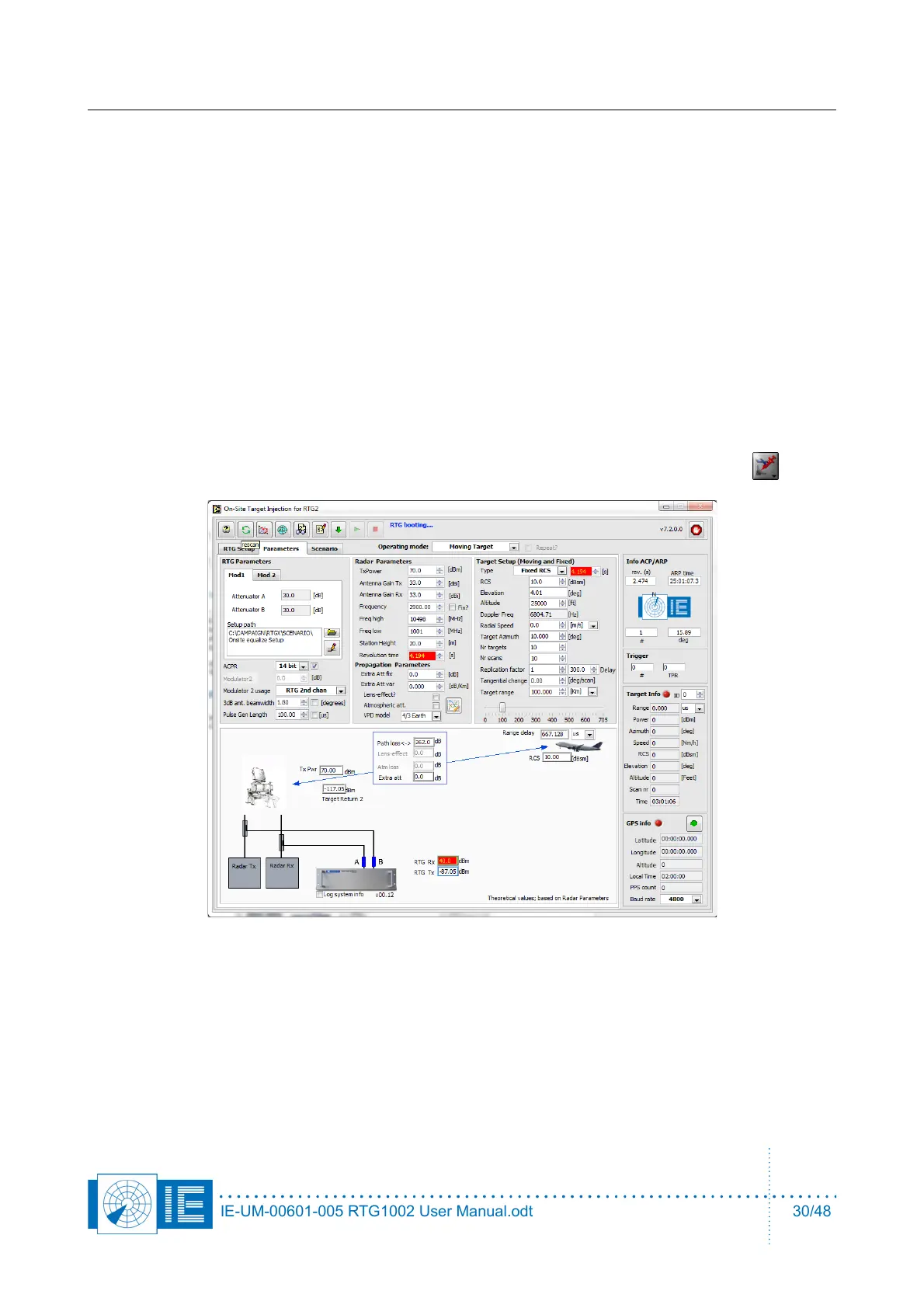
1. Load the RTG1002 on site Target Generation software from the Scenario Generation button
in the PSR Generation section of the RASS-S toolbox.
2. On every available network connection there will be checked if there is a target generator connected.
If there is more than one target generator detected, connected to the same network segment (not via
router but connected to a switch for example) a list will pop up and one can select which target
generator to use. Then the calibration files and settings will be loaded into the FPGA to control the
RTG1002. The HMI will indicate Booting...
IE-UM-00601-005 RTG1002 User Manual.odt 30/48


 To Next Page