Radar Target Generator - RTG1002 Edition Date: 19-Apr-18
3.4. Fixed – or Moving Target Operating Mode
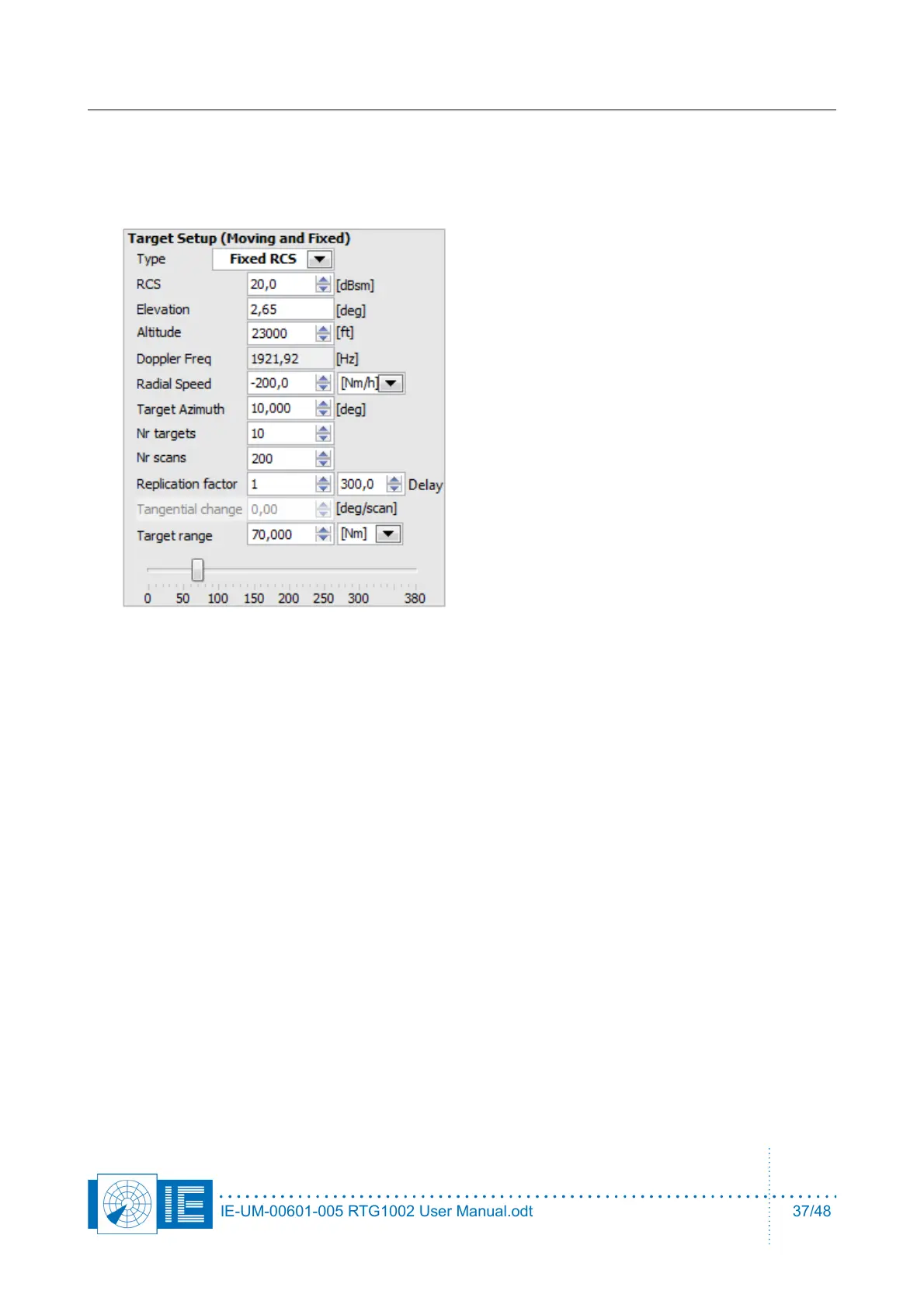
1. Create a simple scenario by entering these parameters
2. This scenario will create 10 targets with RCS of
100m2. The first target at 10 degrees and rest
with equidistant intervals (36 degrees).
All these targets will start at 70nm and fly
inbound with a speed of 200 knots at a
constant altitude of 23000feet.
3. The Replication Factor should be 1, for
sensitivity tests. It is possible to replicate the
test target every xx Nm/Km/microsecconds
(same as the unit selection of the target range).
The minimum delay for replication is the pulse
width + 1µs.
4. Select an antenna diagram from a VPD file for the simulation of the altitude of the test target. When
the radar transmits on the low coverage beam and uses two beams on reception, then select the
third option for VPD usage, as in the next figure. Place the sma-sma bridge adapter between the
monitor output of the digital delay line and the input of modulator2.
IE-UM-00601-005 RTG1002 User Manual.odt 37/48


 To Next Page