USING YOUR DEVICE | IPG PHOTONICS
S
S
U
U
B
B
M
M
E
E
N
N
U
U
B
B
U
U
T
T
T
T
O
O
N
N
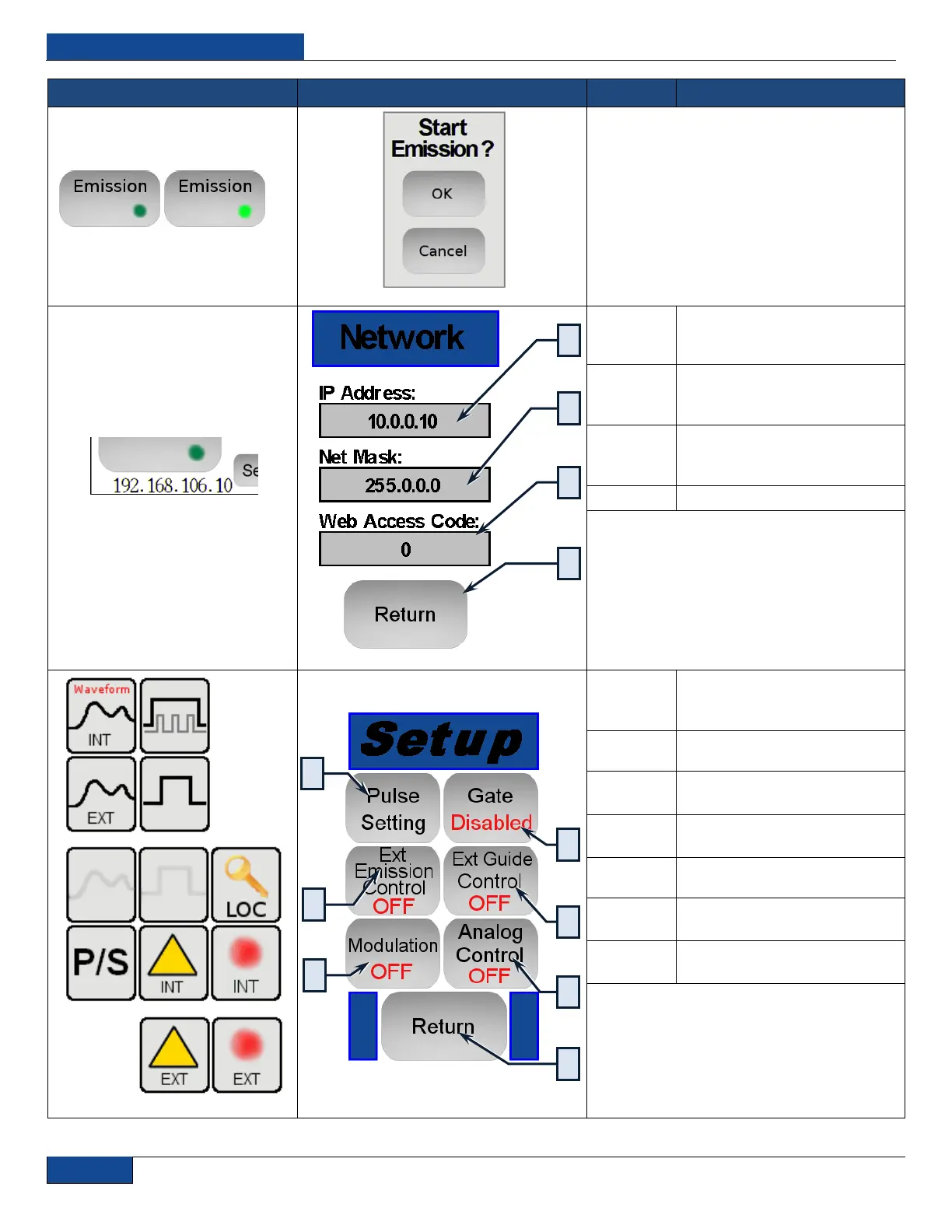
Pressing the Emission Button will ask you to
confirm the emission startup process by
pressing “OK” or “Cancel” to exit.
Pressing the address starts
dialog to enter the new address.
Pressing net mask address
starts dialog to enter the new
address.
Pressing the web access code
starts dialog to enter the new
address.
Returns to previous screen
Opens Pulse Settings menu
(function described lower in
table)
Enable / Disable Gate mode
Enable / Disable External Guide
Laser control
Enable / Disable External
Analog Power control
Return to previous screen
Enable / Disable Modulation
mode
Enable / Disable External
Emission control


 To Next Page