EasyManua.ls Logo

IPG YLR Series - Computer Configuration Procedure; Ethernet and RS-232 Connection Steps

IPG YLR Series
102 pages
Print Icon
To Next Page IconTo Next Page
To Previous Page IconTo Previous Page
Loading...
YLR-SERIES USER GUIDE
IPG PHOTONICS | USING YOUR DEVICE
39
Pulse
Setting
S
S
U
U
B
B
M
M
E
E
N
N
U
U
B
B
U
U
T
T
T
T
O
O
N
N
S
S
U
U
B
B
M
M
E
E
N
N
U
U
I
I
T
T
E
E
M
M
D
D
E
E
S
S
C
C
R
R
I
I
P
P
T
T
I
I
O
O
N
N
1
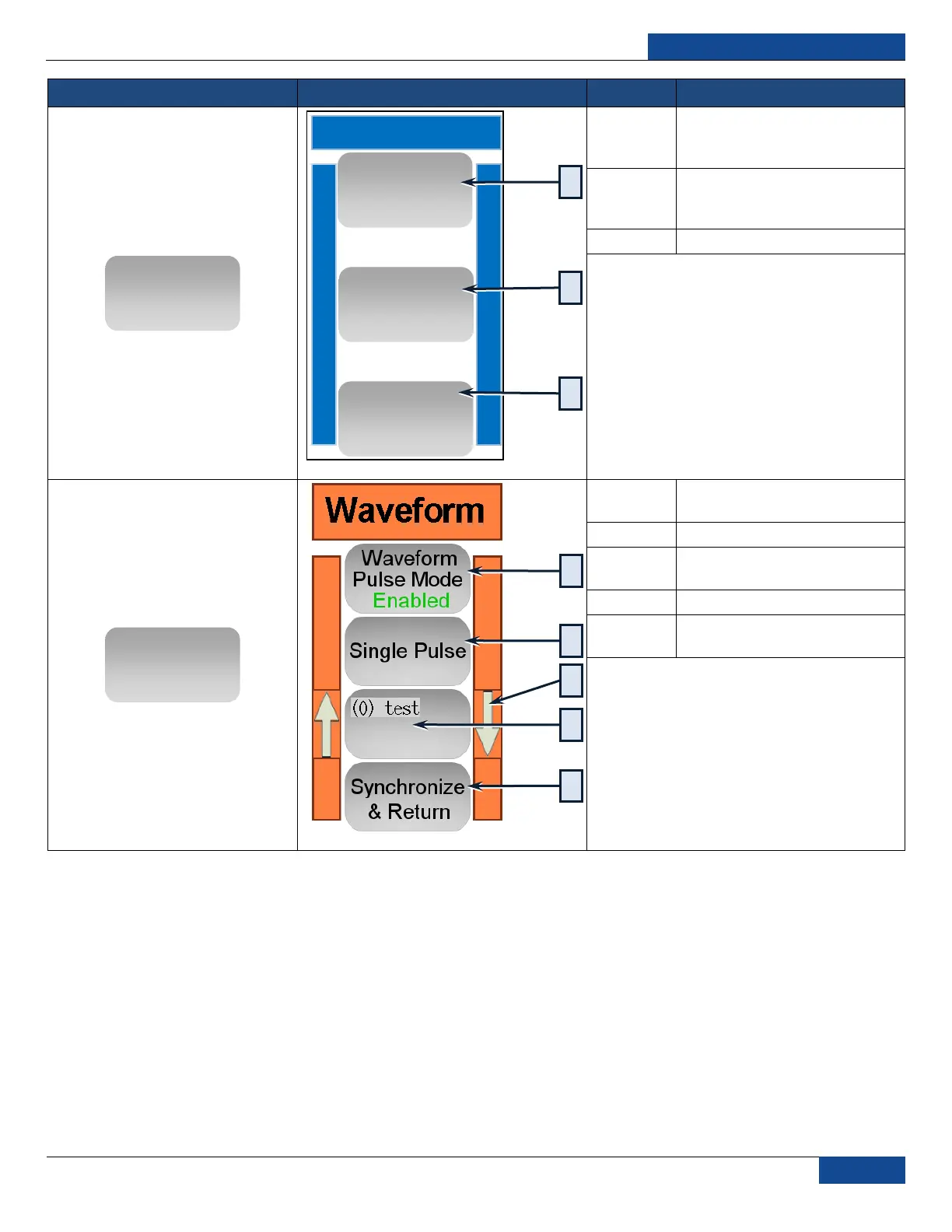
Opens Pulse Mode Submenu
(described lower in table)
2
Opens Waveform Mode
Submenu (described lower in
table)
3
Return to previous screen
1
Enables/Disables Waveform
Pulse Mode
2
Single Pulse / Pulse Sequence
3
UP/DOWN Arrows scroll to
select a program from memory
4
Selected program in memory
5
Transfers selected program to
the laser.
Pulse
Return
Waveform
Mode
Pulse Mode
Waveform
Mode
3
1
2
5
1
2
4
3

Table of Contents