MINI and MIX Series I/O modules/Modbus
version 1.3 www.gc5.pl Page 29 / 73
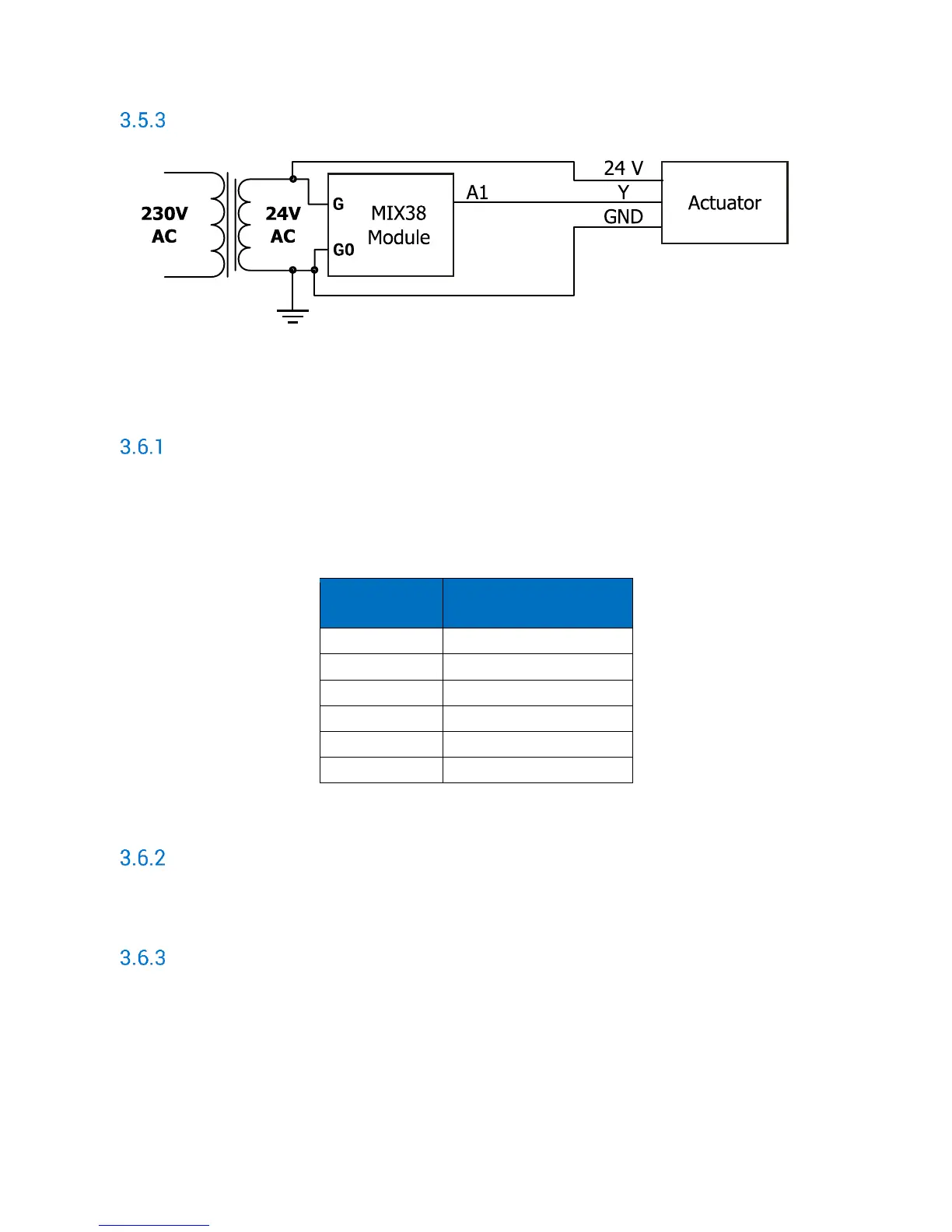
Connection an actuator to Analog Output
Figure 25 Connection an actuator to AO
3.6 Analog Outputs MODBUS Registers
State of Analog Outputs working as Digital Outputs (40019)
Set/setting true value of particular bit of this 16-bit register causes setting maximum output
voltage (10 V) on corresponding output and setting to 0 corresponding register with Analog
Output value (40121 – 40126).
Bits of register correspond to the following Analog Outputs.
Table 18 AO working as DO for MIX38 and MIX38-IP
Value of the analog outputs 1 – 6 (40121 – 40126)
In these 16-bit registers are stored value in mV of voltage that appears at the Analog Output.
Default state of the analog outputs (digital) (40144)
Setting true value of particular bit of this 16-bits register sets the maximum voltage (10V)
on the corresponding Analog Output after power on or watchdog reset.


 To Next Page