19
2.2.2.4 Editing programs
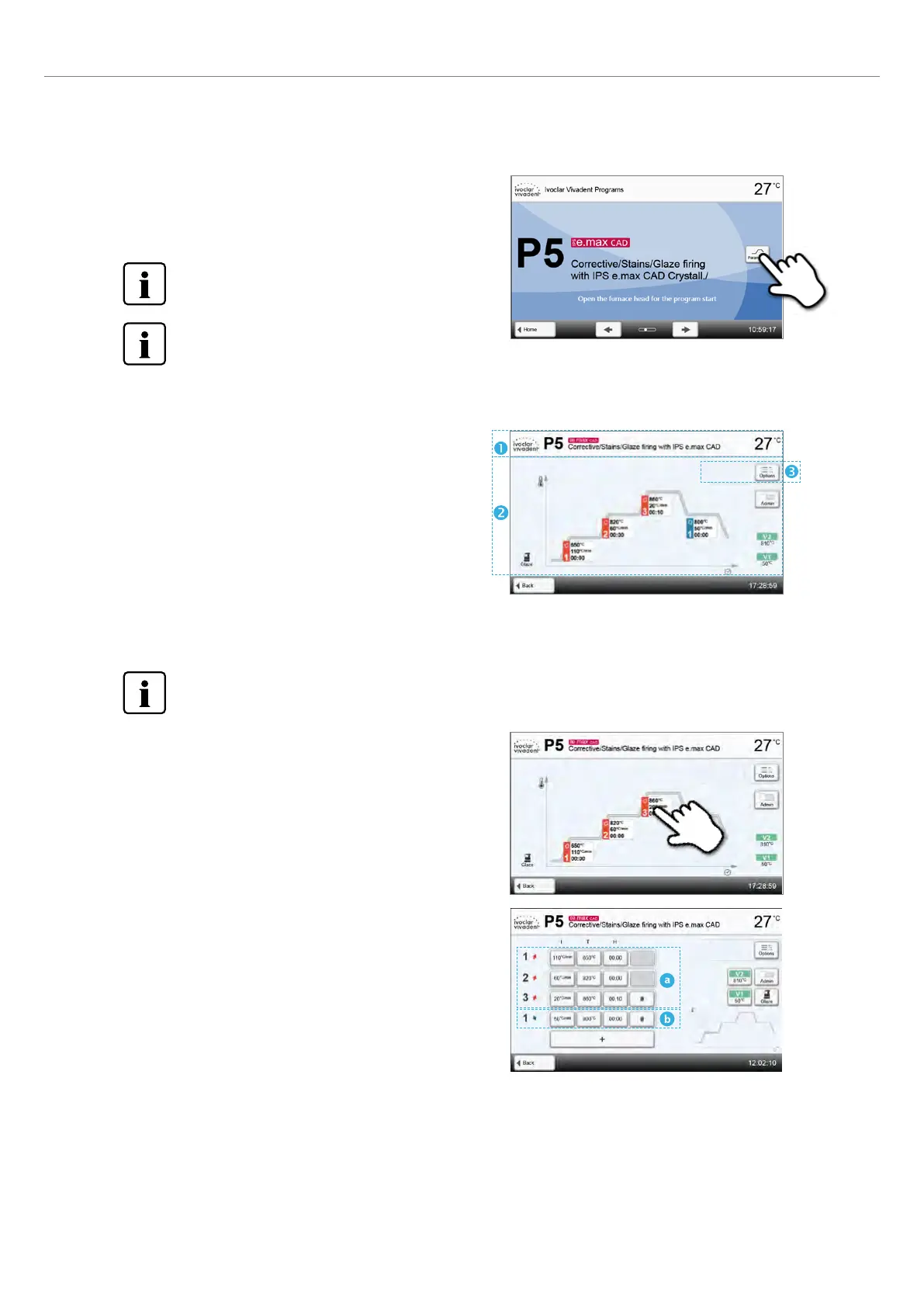
If the [Parameters] button is pressed while the program screen is
displayed, the program parameter screen opens. Firing programs can
be edited in this screen.
For Ivoclar Vivadent programs, the write-protection must
be deactivated first, before any parameters can be
changed.
Not all Ivoclar Vivadent programs can be edited.
The following information is shown in program parameter screen:
1. Information bar:
– Program designation
– Current furnace temperature
2. Firing curve:
– Predrying
– Number of heating and cooling stages
– Holding temperature, temperature increase rate and holding time
per stage
– Temperatures for vacuum on and vacuum off
3. Program options:
In addition to the parameters shown in the firing curve, several other options are available that can be activated by pressing
the [Options] button. The icons in the grid show the activated options.
When the furnace head is open, the temperature of the thermocouple in the furnace head is indicated, not the
temperature in the firing chamber.
In the parameter view, the parameters can be changed. Up to three
heating (a) and two cooling (b) stages are available.
Editing parameters
By pressing the firing curve, you will reach the parameter view.
2. Application















 To Next Page