14
2.2 Operation and configuration
2.2.1 Introduction to the operation
Control unit
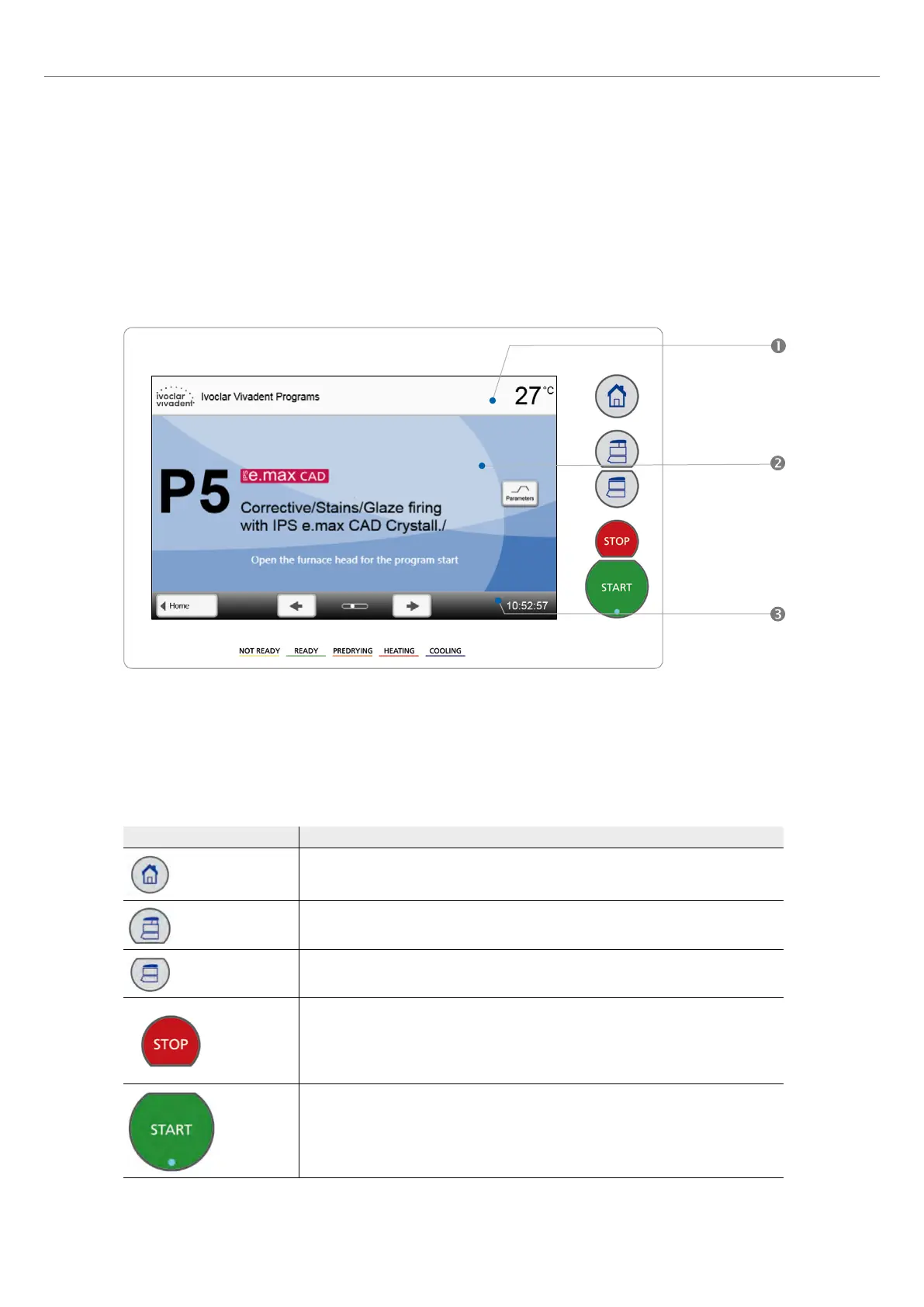
The Programat CS6 is equipped with a widescreen colour display. The furnace can be intuitively operated by means of the
membrane-sealed keypad and the touch screen. The touch buttons can be actuated by slightly tapping the display with the
fingertip. Then the furnace runs the desired function.
The user interface in the display is divided into three sections:
1. Information bar (e.g. indication of the current furnace temperature, the selected program, etc.)
2. Main screen (e.g. editing firing programs, changing the settings, etc.)
3. Navigation bar (e.g. scrolling, switching to higher levels, etc.)
Description of the key functions
Key Function
Home
Switch to home screen (main menu)
Open furnace head
Close furnace head
STOP
A program in progress can be stopped by pressing the STOP key. The movement of the
furnace head can be stopped at any time by pressing STOP. The acoustic signal can be
confirmed by pressing the STOP key.
START (Start LED)
Starts the selected program. The green LED indicates that a program is active.
2. Application















 To Next Page