35
Step 2:
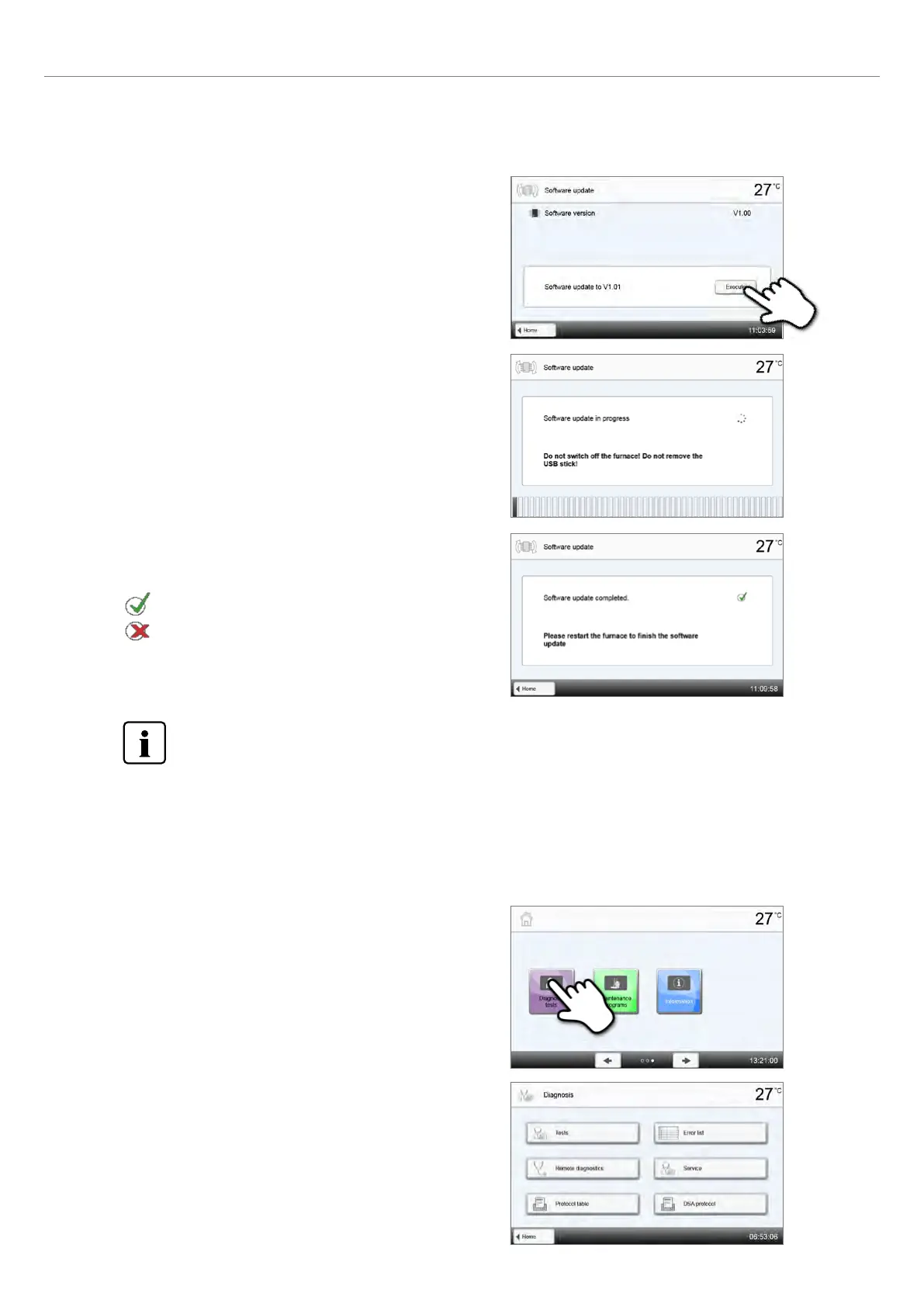
Conduct software update
If the USB flash drive with the software file is already connected, the
furnace automatically searches for a valid software file. If the USB
flash drive has not yet been connected with the furnace, do so now.
Press the [Execute] button.
Step 3:
The status bar shows the progress of the update.
The USB flash drive must not be removed during the update
process and the furnace must not be switched off.
Step 4:
End software update
The following messages are displayed:
Software update successful
Software update failed
The furnace has to be switched off by means of the mains switch at the rear of the furnace and switched on
again after a waiting time of five seconds to complete the software update.
The following functions are available in the Diagnosis menu:
– Tests (e.g. vacuum test, heater test etc.)
– Error list (saved error messages)
– Remote diagnosis
– Service
– Protocol table
– DSA protocol
2.2.4.6 Diagnosis
Scroll to page 2 in the home screen and press the
[Diagnosis]] button.
2. Application















 To Next Page