26
Step 3:
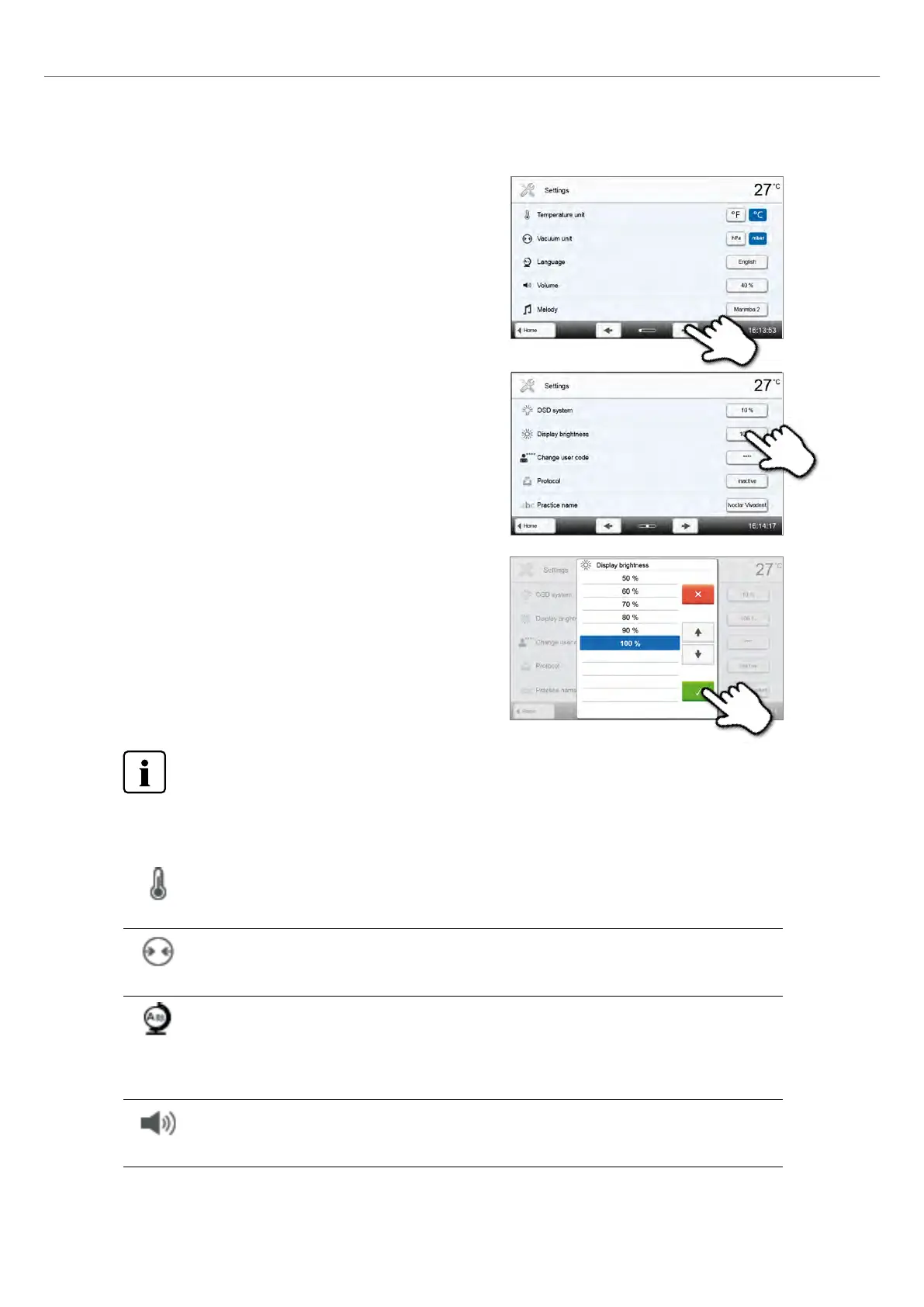
Change the brightness of the display
Select the desired display brightness in percent and confirm the entry
with the green button or cancel the entry by pressing the red button.
To return to the home screen, press either the [Home] button in the navigation bar or the Home key on the
membrane-sealed keypad.
The following settings can be changed in the Settings menu:
Temperature unit
You can choose between °C and °F.
Setting option: °C / °F
Vacuum unit
You can choose between mbar and hPa.
Setting options: mbar / hpa
Language
Select the desired operating language.
Setting option: German, English, Italian, French, Spanish, Portuguese, Swedish, Dutch, Turkish, Russian,
Polish, Croatian, Trad. Chinese, Mandarin Chinese, Finnish, Norwegian, Slovenian, Czech, Slovakian,
Hungarian, Indian (Hindi), Japanese, Korean, Arabic, Iranian (Farsi), Serbian
Volume
Select the desired volume of the acoustic signals
Setting option: Off / 20 – 100 % in 20 % steps
Step 2:
Open display brightness
The [Arrow] buttons are used to scroll through the Settings menu.
Press the button until the setting "Display brightness" appears in the
display.
Press the touch button in the line "Display brightness".
2. Application















 To Next Page