DP400 Motherboard
○○○○○○○○○○○○○○○○○○○○○○○○○○○○○○○○○○○○○○○○○○○○○○○○○○
User’s Manual
4•10
○○○○○○○○○○○○○○○○○○○○○○○○○○○○○○○○○○○○○○○○○○○○○○○○○○
Installing the Processor Wind Tunnel
After you install the Xeon processor and heatsink assem-
bly, you must install the Processor Wind Tunnel (PWT)
assembly. The PWT has three parts:
• Shroud
• Fan Assembly (fan with mounting frame)
• PWT End Cap
You install these components separately and in order as
follows.
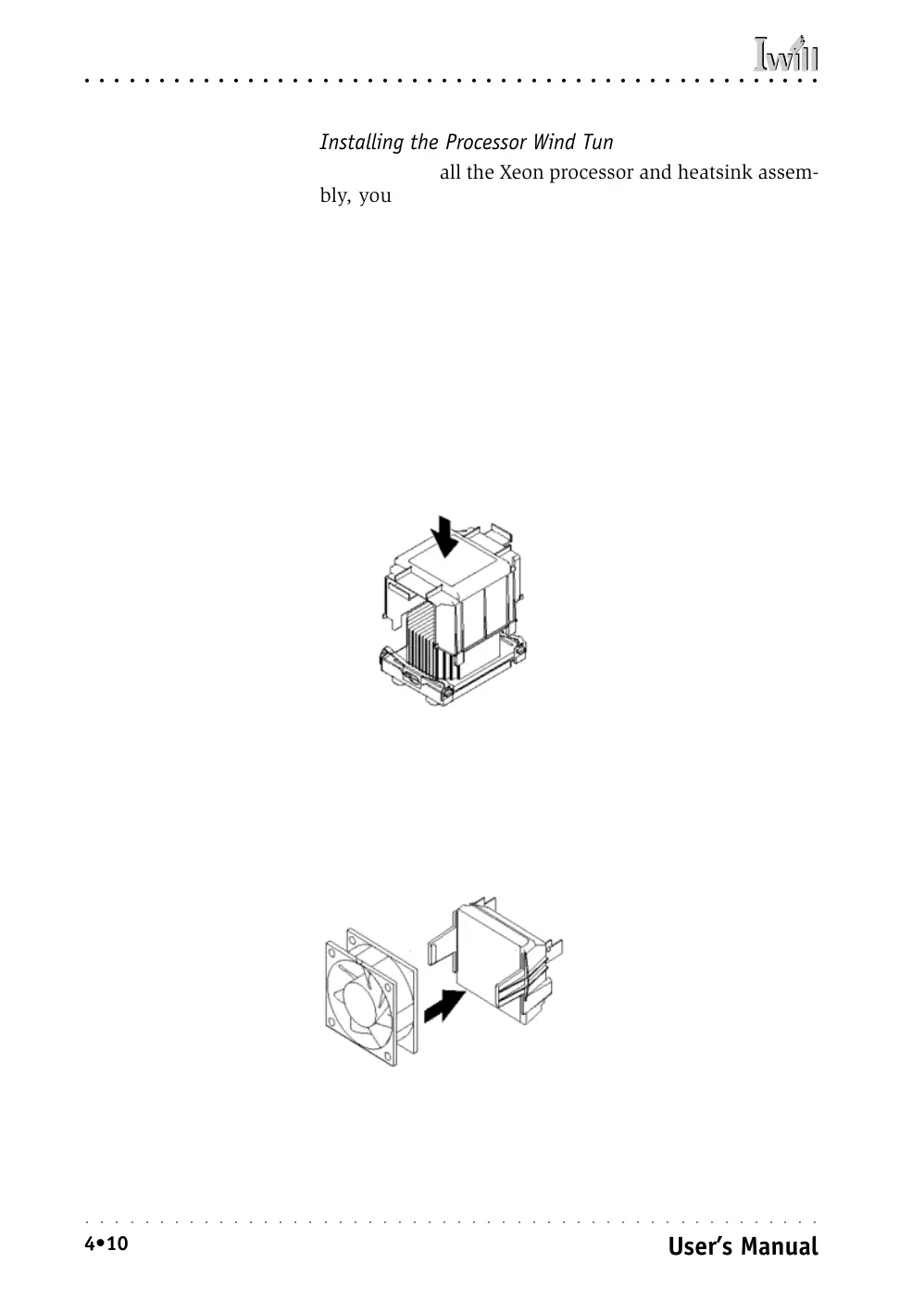
Install Shroud
First install the PWT shroud:
1. Clip the shroud onto the retaining mechanisms at
the corners. It should fit onto the mechanism cor-
ners and the flexible tabs should snap into place.
Attach Fan Assembly
Next attach the cooling fan:
1. Clip the fan mounting frame onto the cooling fan.
Orient the fan so that it will blow air into the PWT
Shroud.
Orient the fan so that it
blows toward the Heatsink
Step 1:
Attach the PWT shroud
Step 1:
Clip the fan mount onto
the fan
Press the shroud down onto
the Retention Mechanisms
untl it snaps into place



 To Next Page