34
07610-004-33-05-E
PROGRAMMING
TROUBLESHOOTING
PROGRAM
SELECTION MODE
To access Program Selection Mode, the machine should be on and preferably not in
operation (accessing this mode during operation will interrupt the process).
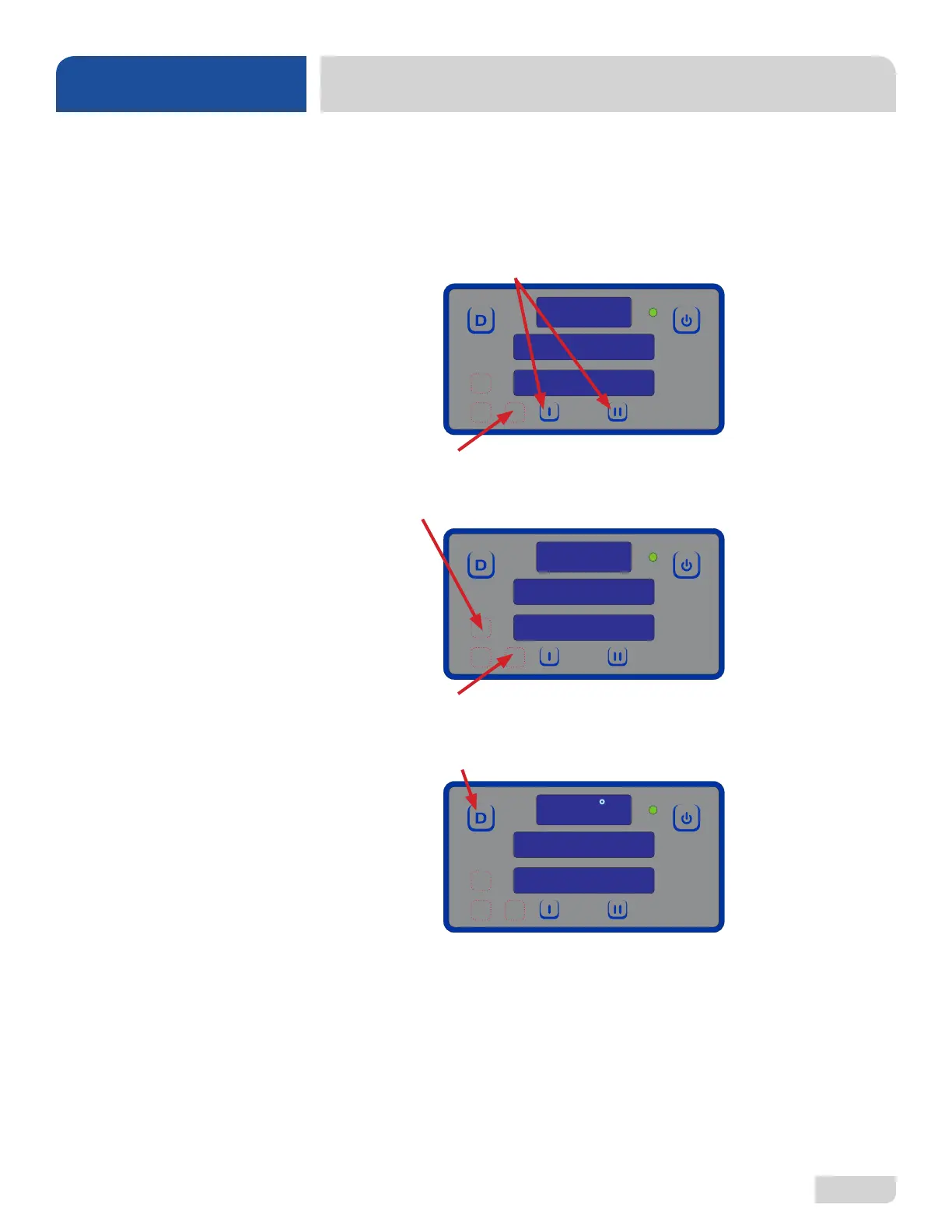
The programming buttons (Up-arrow, Down-arrow, and Select) are hidden on the
display and are shown below outlined with red dots.
1. Press and hold the I and II Buttons until “Program” starts ashing (2–3 seconds).
2. Press the Select Button.
3. Use the Up-arrow Button to change the program number to “5” for low-temp
machines or “6” for high-temp machines.
4. Press the Select Button.
5. “Program” will ash.
6. Press the Delime Button to exit.
PROGRAM
PROGRAM
6
READY
CYCLE 1
180
F







 To Next Page