36
07610-004-33-05-E
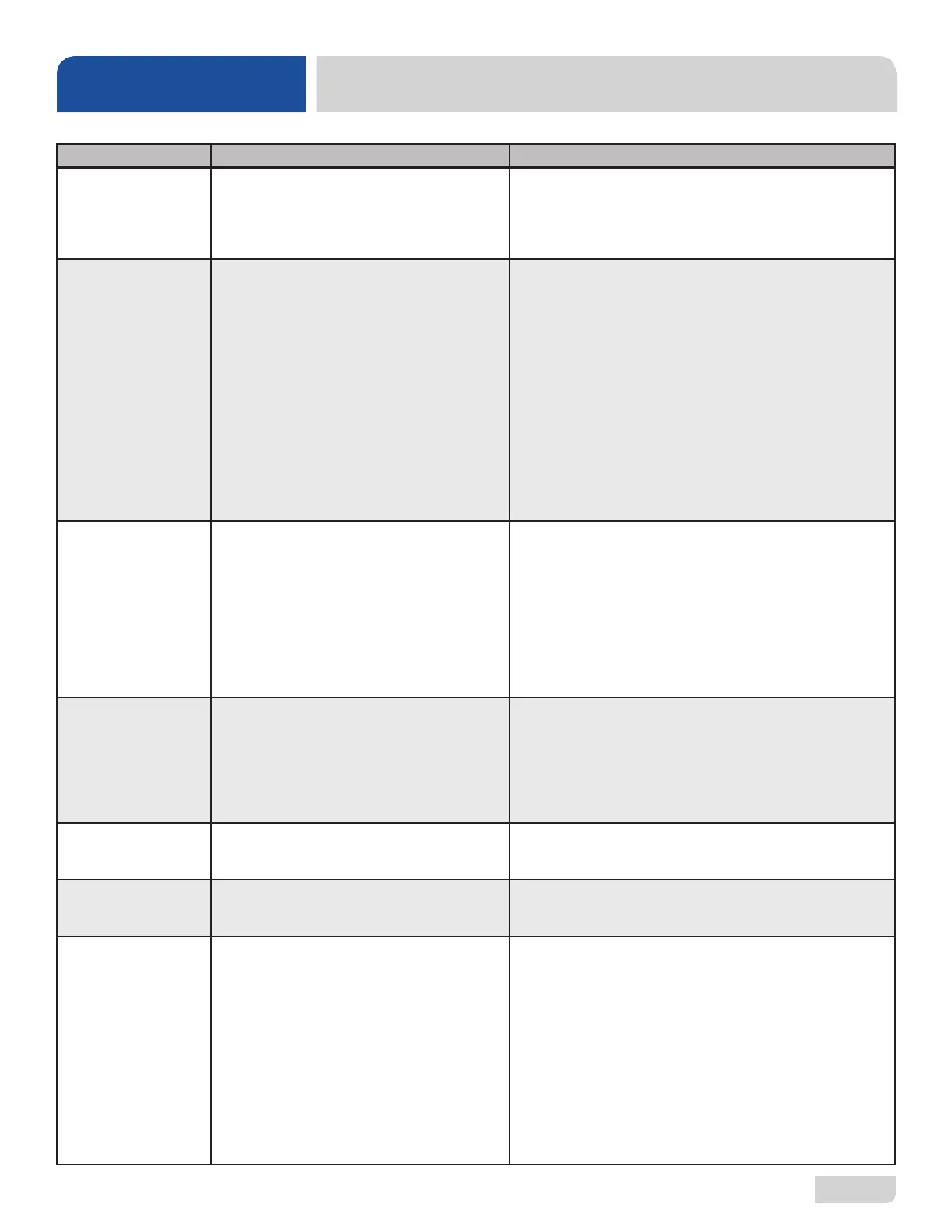
FAULT CODES
TROUBLESHOOTING
DISPLAY SHOWS POSSIBLE CAUSES REMEDY
"F4 Service needed,"
"Check incoming
power"
1. Incoming power not properly connected.
2. L3 is missing (3-phase units only).
1. Check connections to heater.
2. Verify that L3 is present and connected properly.
“F6 Service needed,”
“No water in wash tank”
1. Low or no water pressure.
2. Faulty inlet valve or ll relay.
3. Contactor to wash heater not turning off.
4. Faulty temperature input (T1) on IO
module.
5. Faulty temperature probe (T1).
6. Faulty oat switch allows heaters to
operate with no water in tub.
1. Verify incoming water pressure is 15 PSI.
2. Verify that ll relay is supplying voltage to ll solenoid.
Replace faulty component.
3. Check for welded contacts. Verify that output from IO
module turns off when above the set temperature.
4. Substitute a 1.2 kΩ resistor for T1, and verify that wash
heater turns off. If not, replace IO module.
5. Verify that T1 resistance is correct with respect to
temperature (see table on next page). If not, replace T1.
6. Replace oat switch.
“F7 Service needed,”
“Check wash tank
thermostat”
1. Contactor to wash heater not turning off.
2. Faulty temperature input (P10) on IO
module.
3. Faulty temperature probe (T1).
1. Check for welded contacts. Verify that output from IO
module turns off when above the set temperature.
2. Substitute a 1.2 kΩ resistor for T1, and verify that wash
heater turns off. If not, replace IO module.
3. Verify that T1 resistance is correct with respect to
temperature (see table on next page). If not, replace T1.
“F8 No water in wash
tank,” “Check inlet
water and door”
1. Malfunction of ll solenoid or ll relay.
2. Door is open, which inhibits ll mode.
3. Faulty door switch.
1. Replace faulty solenoid or ll relay.
2. Close door to activate door switch.
3. Replace or adjust door switch.
F11 Service needed
–check wash tank
thermostat
1. Faulty temperature probe (T1). 1. Replace probe that connects to P10.
F12 Service needed –
check booster thermo-
stat
1. Faulty temperature probe (T3). 1. Replace probe that connects to P13.
F13 Communication
error. Check 6-pin
cable
1. Loose connection in 6-pin cable between
display board and IO module.
2. Faulty 6-pin cable between display board
and IO module.
3. Faulty communication port on IO module or
display board.
1. Fully disconnect 6-pin cable at each end, and reconnect
each end until a click is heard.
2. Inspect for broken wire or unseated terminal by gently
pulling on each wire at each end of the cable. Reseat any
loose terminals by inserting it fully into the housing using
long-nosed pliers. Replace cable if broken wire is found.
3. Temporarily substitute a veried good display board, and
check if F13 message recurs. If so, replace with a good IO
module.






 To Next Page