Getting Started XT200 User Manual
Janam Technologies LLC Version 2, April 2020 Getting Started 2-10
Home screen customization
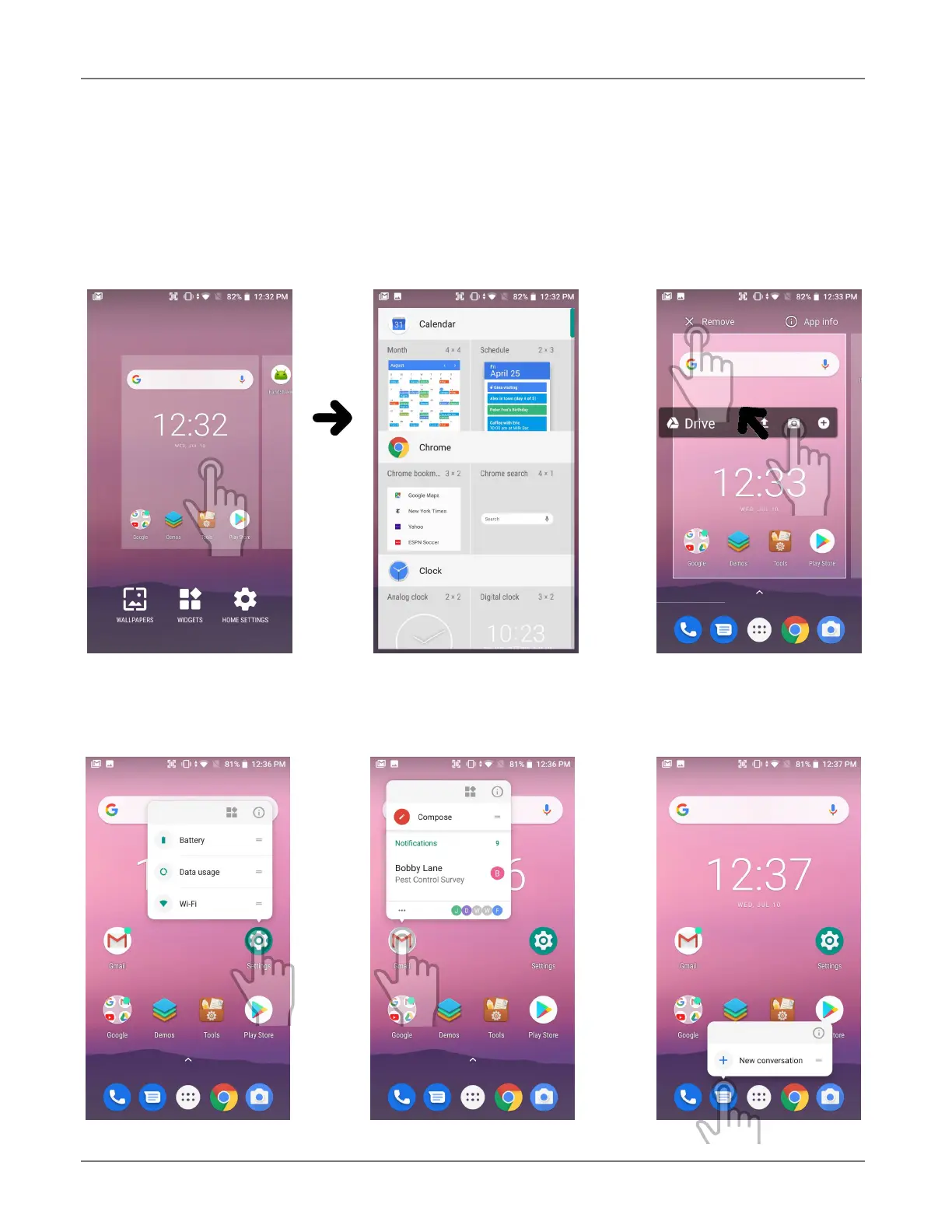
The Android home screen can easily be customized. Tap and hold on an empty spot on the home
screen and select from WALLPAPERS, WIDGETS, or SETTINGS. WALLPAPERS allows selection of dif-
ferent styles and pictures. WIDGETS brings up a variety of preprogrammed functions in different sizes
that can be placed on the home screen. To remove a home screen icon or widget, tap and hold it,
then drag it to “Remove.” To get info on the item, tap, hold and drag it to “App info.”
Tapping and holding some icons brings up function the app can perform. Icons can be folders. To cre-
ate a folder, drag an icon onto another icon. You can also drag icons out of a folder. A folder with just
one icon left in it will return to being an icon.



 To Next Page