XT200 Setup XT200 User Manual
Janam Technologies LLC Version 2, April 2020 XT200 Setup 3—3
Backup, Restore, and Reset
Android backup concept
Android does not offer a traditional full backup (i.e. one large file from which all software, settings,
and data can be restored). Instead, Android synchronizes settings and data with Google, including
Wi-Fi passwords, bookmarks, contact and email information, a list of installed applications, application
data, words added to dictionaries, app data, and most of the device settings.
All of this can be restored in case of a failure, or when moving onto a new device. The idea here is to
provide continuity rather than a total 1:1 full backup. It works like this:
Auto Backup for Apps
Android 8 allows backing up various settings and data to your account in the cloud transparently.
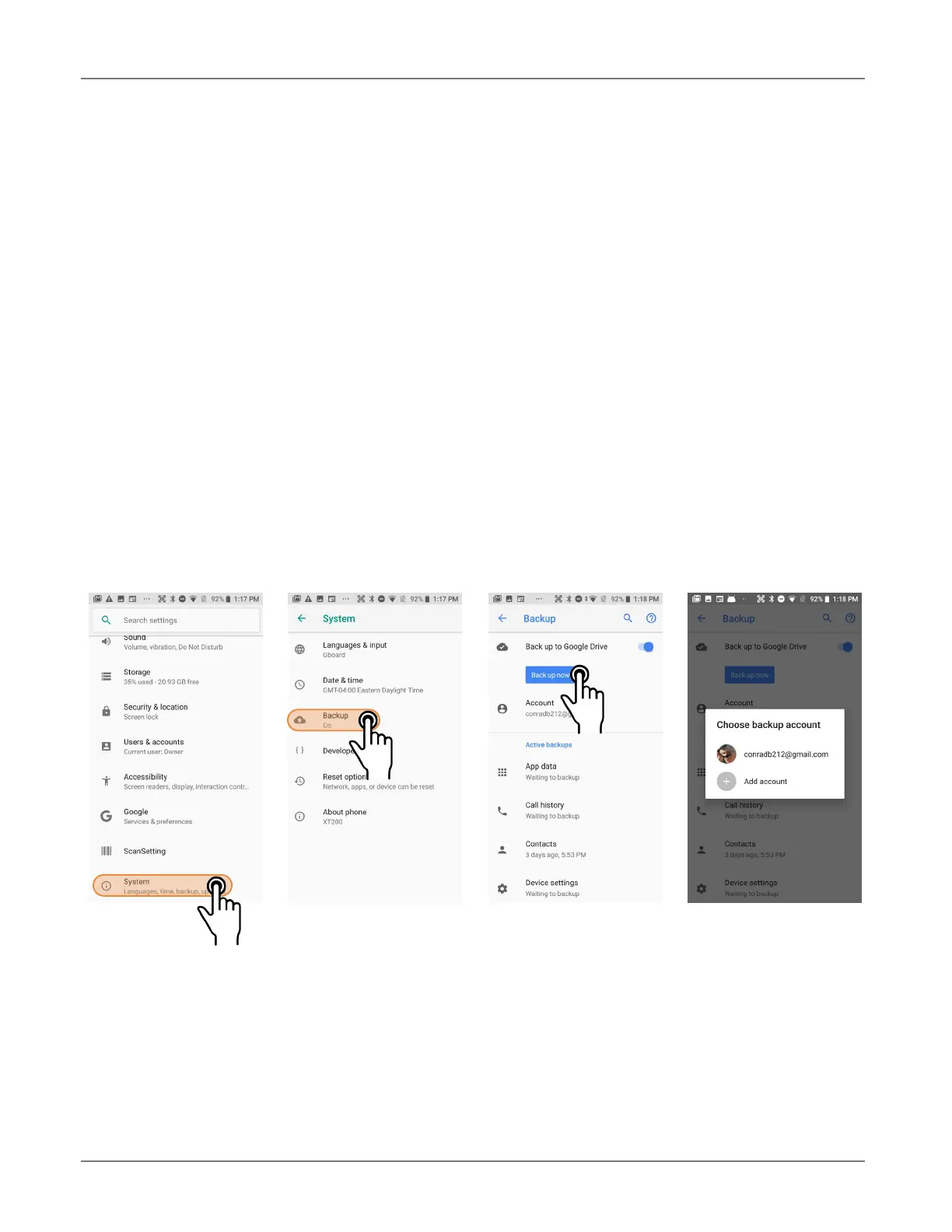
This is enabled and set up in a two step process. First, enable the process in Settings > System >
Backup. Then tap Backup account and choose an account.



 To Next Page