Bluetooth XT200 User Manual
Janam Technologies LLC Version 2, April 2020 Bluetooth 5—2
Bluetooth Concepts
Bluetooth does not have to be on in order for the XT200 to function. In fact, since the Bluetooth radio
consumes power, it should be turned off when it is not needed. You can see that Bluetooth is active
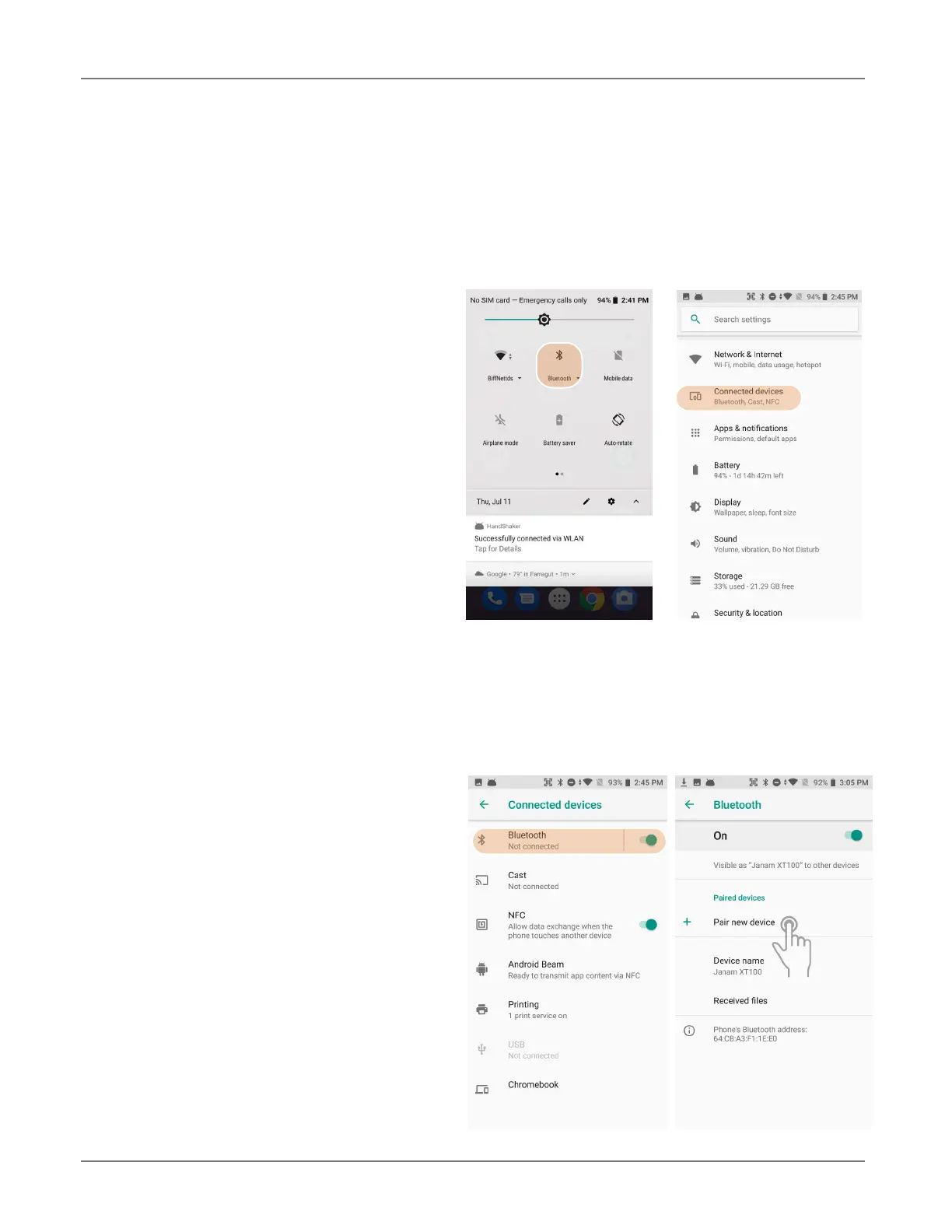
when the small Bluetooth icon is visible in the status bar on top of the home screen. Swiping
down from the top of the XT200 screen reveals an extended view where Bluetooth can be turned on
or off. In the example shown below, the Bluetooth tile is lit up, which means Bluetooth is on.
Note that in Bluetooth terminology, there is a
difference between “paired” and “connected.”
Paired means that a Bluetooth relationship has
been established between two devices, and they
know each other. Connected means the devices
have an active connection.
Depending on the type of device, a connection
may be established automatically once already
paired devices are within range (like a Bluetooth
keyboard for a desktop computer). For other
paired devices it may make more sense to
manually connect them as needed (like for file
transfer between devices).
Bluetooth connections can have different
capabilities, such as sending or receiving files, providing certain information, providing certain types
of security, or connecting to certain sensors. Services can work one way or both ways.
Turning Bluetooth On and Discoverable
In order for the XT200 to establish a Bluetooth connection, it needs to be discoverable, i.e. Bluetooth
must be on and other Bluetooth devices must be
able to “discover” it as a connection candidate. To
make the XT200 discoverable, go to Settings >
Connected devices > Bluetooth. Here you can
see a list of your paired devices (if any). Tap Pair
new device to make Bluetooth search for
available devices.
Note that it’s not always easy to determine the
nature of discovered devices. Sometimes they
are listed only by their MAC (Media Access
Control) hardware address. To keep your own
XT200 from showing up with such a code or serial
number, tap Device name and rename it to
something descriptive (like “Janam XT200”).



 To Next Page