Barcode Scanning XT200 User Manual
Janam Technologies LLC Version 2, April 2020 Barcode Scanning 9—5
Scan Demo App
The XT200 comes preloaded with the Scan Demo app that demonstrates scanning features of the
device. Note that a special Scanner SDK is available for the development of custom scanning appli-
cations (inquire with your Janam sales representative).
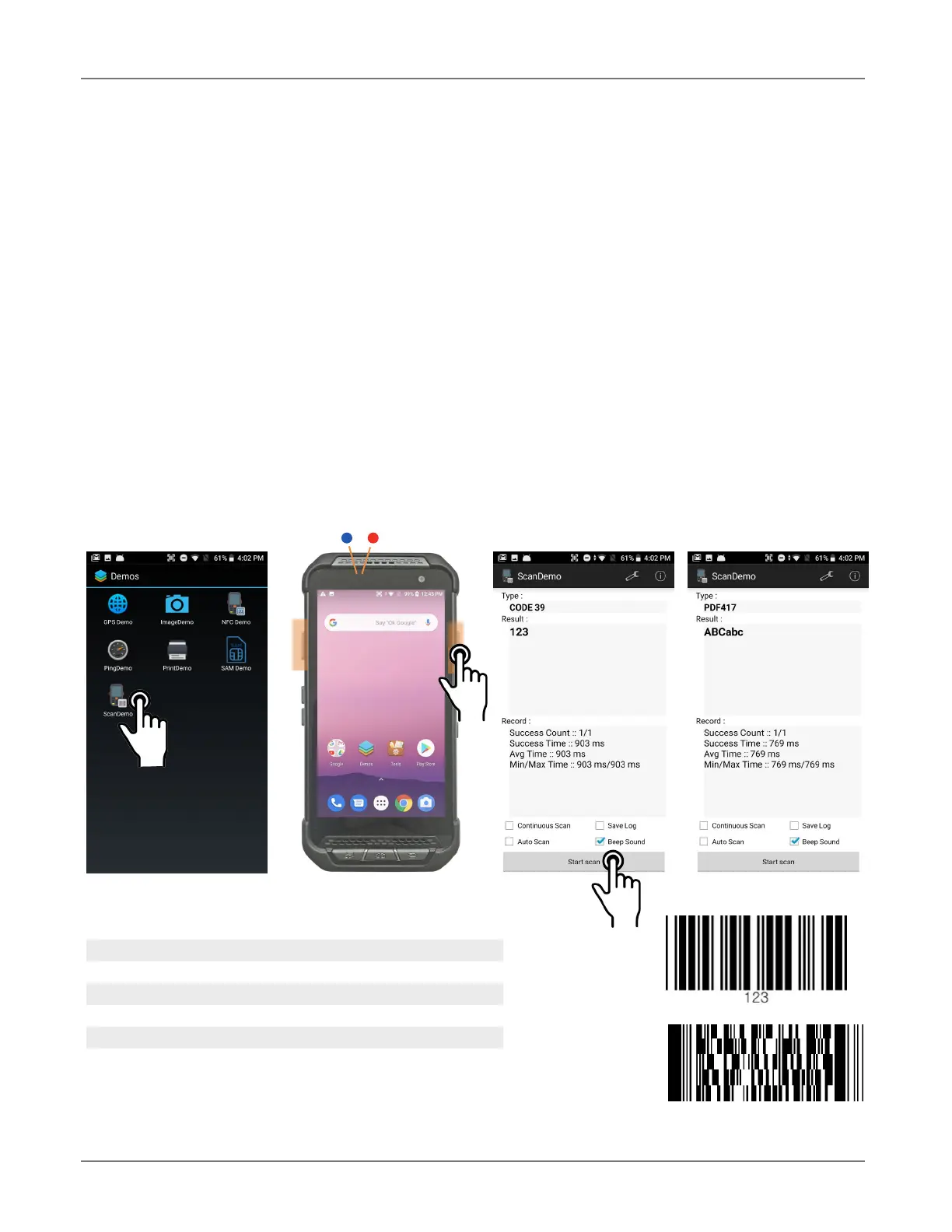
Launch the Scan Demo from the Demos Folder. Position the XT200 over one of the sample bar
codes on this page. A range of 4–10 inches (10–25 cm) from the bar code is recommended. To
scan, pull the XT200’s scan trigger button on the handle or tap “Scan start” on the ScanDemo screen
Aim the barcode imager beam at the target barcode. The aiming dot should be centered in the bar
code to achieve quickest and most accurate decoding. When the bar code is successfully decoded,
the terminal beeps, announcing either a good or a bad scan. In addition, a blue LED flash indicates
a good read, an orange one a bad read.
Upon a successful scan, the scanner decoder will report the symbology of the code as well as the
scan data. It will also report the success/failure rate, as well as read time data and statistics.
Code 39
PDF 417
good scan failed scan
N6603 Example Read Ranges (near to far)
100% U.P.C. 1.8 to 16.5 inches (4.6 to 41.9 cm)
5 mil Code 39 2.5 to 6.4 inches (6.4 to 16.3 cm)
10 mil Code 39 1.1 to 13.3 inches (2.8 to 33.8 cm)
6.7 mil PDF417 1.8 to 7.3 inches (4.6 to 18.5 cm)
10 mil DataMatrix 2.1 to 8.0 inches (5.3 to 20.3 cm)



 To Next Page