Tools XT200 User Manual
Janam Technologies LLC Version 2, April 2020 Tools 8—2
Various tools
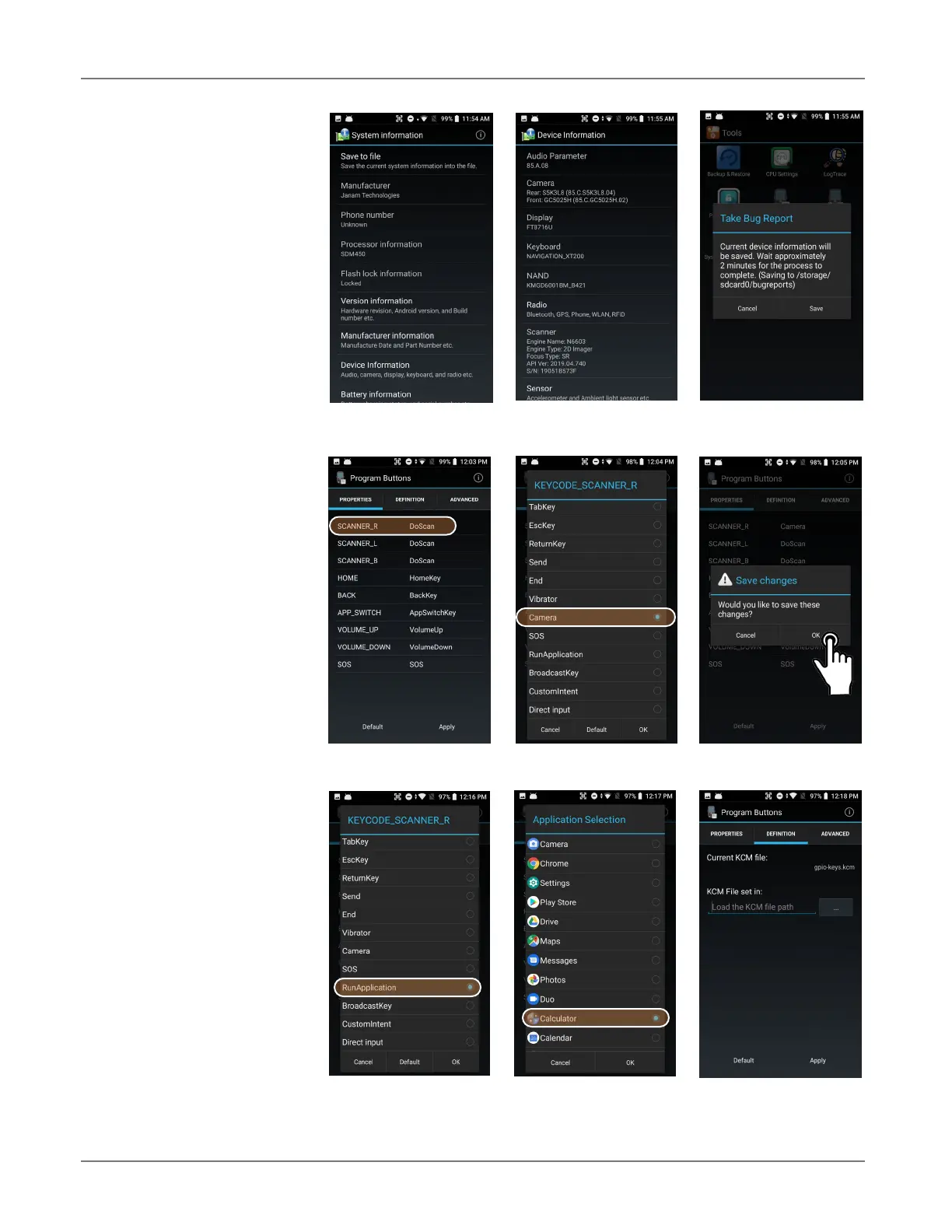
System information pro-
vides detailed information
about the XT200 hardware,
OS, applications, firmware,
manufacturer, battery, drivers
and more. Tap to drill down
into areas.
If something goes wrong with
the XT200, the Take Bug
Report utility can be used to
record device information for
analysis and debugging.
Program buttons
With the Program Buttons
tool you can change what the
XT200’s physical push buttons
do. You can, for example, as-
sign the right scanner button
to launch the camera instead
of performing a scan. To do
so, select the SCANNER_R
button. This brings up a list
of all functions that can be
assigned to the button. Scroll
down to Camera and tap on
it. Then press
Apply and
Save, or Cancel. Program
settings can be changed any-
time.
You can also make it so that
pressing one of the program-
mable keys launches an ap-
plication. For that, scroll down
and select
RunApplication.
This brings up a list of all
available applications. In this
example, we assigned the
Calculator app to the right
scanner button.
Tapping the
Definitions tab
allows programmers to load
an alternate KCM (Key Char-
acter Map) file.



 To Next Page