Camera XT200 User Manual
Janam Technologies LLC Version 2, April 2020 Camera 6—2
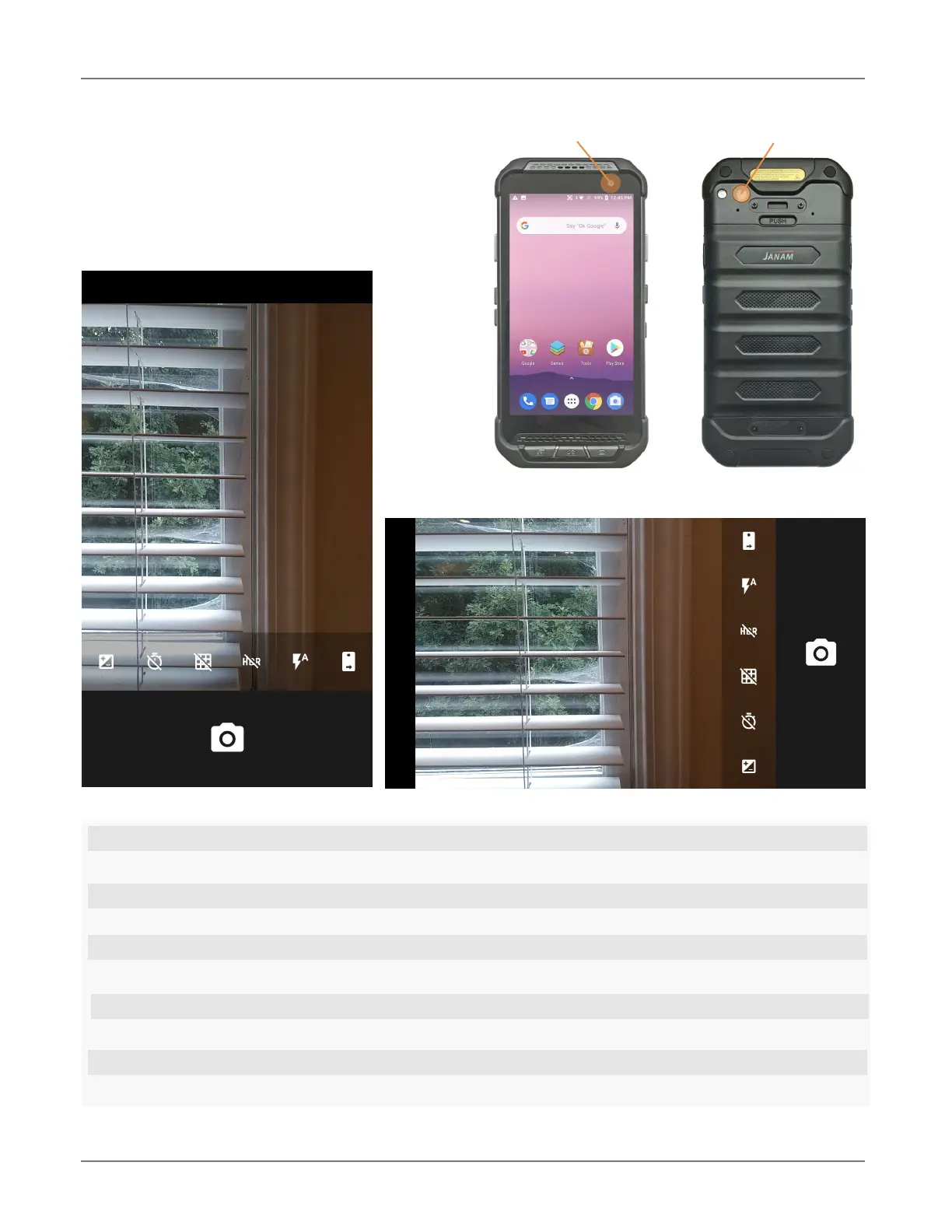
1. When set to manual, this allows for Exposure Compensation (-2 to +2 in 0.5 increments).
2. Timer control. Tap to cycle through off/3/10 seconds.
3. Toggles between framing grid overlay on and off.
4.
HDR (High Dynamic Range). Tap to toggle HDR on/off.
5.
Flash for rear camera. Tap to cycle on/auto/off. In video mode, it turns LED light on/off.
6. Camera selection. Tap to toggle between front and rear camera.
7. Swipe right to bring up
camera or video selection, and Settings.
8. Shutter Release
9. Touch wherever you want the camera to focus.
10. Swipe left to bring up the
Gallery app for photo editing.
Camera Controls Overview
1
1
2
2
3
3
4 5
5
6
7
8
67
8
9
Front camera location
Rear camera location
Camera controls in portrait mode
Camera controls in landscape mode
All of the XT200 camera controls are
located onscreen. The camera can be
used both in portrait or in landscape
orientation.
10
10
9
4



 To Next Page