Email XT200 User Manual
Janam Technologies LLC Version 2, April 2020 Email 7—4
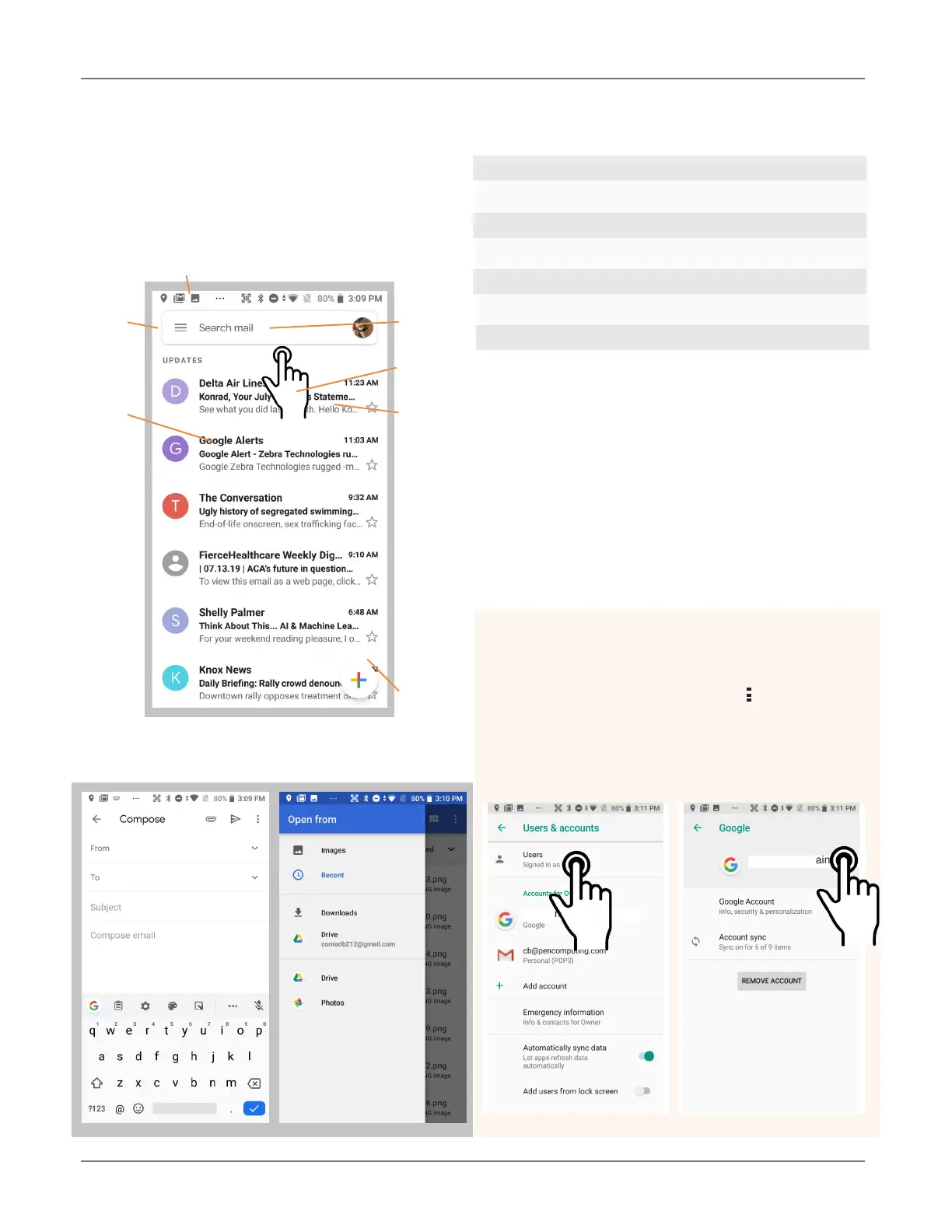
Creating and Sending an Email:
From the Email Inbox, tap the Pencil icon (7) to
launch a new email. Tap on To: to bring up the
keyboard. Begin typing the email address. Tap
down arrow to open CC and BCC fields.
Tap on the text area to begin typing (or dictating)
your email. Tap the paperclip icon to add an at-
tachment from a variety of sources. When done,
hit the paper airplane icon to Send.
Deleting an email account:
To delete an email account, go to Settings, tap
on Accounts, tap the desired account, make
sure sync is off, tap account again, tap for
popup, select Remove account.
2
1
3
7
5 6
Email Inbox
This is what the stock email Inbox looks like:
1 Status icons, same as on Home Screen
2. Tap to select which folder and account to use
3. Search email
4. Swipe down to check for new email
5. Email sender and title
6. Tap on individual emails to see full text
7. Compose a new email message
4
user@mydomain.com
user@mydomain.com
user@mydomain.com



 To Next Page