XT200 Setup XG200 User Manual
Janam Technologies LLC Version 2, April 2020 XT200 Setup 3—13
Device Settings (continued)
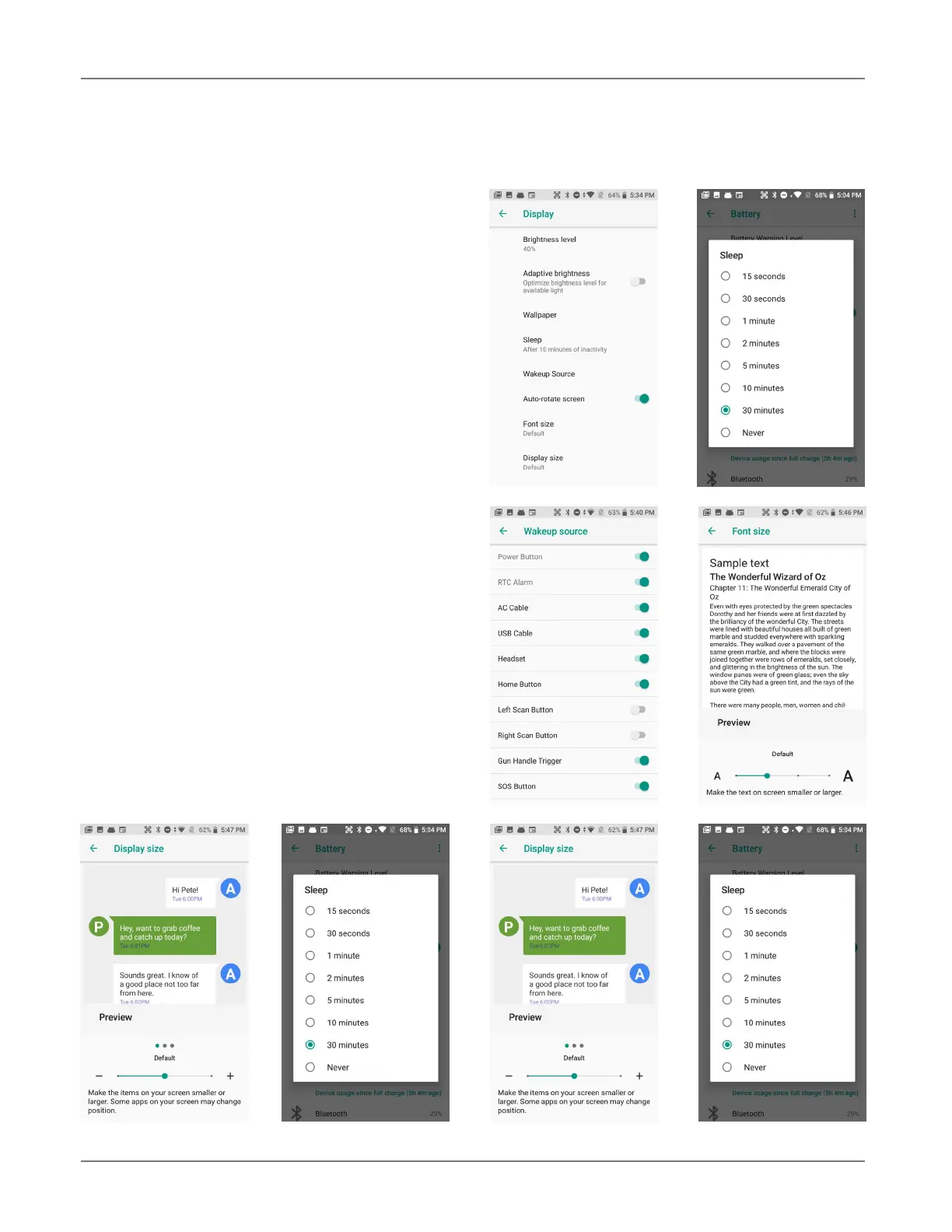
Display
The Brightness level can be adjusted manually
or the XT200 can use its Adaptive brightness
to automatically adjust brightness.
Wallpaper allows the user to select a screen
background.
The Sleep screen allows screen timeout and
screen suspension be set between 15 seconds
and never.
The Wakeup Source screen sets what can and
cannot wake the device (like buttons, cables,
headsets, scan triggers, etc.).
Auto-rotate can be set on and off.
Font size can be set to Small, Default, Large,
and Huge. Sample text shows what it looks
like.
Display size can be set to Small, Default,
and Large. Sample layout shows what it looks
like.
Screen saver selects from clock, colors, pho-
tos, photo frame or photo table. Depending on
the selection, there are additional options.
Ambient display wakes the screen upon device
pickup or notification.



 To Next Page