Air Temperature Menu
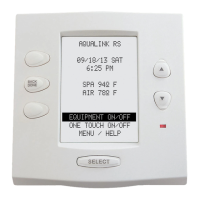
The AIR TEMPERATURE menu lets you turn the display of the air temperature on and off on the AquaLink RS
display. You must have an air temperature sensor installed for this feature to operate.
NOTE If an air temperature sensor is not installed, the display will read AIR TEMP SENSOR NOT INSTALLED.
To activate air temperature display
1. Press the MENU button, then press the FORWARD button and scroll through until you reach SYSTEM
SETUP. Press ENTER and then press FORWARD to AIR TEMP. Press ENTER again. The AquaLink RS
display will read AIR TEMP ON <—>* or AIR TEMP OFF <—>*.
2. Use the FORWARD and BACK arrow buttons to toggle between on and off. When the option you want is
displayed, press ENTER.
Page 16
SPECIAL NOTE ON FREEZE PROTECTION
Freeze protection is intended to protect equipment and plumbing for short periods of freezing only. It does this by
activating the filtration pump and circulating water so that it won't freeze inside of equipment or plumbing. Freeze
Protection does not guarantee that equipment will not be damaged by extended periods of freezing temperatures.
In these conditions, the pool and spa should be shut down completely (i.e., drained of water and closed for the
winter) until warmer weather exists.
Freeze Protection Menu
The Freeze Protection menu lets you assign freeze protection to your pool and spa equipment. When a piece of
equipment is assigned to freeze protection, it will turn on when the AquaLink RS detects freezing conditions. The
main filter pump is freeze-protected as a default. You can change the temperature at which freeze protection will
activate (between 34ºF and 42ºF). For example, if you want freeze-protected equipment to turn on when the air
temperature has dropped to 37ºF, you can set the system so this is the case.
NOTE Default freeze protection activation temperature is 38º F. Normal items to assign to freeze protection are spa jet pump or
waterfall pump.
To set freeze protection
1. Press the MENU button, then press the FORWARD button and scroll through until you reach SYSTEM
SETUP. Press ENTER and then press FORWARD to FRZ PROTECT. Press ENTER again. The display will
read ASSIGN ITEMS <—>* .
2. Use the FORWARD and BACK arrow buttons to move between ASSIGN ITEMS and TEMP SETTING. If
you want to assign items to freeze protection, press ENTER when ASSIGN ITEMS is displayed. If you want
to set the temperature at which freeze protected items are activated, press ENTER when TEMP SETTING is
displayed.
3.
If you are assigning items, the AquaLink RS display will read ENTER DEVICE TO ADD TO FREEZE
PROTECTION. Press the button of the equipment you want to add to freeze protection. Press ENTER when
done.
4.
If you are setting the temperature at which freeze protected equipment is activated, use the FORWARD and BACK
arrows to change the temperature. Press ENTER when the desired temperature is displayed.
CAUTION
Activating the spa during freezing conditions will override freeze protection. This means that if you are using your
spa when freezing conditions exist, freeze protection will not circulate water to non-spa related equipment that
you may have freeze protected (for example, pool cleaner, booster pump) and the potential exists for equipment
damage.


 To Next Page
 Loading...