83
5. Turn the on/o switch or key.
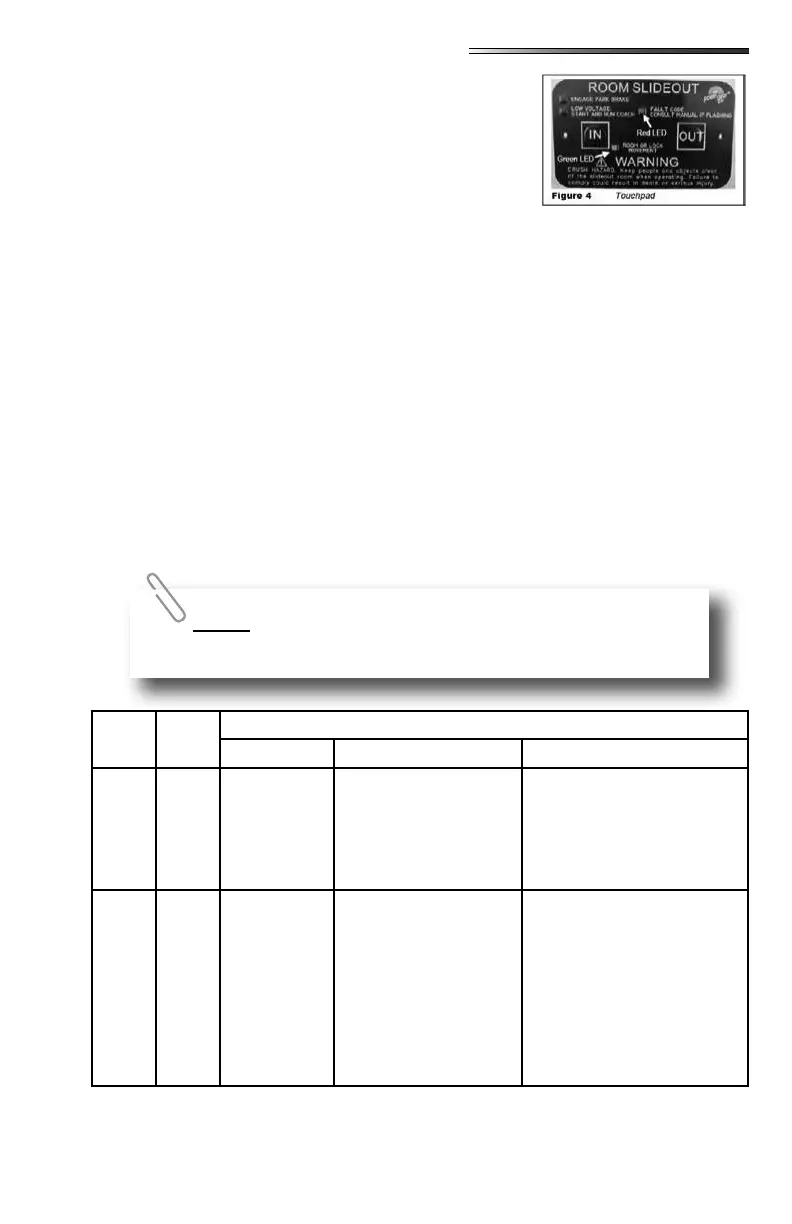
6. Press and hold the OUT button (Fig 4). To retract, press
and hold the IN button. There will be a slight delay be-
fore the room begins moving.
7. The GREEN LED should be solid ON when room is in
motion.
8. Release the OUT button when the room is fully extended
or the IN button when fully retracted, and stops moving.
9. Turn the on/o switch or key.
The control has the ability to detect and display several faults. When a fault is detected,
room movement stops and two dierent LEDs will ash in a pattern.
The RED FAULT CODE LED (Fig 4) will ash a number of times corresponding to a spe-
cic fault code (refer to the Fault Code Chart).
The GREEN ROOM MOVEMENT LED (Fig 4) will ash GREEN a number of times cor-
responding to which motor has the associated fault.
Example: (4) RED ashes and (2) GREEN ashes indicate a motor fault on motor 2.
; faults must be cleared for the room to operate normally.
faults can be cleared by pushing and releasing theor buttons on
the wall touchpad (Fig 4).
faults must be cleared by pushing and releasing the SET STOPS/CLEAR
FAULTS button located on the back of the wall touchpad (Fig 2).
Fault
Code
Fault
Type
Fault Codes
Description Possible Cause Possible Solution
1 Major
Stops not
programmed
-Stops have not been
set
-Stops were cleared
-Stops were improperly
set
Steps need to be pro-
grammed by an authorized
service facility.
2 Minor System Fault
-Obstruction present
-Excessive system drag
Run room in opposite direc-
tion. If it continues to move
in the opposite direction,
remove obstruction, exces-
sive weight in room or repair
of damaged component. If
room stops moving in oppo-
site direction, observe fault
code and refer to this chart
For MAJOR faults, the control must be overridden by following the
EMERGENCY RETRACT MODE in the






 To Next Page