ACU-5000 Operations Manual
6-10 Interoperability Now
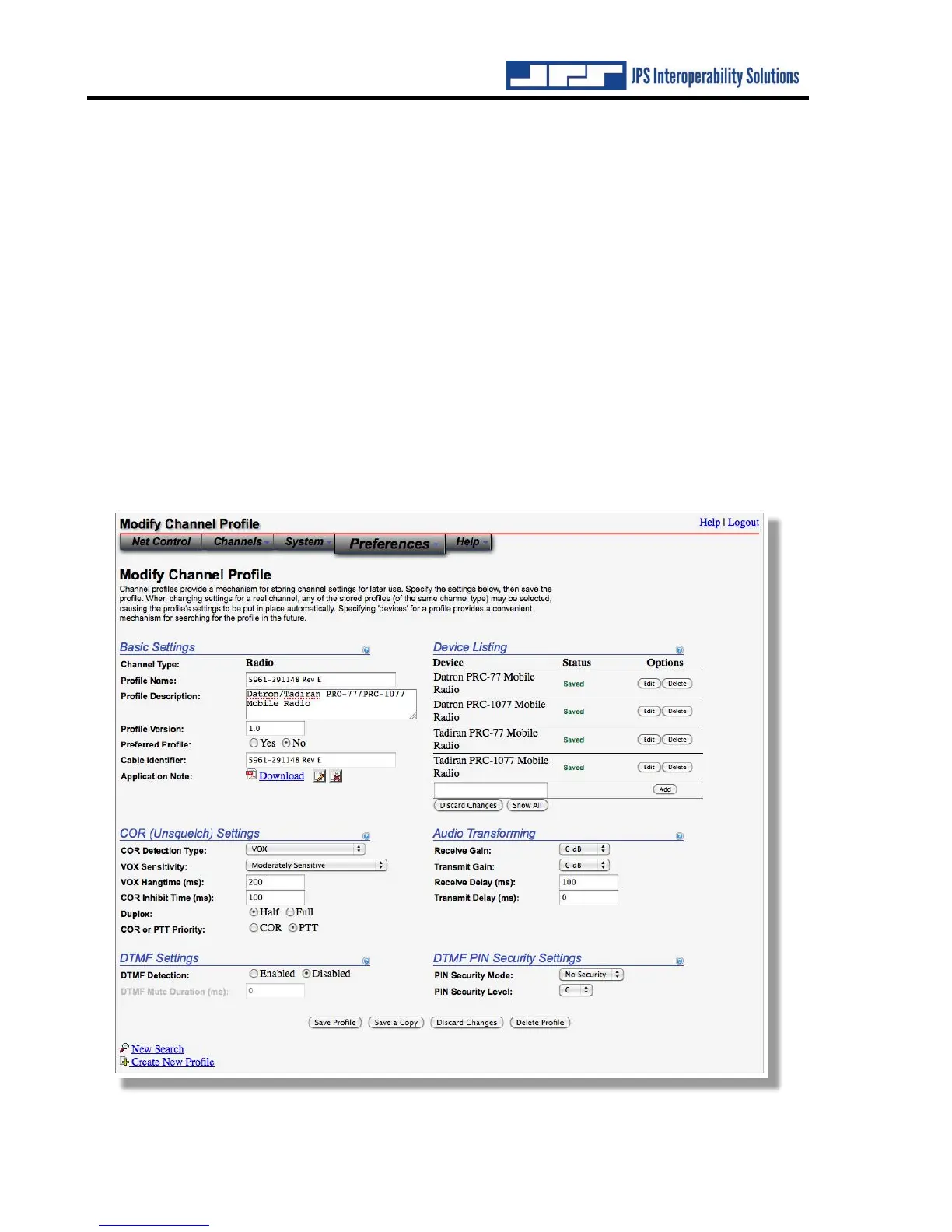
Modify Channel Profile page:
This sample profile shows multiple radios that use the same profile. Stored Application notes
related to these radio models are stored within the ACU-5000 and can be retrieved by clicking
on the “Download” button. A new search can also be requested from this page.
The “Save a Copy” option at the bottom of this page allows a copy of the current configuration
to be saved as an additional profile. This is helpful in either of these two circumstances:
• To create a new profile that is similar to an existing profile (and therefore it’s convenient
to use that existing profile as a starting point).
• To fine tune a profile for a specific radio. Assume, for example, that the existing profile
for radio model ABCD works properly for most of these radios but one exhibits atypical
operation and requires some changes (for example, to the TX or RX audio levels). The
Save a Copy option allows the creation of a profile optimized for this particular radio.
If a new name has been provide for the profile when “Save a Copy” is selected, that new name
will be used. Otherwise, the name of the new profile created will be assigned a name that indicates
that it’s a copy of the original profile.



 To Next Page