4. Operation
4-16
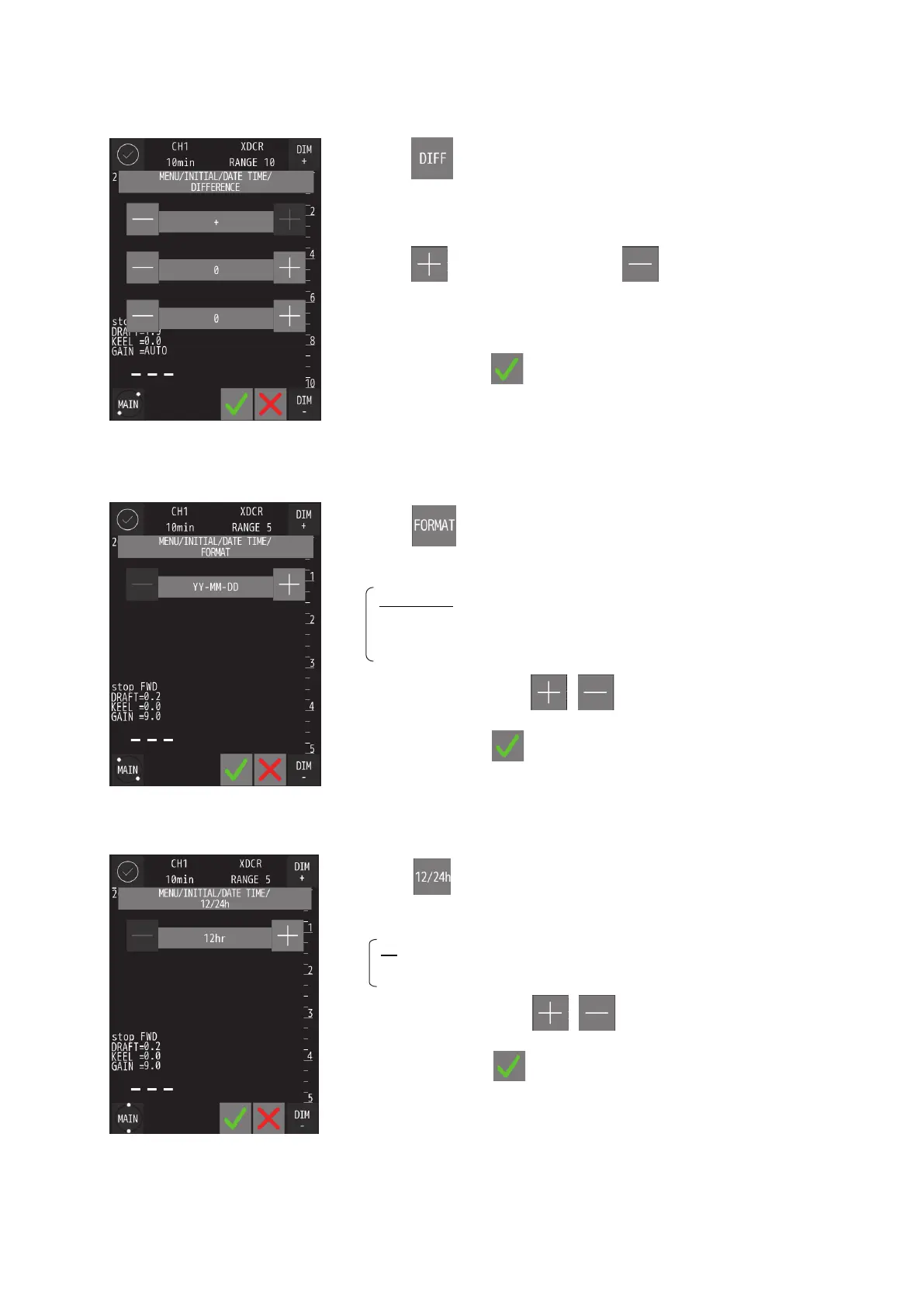
DIFF (Time difference)
FORMAT (Date display)
12/24 (Time notation)
・ Touch and the setting will be displayed.
・
The setting items are ± / hour / minute in order from the top of the screen.
・ Touch to increase the value and to decrease it.
・ When the time difference is “±0", it is recognized as UTC.
・ After setting, touch
.
・ Touch
and the settings will be displayed.
・ Set content :YY-MM-DD DD MM,'YY MM DD,'YY is displayed.
YY-MM-DD :Change the notation to YY-MM-DD
DD MM,‘YY :Change the notation to DD MM,‘YY
MM DD,‘YY :Change the notation to MM DD,‘YY
・ Change the settings with
, .
・ After setting, touch
.
・ Touch
the settings will be displayed.
・ Set content :12/24
12 : 12 hour notation.
24 : 24 hour notation.
・ Change the settings with
, .
・ After setting, touch
.


 To Next Page