– 62 –
5-5. Operating the production management function
The production management screen has two different screens, i.e., the screen No. 1 for displaying informa-
tion on production volume produced by sewing work, and the screen No. 2 for setting the operation for the
screen No. 1.
On the production management screen No. 1, the target production volume according to the working hours
and the actual production volume are displayed to notify the operator of a delay or progress of sewing work
in real time. With this function, the operator is able to carry out his/her work while checking his/her work pace.
This enhances his/her motivation to achieve his/her goal, thereby leading to a substantial increase in produc-
tivity.
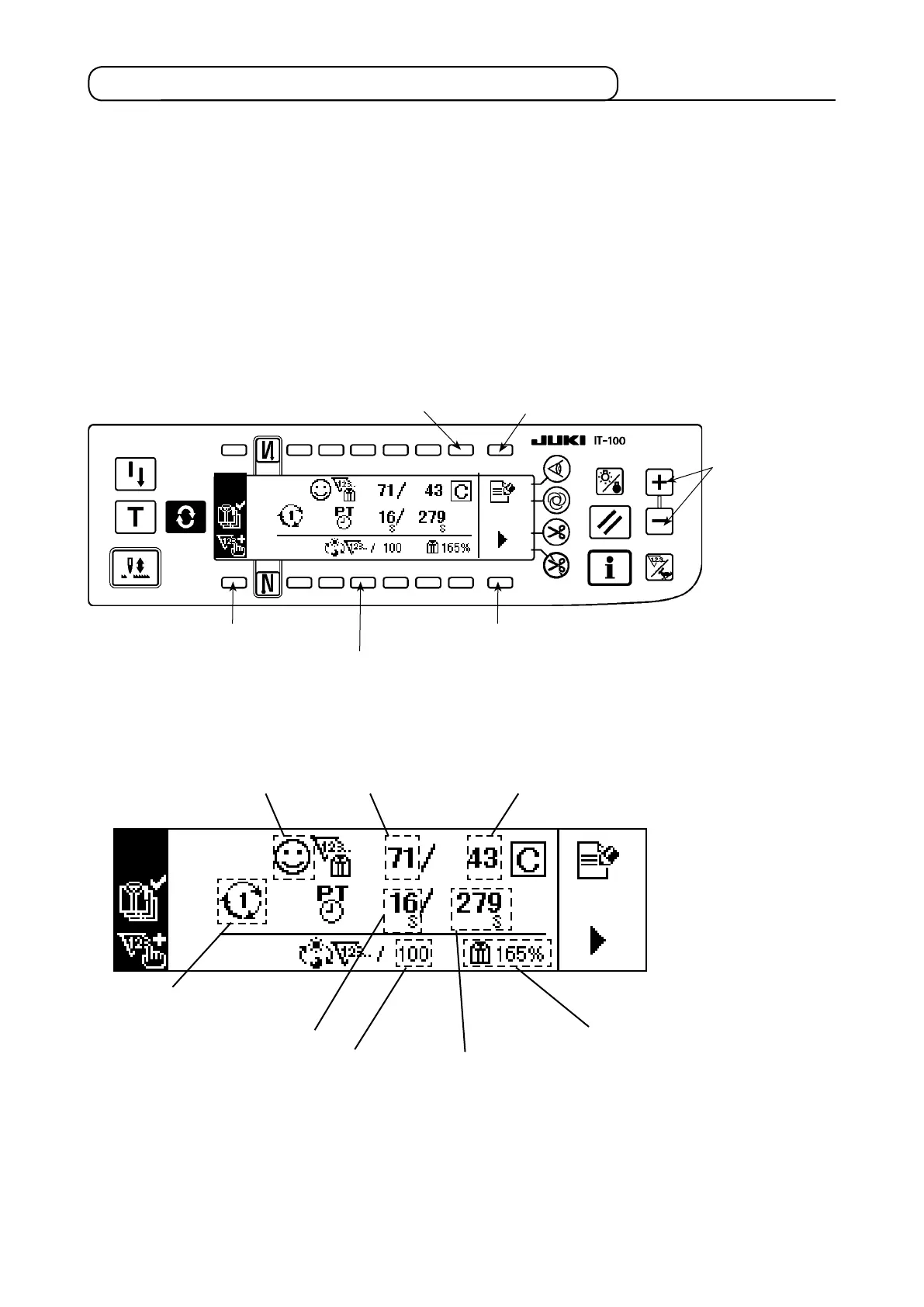
(1) Production management screen No. 1
<Production management screen No. 1 (Operation switch>
Display changeover switch to display the production
management screen No.2
5
Production volume count-up switch
1
Actual production volume clear switch
3
<Production management screen No.1 (displayed information)>
Production
volume counter
correction switch
6
D. Delay/progress display
G. Achievement ratio display
A. Display of method to calculate
the target production volume
C. Actual production
volume display
Measurement stop switch
4
H. Daily target production volume display
F. Latest pitch time display
B. Target production
volume display
The target production volume setting switch
2
E. Target pitch time display











 To Next Page