– 88 –
6
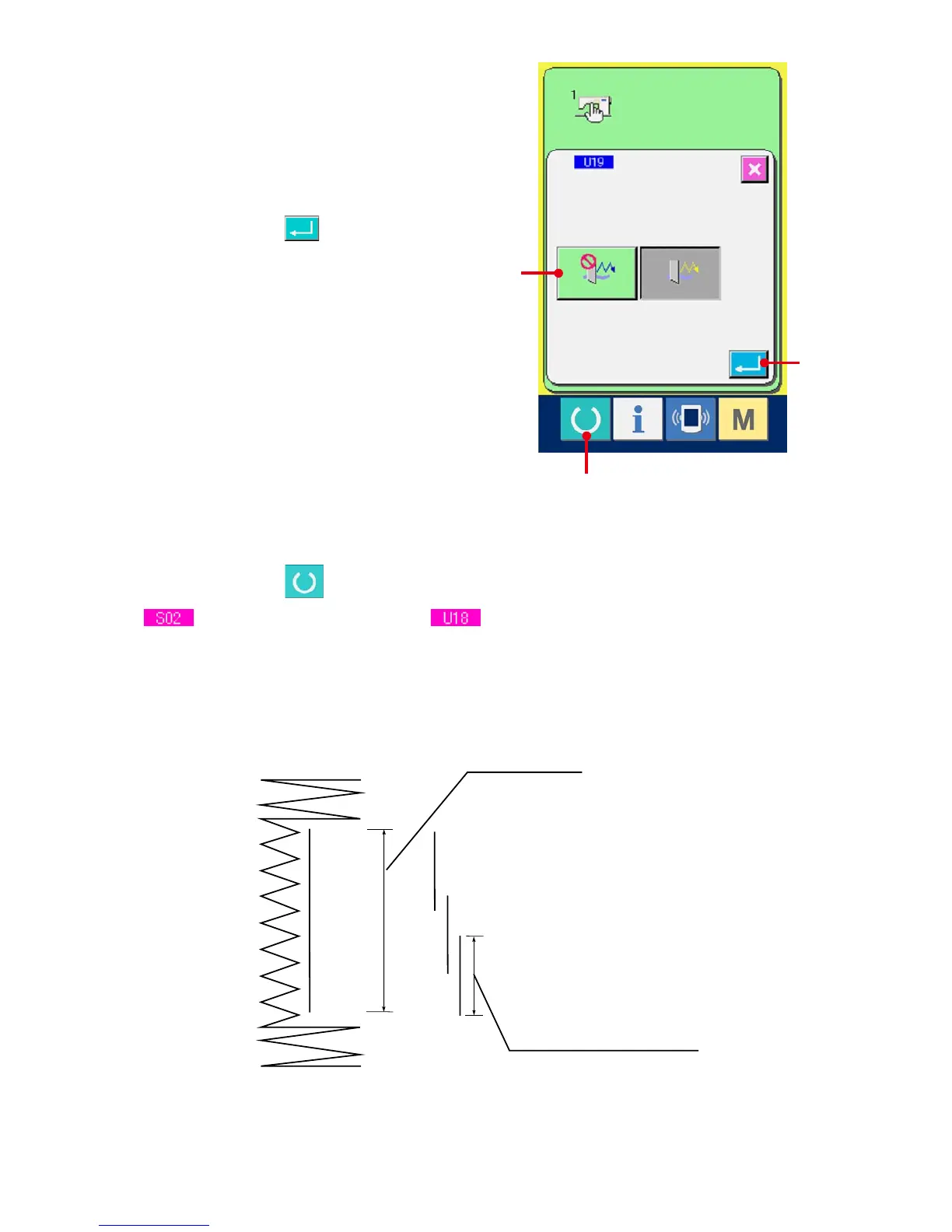
Make effective the function of plural motions
of cloth cutting knife.
Select the effective button (G).
7
Determine the function of plural motions of
cloth cutting knife.
When ENTER button (H) is pressed, the
function of plural motions of cloth cutting knife
screen is closed and the selection of the function
of plural motions of cloth cutting knife has been
completed.
Then the screen returns to the memory switch list
screen.
8
Perform sewing.
When READY switch (I) is pressed, the sewing screen (green) is displayed. At this time, when
Cloth cut length is set to larger than Cloth cutting knife size which has been set in step
3
,
the sewing machine automatically actuates plural motions of knife and performs sewing.
※ Whenyoudesiretosewtheholeshapesmallerthanthesizeofknifeattached,error489appears.
Sewing data
S02 Cloth cutting length
1st time
Memory switch data (Level 1)
U18 Cloth cutting knife size
2nd time
3rd time
G
H
I



 To Next Page