CHAPTER 3
Chassis Description
•
SRX240 Services Gateway Front Panel and Back Panel Views on page 13
•
SRX240 Services Gateway Built-In Interfaces on page 16
•
SRX240 Services Gateway LEDs on page 18
SRX240 Services Gateway Front Panel and Back Panel Views
This topic describes the front panel and back panel of the SRX240 Services Gateway
models. This topic includes the following sections:
•
SRX240 Services Gateway Front Panel on page 13
•
SRX240 Services Gateway Back Panel (AC power supply models) on page 15
•
SRX240 Services Gateway Back Panel (DC Power Supply Model) on page 15
SRX240 Services Gateway Front Panel
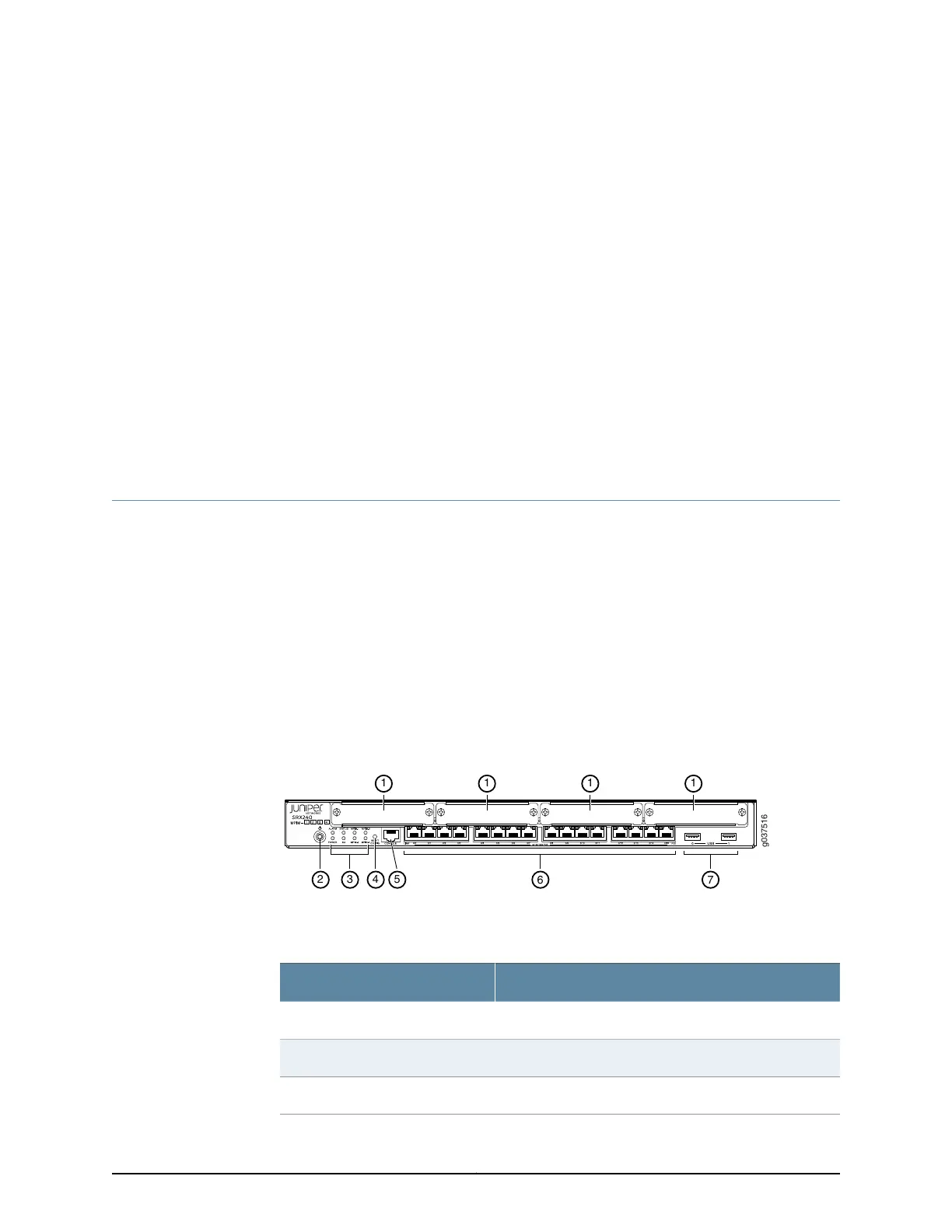
Figure 2 on page 13 shows the front panel of an SRX240 Services Gateway.
Figure 2: SRX240 Services Gateway Front Panel ( with AC Power Supply
Model, and with DC Power Supply Models)
Table 6 on page 13 lists the front panel components of the services gateway.
Table 6: SRX240 Services Gateway Front Panel
ComponentNumber
Mini-PIM slots1
Power button2
LEDs: Status, Power, Mini-PIM, Alarm, HA3
13Copyright © 2015, Juniper Networks, Inc.



 To Next Page
 Loading...











