133
APPENDIX V
REPLAYING STENCIL 2 DATA
Stencil 2 can replay raw data (.bag files) with different parameters if a raw data (.bag) file was
saved during the real time processing. This option is enabled at shipment.
You can only replay data with feature tracking if you mapped or localized using the with Camera
option originally. However, you can replay data without the Feature Tracker even if you originally
mapped or localized with it.
You could also use a .bag file recorded while mapping and replay it in localization mode or vice
versa.
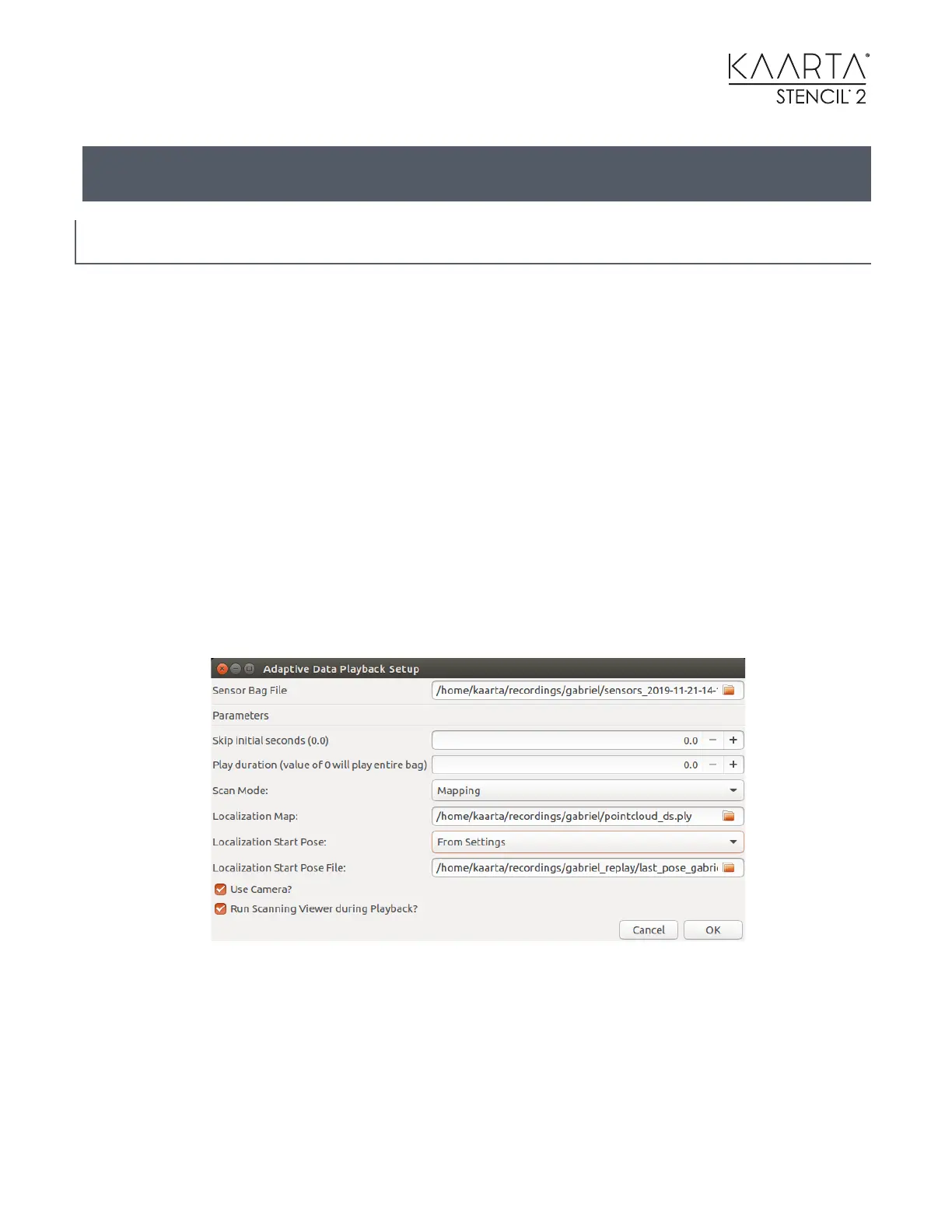
The Playback_Raw_Data icon brings up a dialog box where the user skip any time at the
beginning of the dataset and select a duration. This dialog box remembers the previous raw .bag
file you had selected, so one can make multiple runs using the same .bag file with different
parameters without having to select the file each time. Otherwise the user should use the file
manager browser by selecting the drop-down button to the right of the Sensor Bag File to
change it.
Adaptive Data Replay will run at the optimal speed to fully process each scan frame before it
starts on the next frame. Depending on the environment scanned and settings in the parameter
file, this could be faster or slower than real time. One reason to Skip initial seconds would be if
you had not moved for a long period of time at the start of the data collection or if there were
issues at the start of the data collection. The Play duration allows you to play a section of the
.bag file. If you skip time at the beginning and set the duration, you can select any part of the
.bag file for playback.



 To Next Page