49
CLOUDCOMPARE COMMAND LINE EDITOR TOOL (ALPHA VERSION)
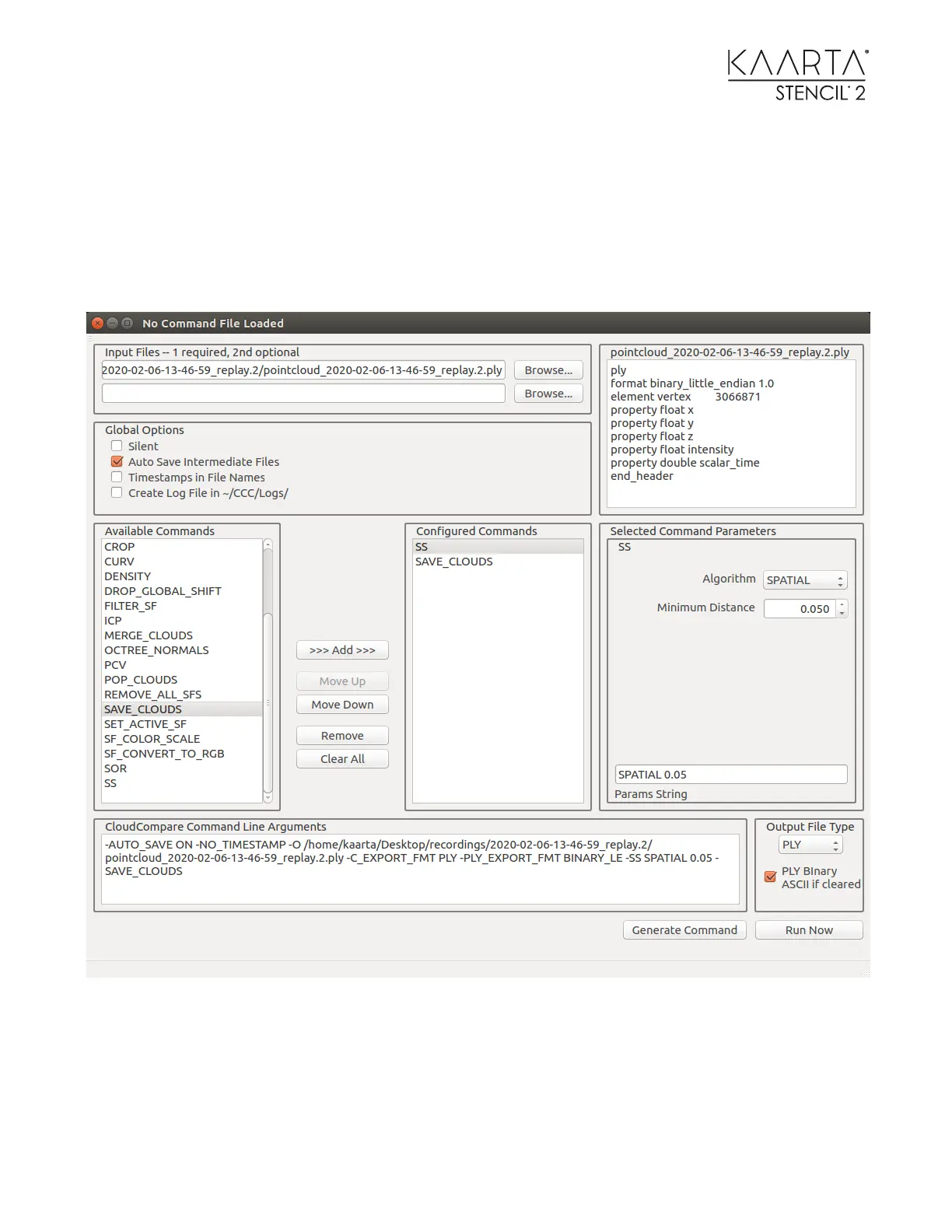
The CloudCompare Command Line Editor or CC Command Builder (CCCBuilder) Tool is started
by typing CCCBuilder in a console terminal. The following dialog box comes up which allows you
to select CloudCompare commands and builds and executes CC commands without bringing up
the visual elements of CloudCompare. This greatly increases the size of point clouds you can
work with.
A simple example is shown here. A point cloud was selected using the Browse button.
Subsampling (SS) was selected in the Available Commands window. The >>> Add >>> button was
used to move it to the configured Commands window. Clicking on the SS in the Configured
Commands window brings up the Selected Command Parameters where the user selected the
Spatial Algorithm and specified the Minimum Distance to be 5 cm. After each add / change, the



 To Next Page