27
Changing Intermittent time intervals will take effect next cycle.
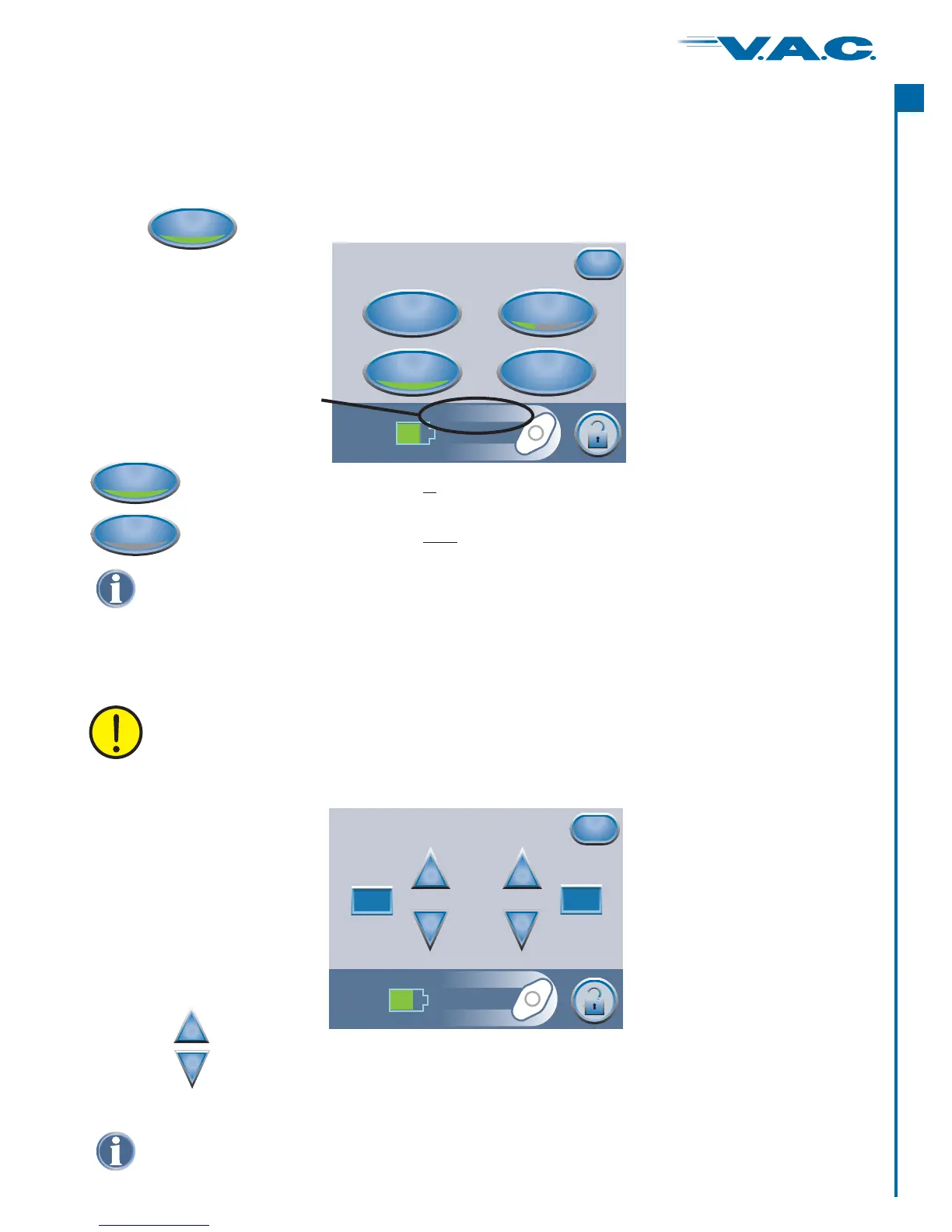
From the Clinician Mode Home screen, press ‘ ’, then press
to access th
Therapy ‘ ’, then press
is screen.
Settings
‘Intermittent’
From the Clinician Mode Home screen, press ‘ ’, then ‘ ’, then ‘ ’ to access
this screen.
Therapy Next Settings
‘Continuous’ and ‘Intermittent’ Modes
When the Green Crescent is , the ActiV.A.C. Therapy Unit is in ‘ ’
mode.
lit
®
Continuous
Continuous
When the Green Crescent is , the is in ‘ ’
mode.
unlit IntermittentActiV.A.C. Therapy Unit
®
Continuous
Continuous
to switch between ‘ ’ and Therapy.Continuous ‘Intermittent’
Press
Settings (cont.)
Press ‘ ’ to return to the ‘Settings’ screen.Exit
Intermittent Settings
Exit
Intermittent
+
_
+
_
On Time
Minutes
On Time
Minutes
Off Time
Minutes
Off Time
Minutes
2
5
Settings
Pressure
Continuous
Intermittent
Exit
Intensity
The words
or will
appear in this area
as modes are switched.
Continuous
Intermittent
Use the buttons to change the desired On and Off Time (in minutes).
Both On and Off Times can be set from 1 minute to 10 minutes in 1 minute increments.
+
_
Default is: On Time = 5 minutes. Off Time = 2 minutes.setting
Default setting is: Continuous.
Press ‘ ’ when finished with the ‘Settings’ screen and go to the ‘Confirm’ screen.Exit
27
®
A
c
t
I


 To Next Page