Log Tool Overview
·
·
·
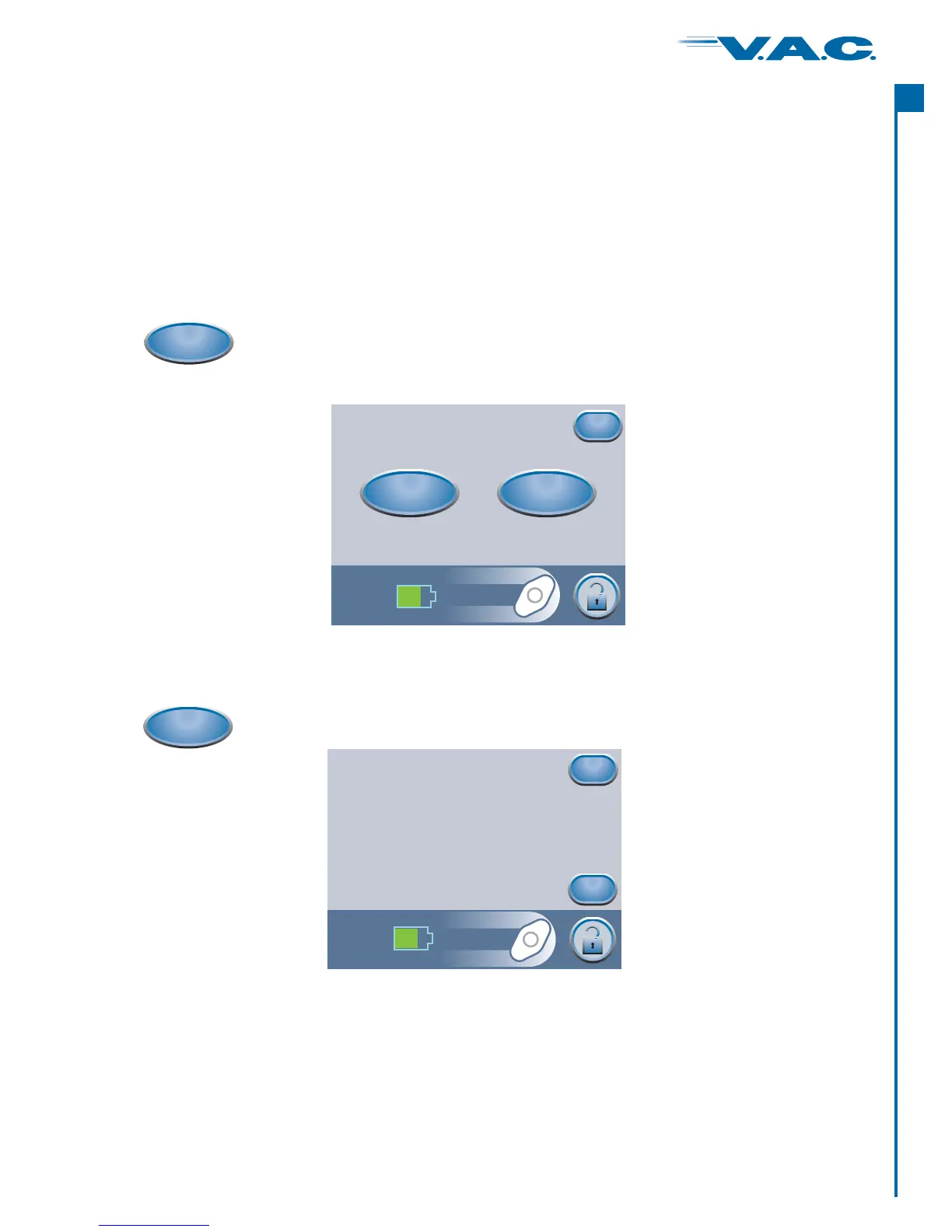
Log Tool can be used to record the number of foam pieces used during a dressing change.
Log Tool can be used to record canister changes.
Logged information is viewable and exportable on the Therapy History screens.
Starting Therapy (cont.)
How to Use Log Tool (When Starting Therapy)
Press ‘ ’ to return to the Clinician Mode Home screen.Exit
Item to Log
For Dressing, also note the No. of foam
pieces in patient chart and on the drape.
Dressing
Canister
Exit
Choose ‘ ’ or ‘ ’.Canister Dressing
Log
on the screen to accessTherapy Start‘ ’ this ‘ ’ screen.Item to LogPress
Press ‘ ’ to log that the canister has been replaced and return to the ‘Item to Log’ screen.
The current time and date will be recorded.
Press ‘ ’ to return to the ‘Item to Log’ screen without logging an entry.
OK
Cancel
Canister
to access this ‘ ’ screen.Canister ReplacedPress
Canister Replaced
Press OK to log that the
canister has been changed
(Will use the current time and date)
OK
Cancel
®
A
c
t
I
33


 To Next Page