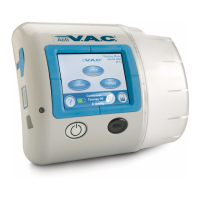
From the Clinician Mode Home screen, press ‘ ’ to access this screen.Utilities
Clinician Utilities
From this ‘ ’ screen the clinician can
Select to set the ‘Time/Date’ to current time and calendar date
Turn the ‘ ’ On and Off.
Utilities :
‘Time/Date’ .
AC Light
·
·
·
Select ‘ ’ to set the displayed ‘ ’ and set the ‘ ’.
Set the display ‘ ’ of the Touch Screen User Interface.
Region Settings Pressure Unit Date Format
Brightness·
Utilities
Time/Date
Region
Settings
AC Light
Exit
Brightness
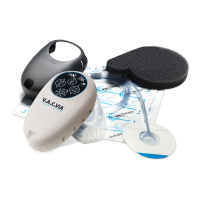
From the Clinician Mode Home screen, press then press ‘ ’ to access this
screen.
‘Utilities’ Time/Date
Changing Time and Date
Press ‘ ’ to return to the screen.Exit ‘Utilities’
Use the buttons to set current time and calendar date.
+
-
+
-
Set Time/Date
Year
Month Day
Hour(24)
Minute
Exit
+
+
+
+
+
-
--
-
-
Holding these b will rapidly scroll through available selections.uttons
Press ‘ ’ to return to the Clinician Home screen.Exit
38
®
A
c
t
I


 To Next Page