Page 3.2 - 8 COMBIVERT R6-S © KEB, 2008-02
Operating and appliance data
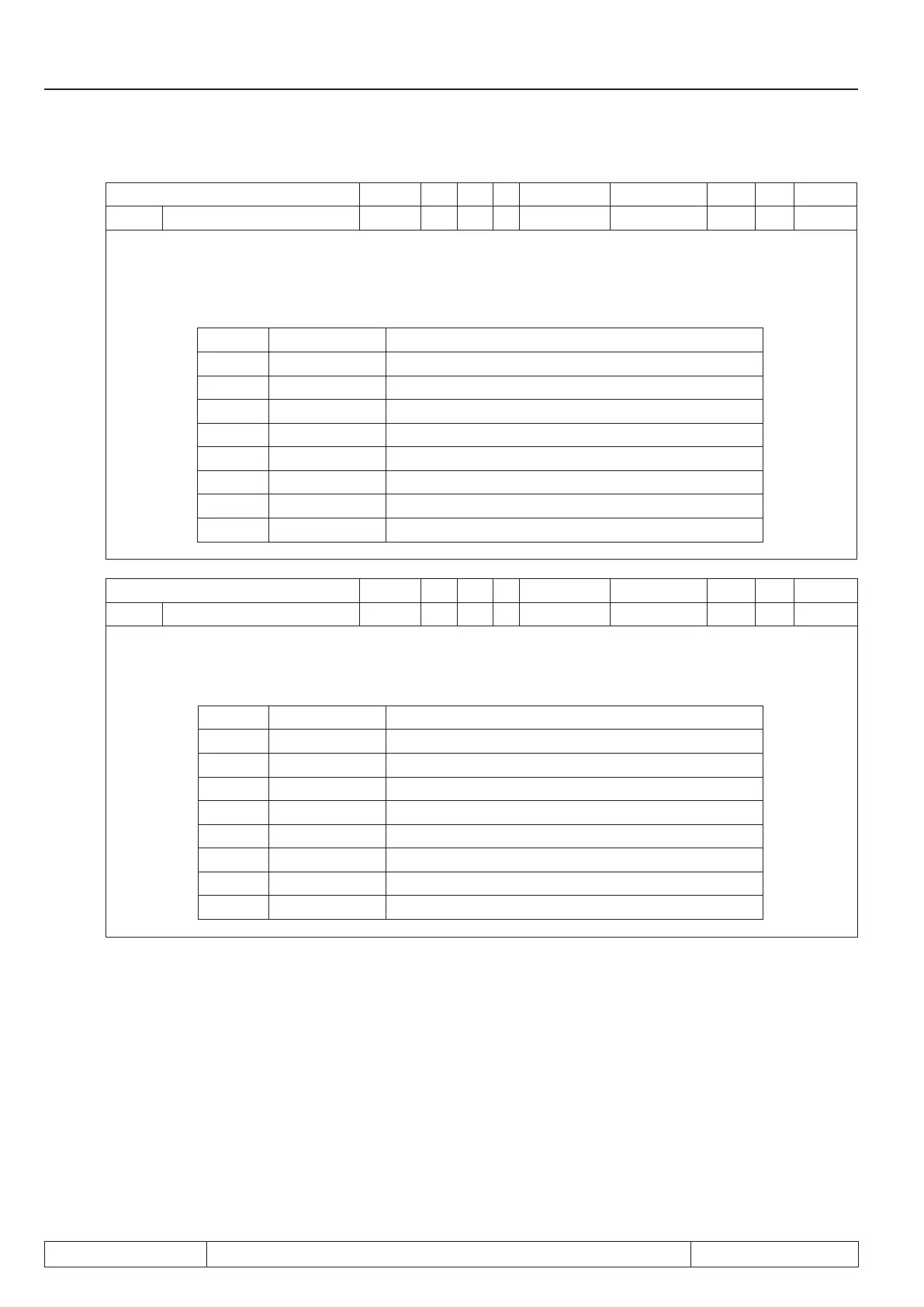
Parameter Addr. R PG E Min. value Max. value Res. [?] Default
ru.23 Output condition state 0217h ro - - 0 255 1 - -
With parameters do 00...do.07 switching conditions can be selected, that serve as base for setting the out-
puts. This parameter indicates which of the selected switching conditions are met before they are linked or
inverted by programmable logic (also see chapt. 3.3. „Digital outputs“). According to following table a speci-
cdecimalvalueisgivenoutfortheswitchingconditions.Ifseveraloftheselectedswitchingconditionsare
met, the sum of the decimal values is indicated.
Bit Decimal value Output
0 1 switching condition 0 (do.00)
1 2 Switching condition 1 (do.01)
2 4 Switching condition 2 (do.02)
3 8 Switching condition 3 (do.03)
4 16 Switching condition 4 (do.04)
5 32 Switching condition 5 (do.05)
6 64 Switching condition 6 (do.06)
7 128 Switching condition 7 (do.07)
Parameter Addr. R PG E Min. value Max. value Res. [?] Default
ru.24 State of outputags 0218h ro - - 0 255 1 - -
Display of the outputagsafterlogicstep1.Theselectedswitchingconditionsarelinkedinlogicstep1
(do.8...24)andindicatedhere(seechapt.3.3„Digitaloutputs“).Accordingtofollowingtableaspecicdeci-
mal value is given out for any outputags.Ifseveraloutputagsareset,thesumofthedecimalvaluesis
indicated.
Bit Decimal value Output
0 1 Flag 0
1 2 Flag 1
2 4 Flag 2
3 8 Flag 3
4 16 Flag 4
5 32 Flag 5
6 64 Flag 6
7 128 Flag 7


 To Next Page
 Loading...