SECTION 2. GETTING READY TO SEW
Connecting the Power Supply
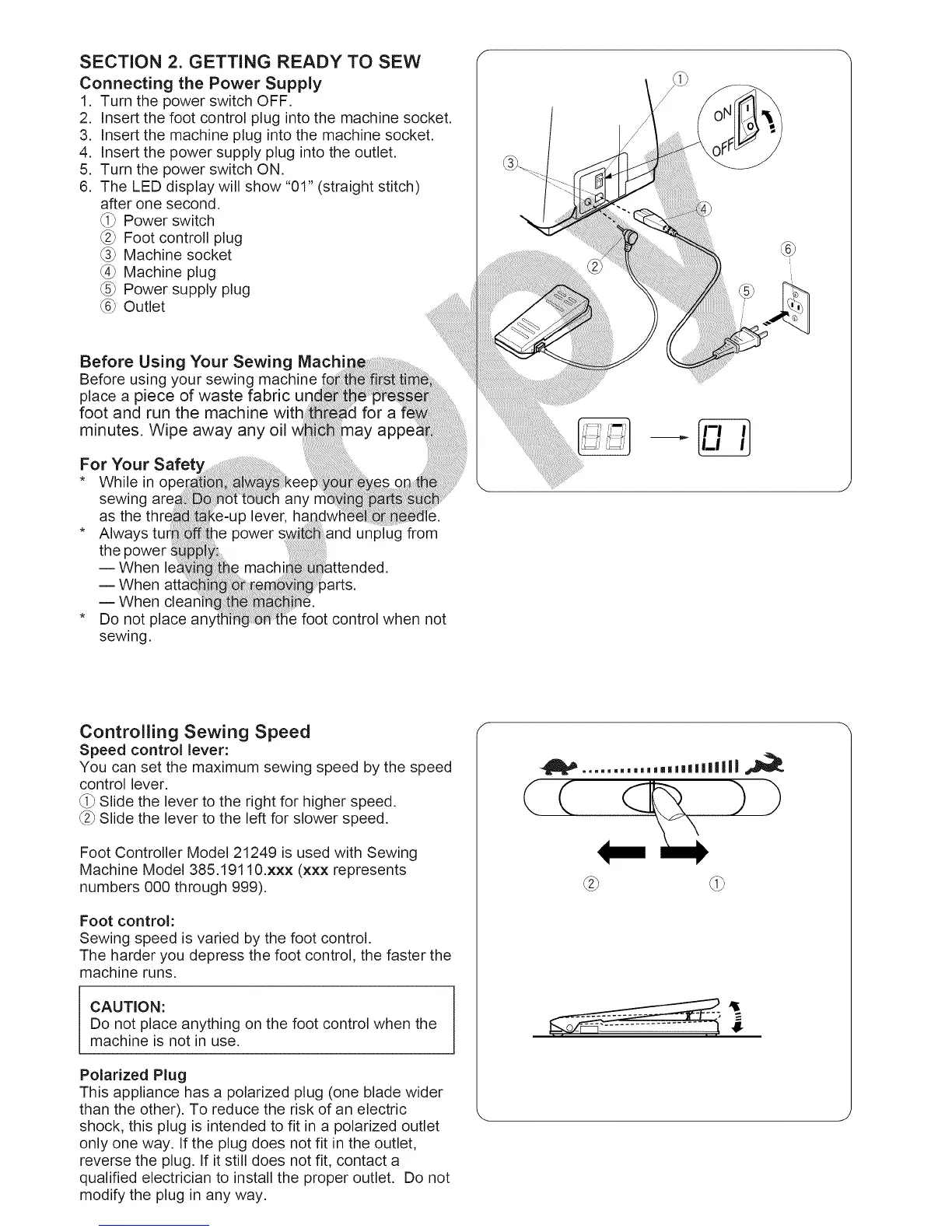
1. Turn the power switch OFF.
2. Insert the foot control plug into the machine socket.
3. Insert the machine plug into the machine socket.
4. Insert the power supply plug into the outlet.
5. Turn the power switch ON.
6. The LED display will show "01" (straight stitch)
after one second.
_i_ Power switch
_2_Foot controll plug
_3_Machine socket
_4_Machine plug
_5_Power supply plug
_6_Outlet
Before Using Your Sewing Mach"
Before using your sewing machine
place a piece of waste fabric
foot and run the machine with
minutes. Wipe away any oil
For Your
* While in
sewing are_
as the
* Always tur
the power
-- When
-- When atti
-- When
* Do not place
sewing.
lever,
le power and unplug from
machi
)arts.
control when not
Controlling Sewing Speed
Speed control lever:
You can set the maximum sewing speed by the speed
control lever.
_i_Slide the lever to the right for higher speed.
_2_ Slide the lever to the left for slower speed.
Foot Controller Model 21249 is used with Sewing
Machine Model 385.19110.xxx (xxx represents
numbers 000 through 999).
Foot control:
Sewing speed is varied by the foot control.
The harder you depress the foot control, the faster the
machine runs.
CAUTION:
Do not place anything on the foot control when the
machine is not in use.
Polarized Plug
This appliance has a polarized plug (one blade wider
than the other). To reduce the risk of an electric
shock, this plug is intended to fit in a polarized outlet
only one way. If the plug does not fit in the outlet,
reverse the plug. If it still does not fit, contact a
qualified electrician to install the proper outlet. Do not
modify the plug in any way.
.......... ,,==m===lliili
(())





 To Next Page