Changing the Presser Foot
WARNING:
Turn OFF the power switch before changing the foot. I
Always use the proper foot for the selected pattern,
Wrong foot can cause need e to break.
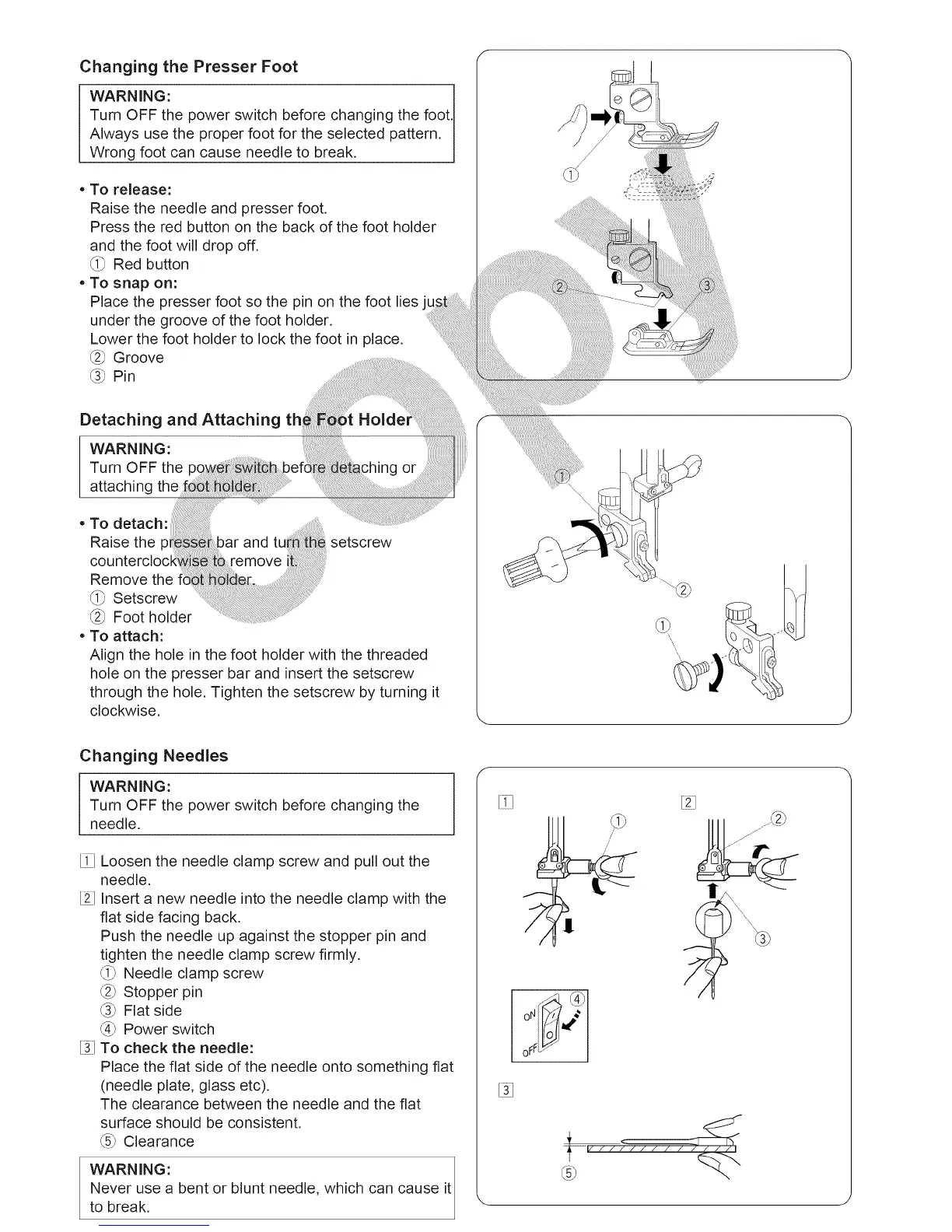
• To release:
Raise the needle and presser foot.
Press the red button on the back of the foot holder
and the foot will drop off.
_i_ Red button
• To snap on:
Place the presser foot so the pin on the foot lies
under the groove of the foot holder.
Lower the foot holder to lock the foot in place.
_2_Groove
_3_ Pin ...... ........
Detaching and Attaching th_ _ :gi
WARNING: .................................. ....
Turn OFF thepow _i_befd aching
• To detach: ..... ..............
Raise the and tu setscrew
counterclock i_ _ remove ii
Remove the .......
_i_ Setscrew ..... ......
_2_Foot holder ........ .........
• To attach:
Align the hole in the foot holder with the threaded
hole on the presser bar and insert the setscrew
through the hole. Tighten the setscrew by turning it
clockwise.
/
Changing Needles
WARNING:
Turn OFF the power switch before changing the
needle.
[i_ Loosen the needle clamp screw and pull out the
needle.
[2] Insert a new needle into the needle clamp with the
flat side facing back.
Push the needle up against the stopper pin and
tighten the needle clamp screw firmly.
_i_ Needle clamp screw
_2_Stopper pin
_3_Flat side
_4_Power switch
[31To check the needle:
Place the flat side of the needle onto something fiat
(needle plate, glass etc).
The clearance between the needle and the fiat
surface should be consistent.
_5_Clearance
WARNING:
Never use a bent or blunt needle, which can cause it
to break.
f
7
.... /// / /





 To Next Page