Sewing on Buttons
Machine setting
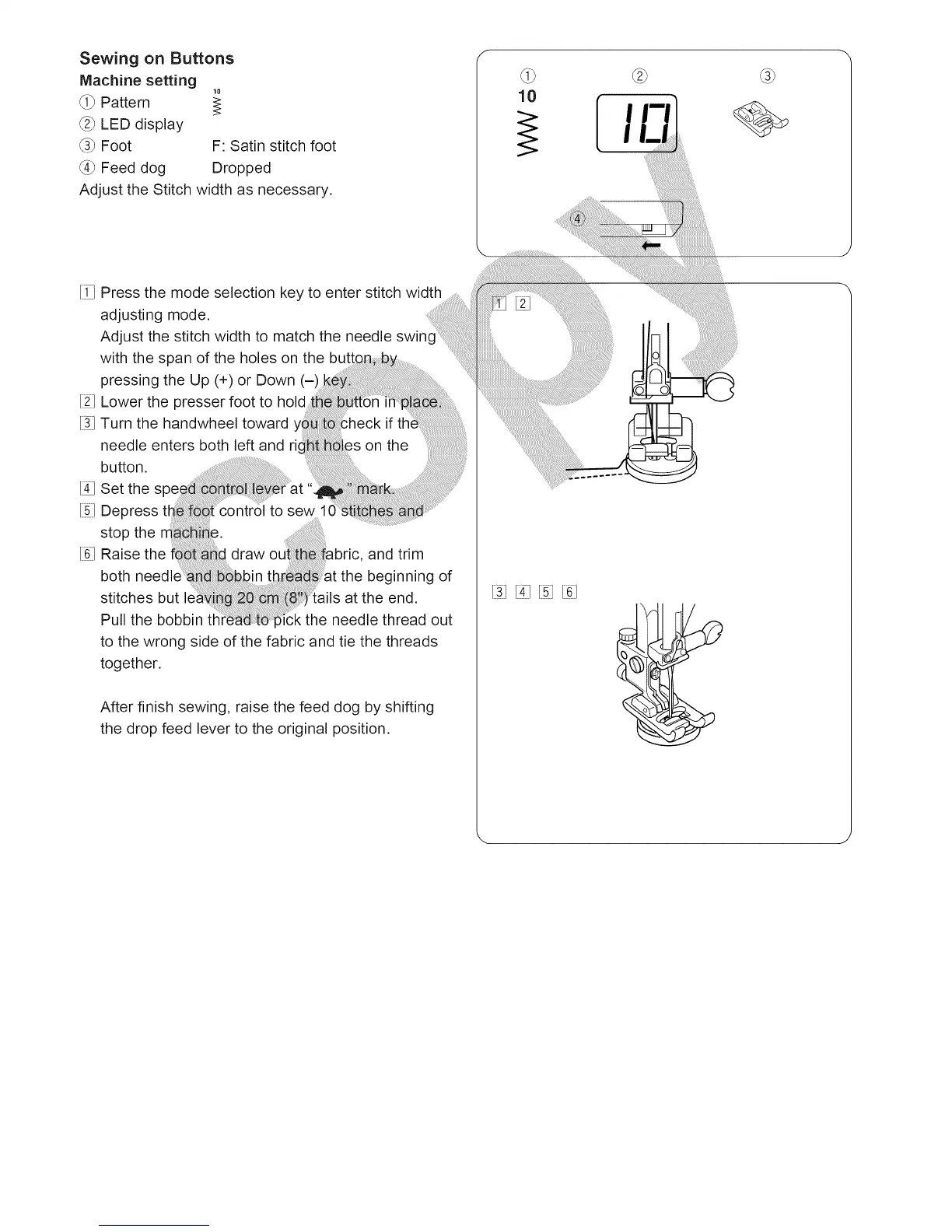
_i_ Pattern
_2_LED display
_3_Foot F: Satin stitch foot
_4_Feed dog Dropped
Adjust the Stitch width as necessary.
10
[i7 Press the mode selection key to enter stitch width
adjusting mode.
Adjust the stitch width to match the needle swinc
with the span of the holes on the
pressing the Up (4-)or Down (-)
[2J Lower the presser foot to hold
[31Turn the handwheel toward if tt
needle enters both left and ri on the
button.
[4JSet the s
% Depress tt to sew 1(
stop the ;.
[61Raise the draw and trim
both the beginning of
stitches but lei at the end.
Pull the bobbin fl "k the needle thread out
to the wrong side of the fabric and tie the threads
together,
After finish sewing, raise the feed dog by shifting
the drop feed lever to the original position.
[31[3 [61





 To Next Page