Adjusting the Stitch Length
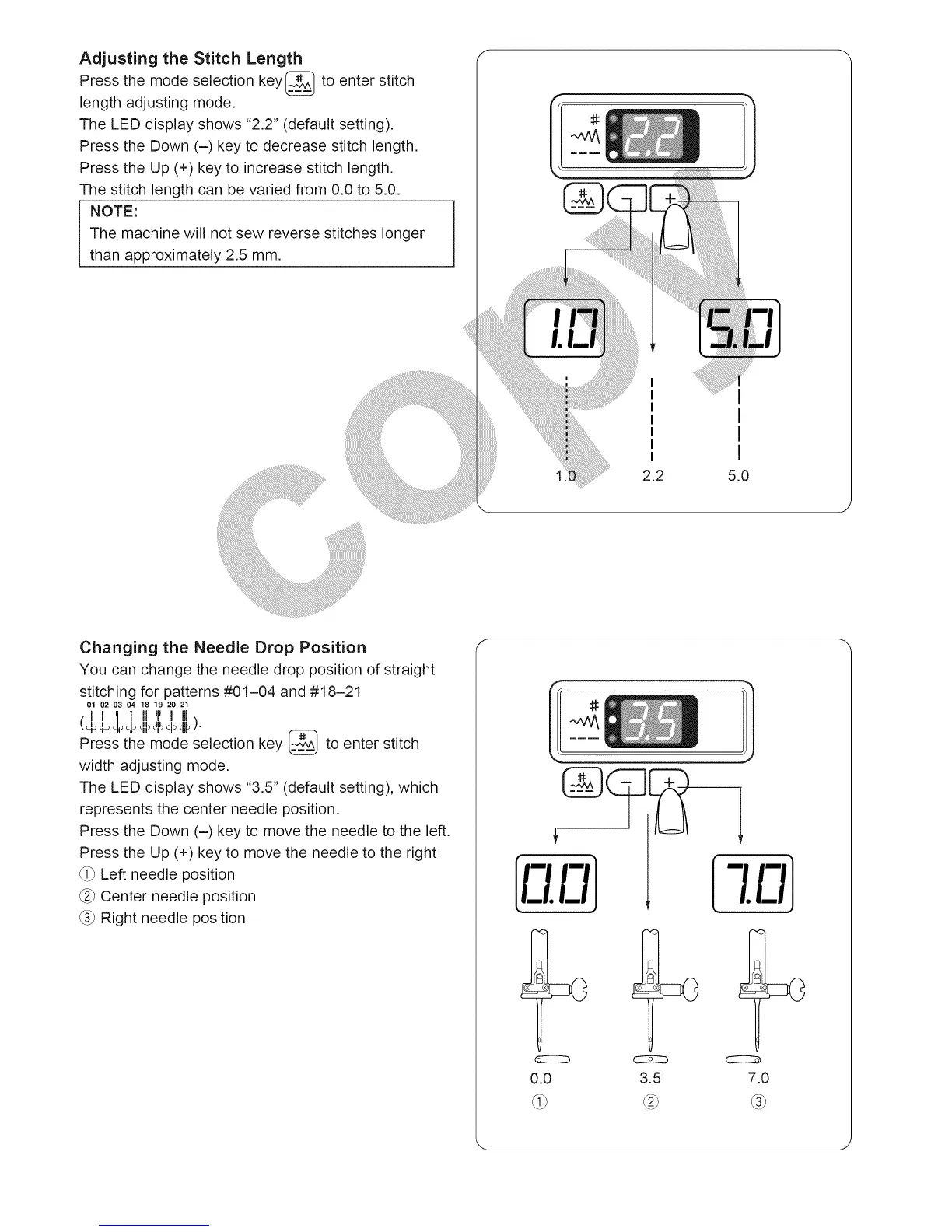
Press the mode selection key_ to enter stitch
length adjusting mode.
The LED display shows "2.2" (default setting).
Press the Down (-) key to decrease stitch length.
Press the Up (+) key to increase stitch length.
The stitch length can be varied from 0.0 to 5.0.
NOTE:
The machine will not sew reverse stitches longer
than approximately 2.5 mm.
1
1
1
1
5.0
Changing the Needle Drop Position
You can change the needle drop position of straight
stitching for patterns #01-04 and #18-21
01 02 03 04 18 19 20 21
cl ill Ill I
I1 Ii l ::: ' I,IIII_
(+ €_ _+ ,,, , I _111_:.
cNI>(hi) c
Press the mode selection key _ to enter stitch
width adjusting mode.
The LED display shows "3.5" (default setting), which
represents the center needle position.
Press the Down (-) key to move the needle to the left.
Press the Up (+) key to move the needle to the right
_i) Left needle position
_2)Center needle position
_3)Right needle position
m m]
LI.LIJ
0.0 3.5 7.0





 To Next Page