SECTION 6. CARE OF YOUR MACHINE
Adjusting Stretch Stitch Balance
The sewing results of the stretch stitch patterns may
vary depending upon the sewing conditions, such as
sewing speed, type of the fabric, number of layers, etc.
Always make test sewing on a scrap piece of the
fabric that you wish to use.
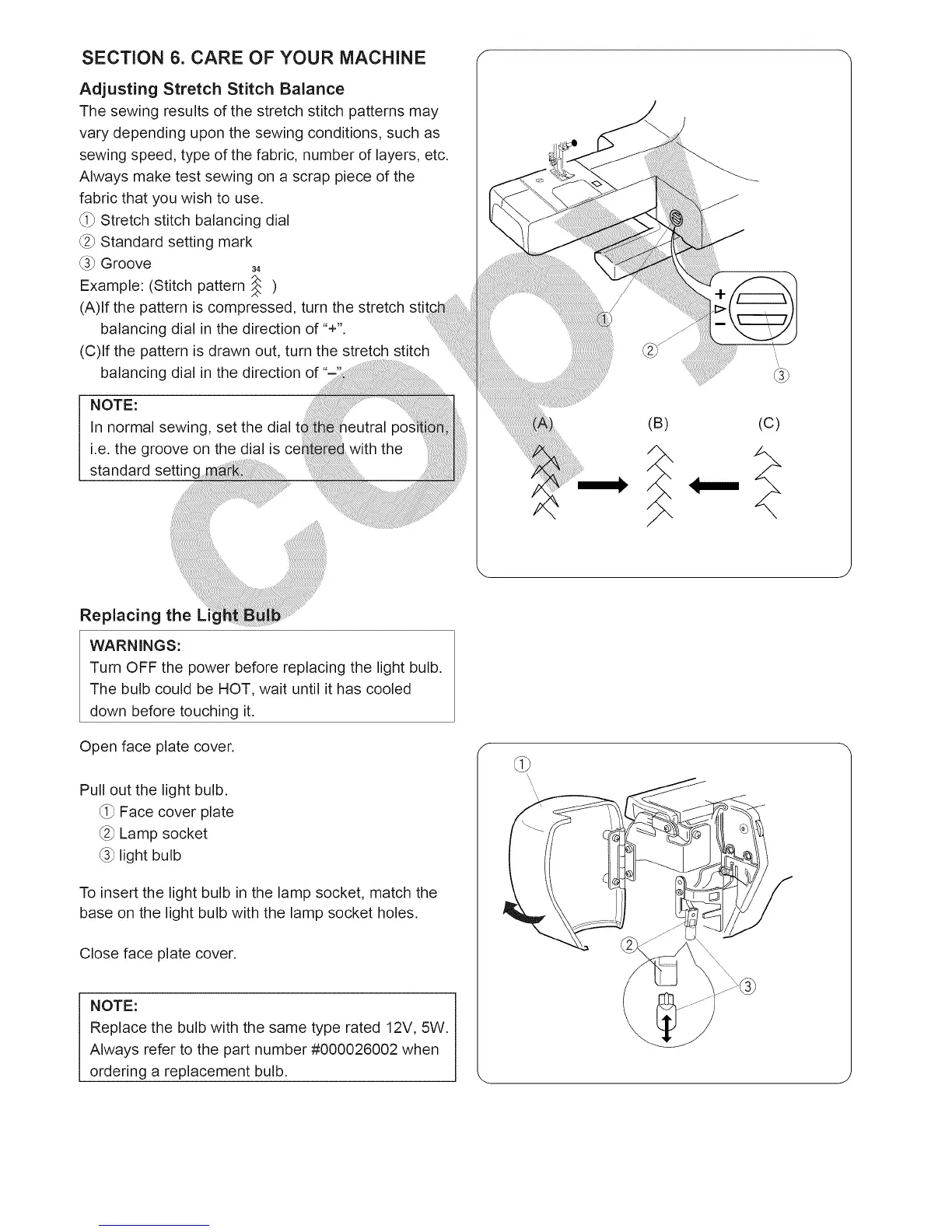
_i_Stretch stitch balancing dial
_2_Standard setting mark
_3_ Groove 34
Example: (Stitch pattern _ )
(A)lf the pattern is compressed, turn the stretch
balancing dial in the direction of "+".
(C)lf the pattern is drawn out, turn the stretch stitch
balancing dial in the direction of
NOTE:
In normal sewing, set the dial
i.e. the groove on the dial is c_
standard setting _:
(B) (c)
Replacing the
WARNINGS:
Turn OFF the power before replacing the light bulb.
The bulb could be HOT, wait until it has cooled
down before touching it.
Open face plate cover.
Pull out the light bulb.
_i_ Face cover plate
_2_Lamp socket
_3_light bulb
To insert the light bulb in the lamp socket, match the
base on the light bulb with the lamp socket holes.
Close face plate cover.
NOTE:
Replace the bulb with the same type rated 12V, 5W.
Always refer to the part number #000026002 when
ordering a replacement bulb.





 To Next Page