Winding the Bobbin
Removing the bobbin
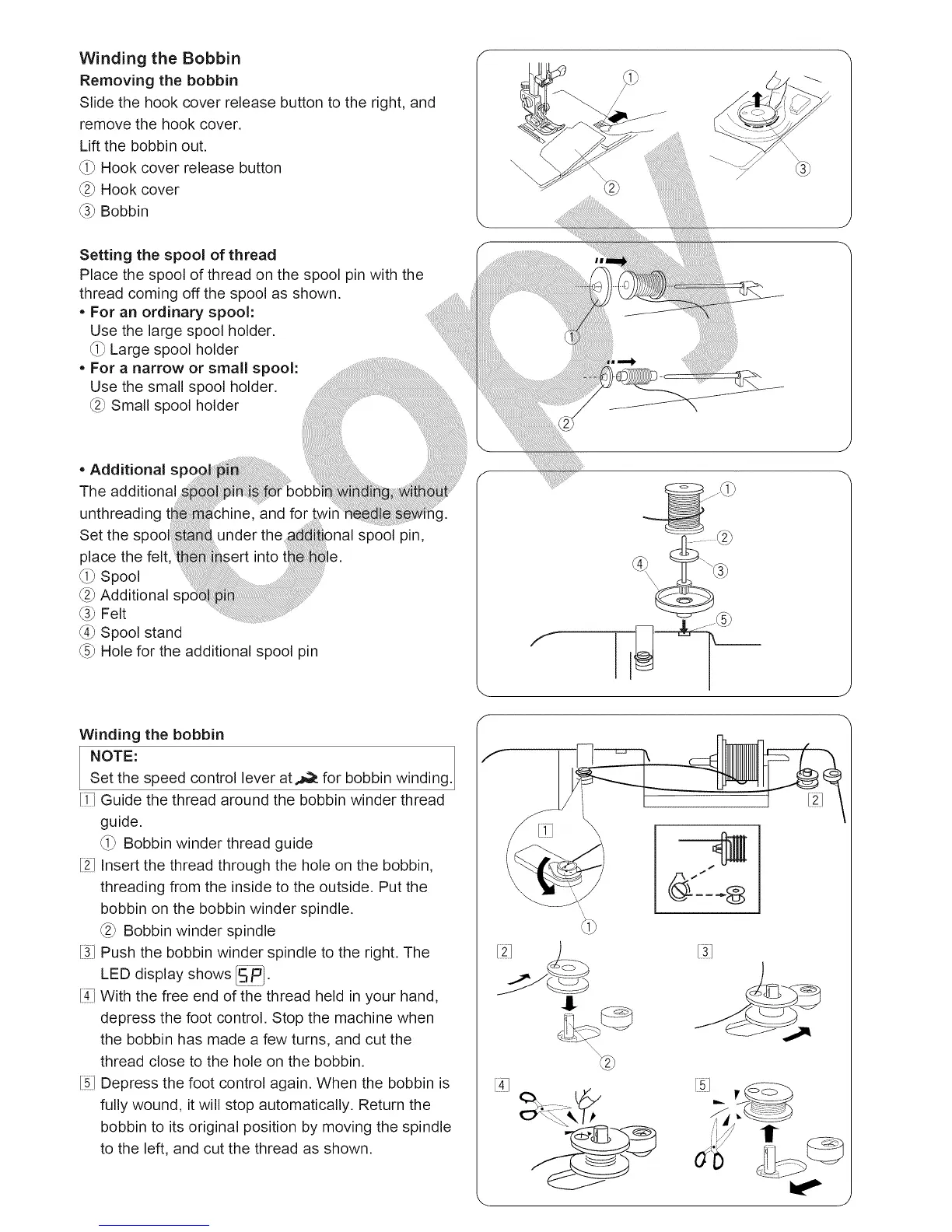
Slide the hook cover release button to the right, and
remove the hook cover.
Lift the bobbin out.
_i_ Hook cover release button
_2_Hook cover
_3_ Bobbin
@
Setting the spool of thread
Place the spool of thread on the spool pin with the
thread coming off the spool as shown.
• For an ordinary spool:
Use the large spool holder.
_i_ Large spool holder
• For a narrow or small spool:
Use the small spool holder.
_2_ Small spool holder
• Additional s
The additional
unthreading
Set the spoc
place the felt
(0 Spool
C2_Additional sp
_3_Felt
_4_Spool stand
_5_Hole for the additional spool pin
!le.
spool pin,
Winding the bobbin
NOTE: winding.
Set the speed control lever at.._ for bobbin
[i_ Guide the thread around the bobbin winder thread
guide.
_i_ Bobbin winder thread guide
[21Insert the thread through the hole on the bobbin,
threading from the inside to the outside. Put the
bobbin on the bobbin winder spindle.
_2_Bobbin winder spindle
[31Push the bobbin winder spindle to the right. The
LED display shows _.
[3 With the free end of the thread held in your hand,
depress the foot control. Stop the machine when
the bobbin has made a few turns, and cut the
thread close to the hole on the bobbin.
[5] Depress the foot control again. When the bobbin is
fully wound, it will stop automatically. Return the
bobbin to its original position by moving the spindle
to the left, and cut the thread as shown.
\ J





 To Next Page