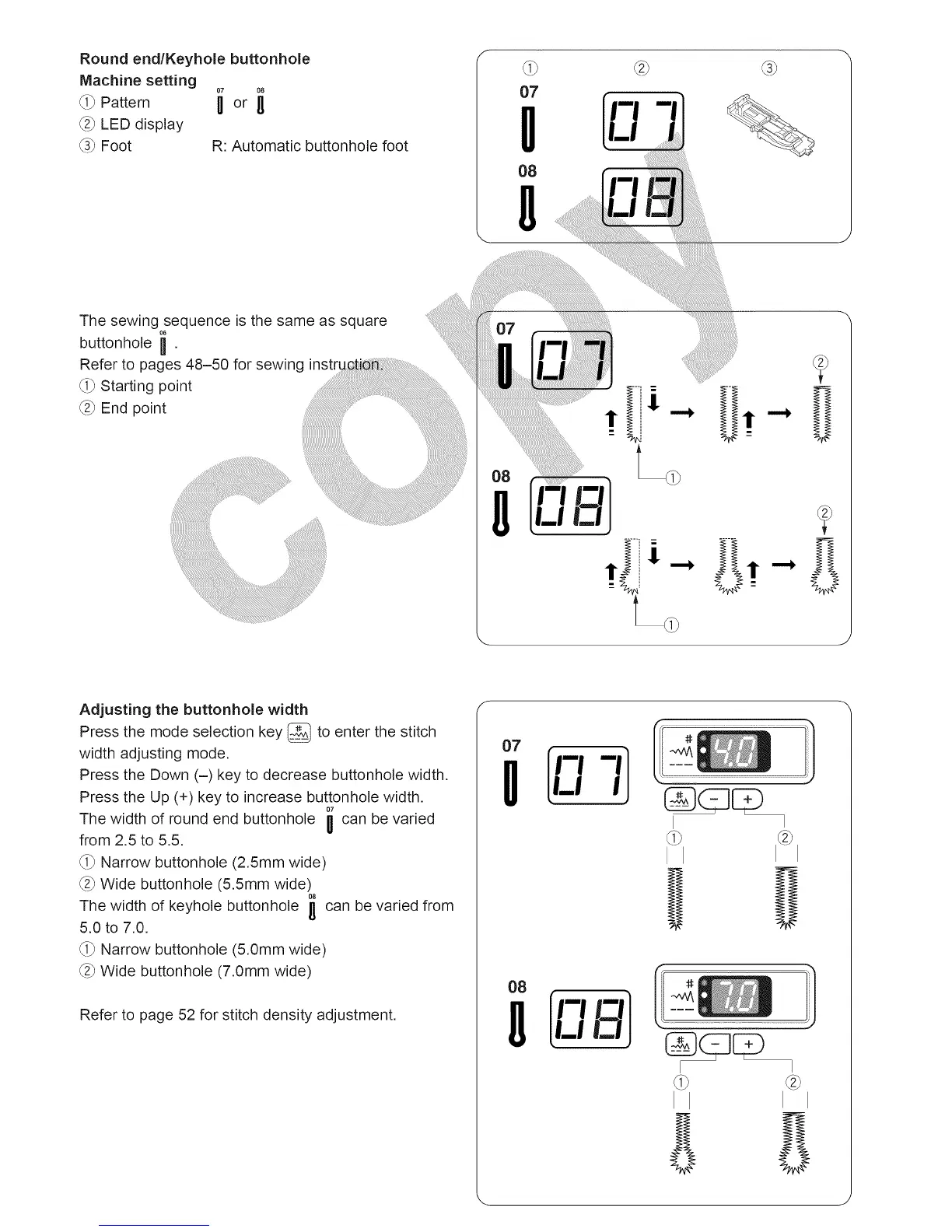
Round endlKeyhole buttonhole
Machine setting
@ LED display
_3_Foot R: Automatic buttonhole foot
O7
O8
The sewing sequence is the same as square
buttonhole H .
Refer to pages 48-50 for sewing
_i_Starting point
_2_ End point .... ......
iiiiiiiiiiiiiiiiiiiiiiiiiiiiiiiiii_
Adjusting the buttonhole width
Press the mode selection key _ to enter the stitch
width adjusting mode.
Press the Down (-) key to decrease buttonhole width,
Press the Up (+) key to increase buttonhole width.
The width of round end buttonhole ii can be varied
II
from 2.5 to 5.5.
_i_ Narrow buttonhole (2.5mm wide)
_2_Wide buttonhole (5.5mm wide)
08
The width of keyhole buttonhole I_ can be varied from
5.0 to 7.0.
_i_ Narrow buttonhole (5.0mm wide)
_2_Wide buttonhole (7.0mm wide)
Refer to page 52 for stitch density adjustment.
08
I1f'-"--']
LLI
GED
I





 To Next Page