SECTION 3. BASIC SEWING
Straight Stitch Sewing
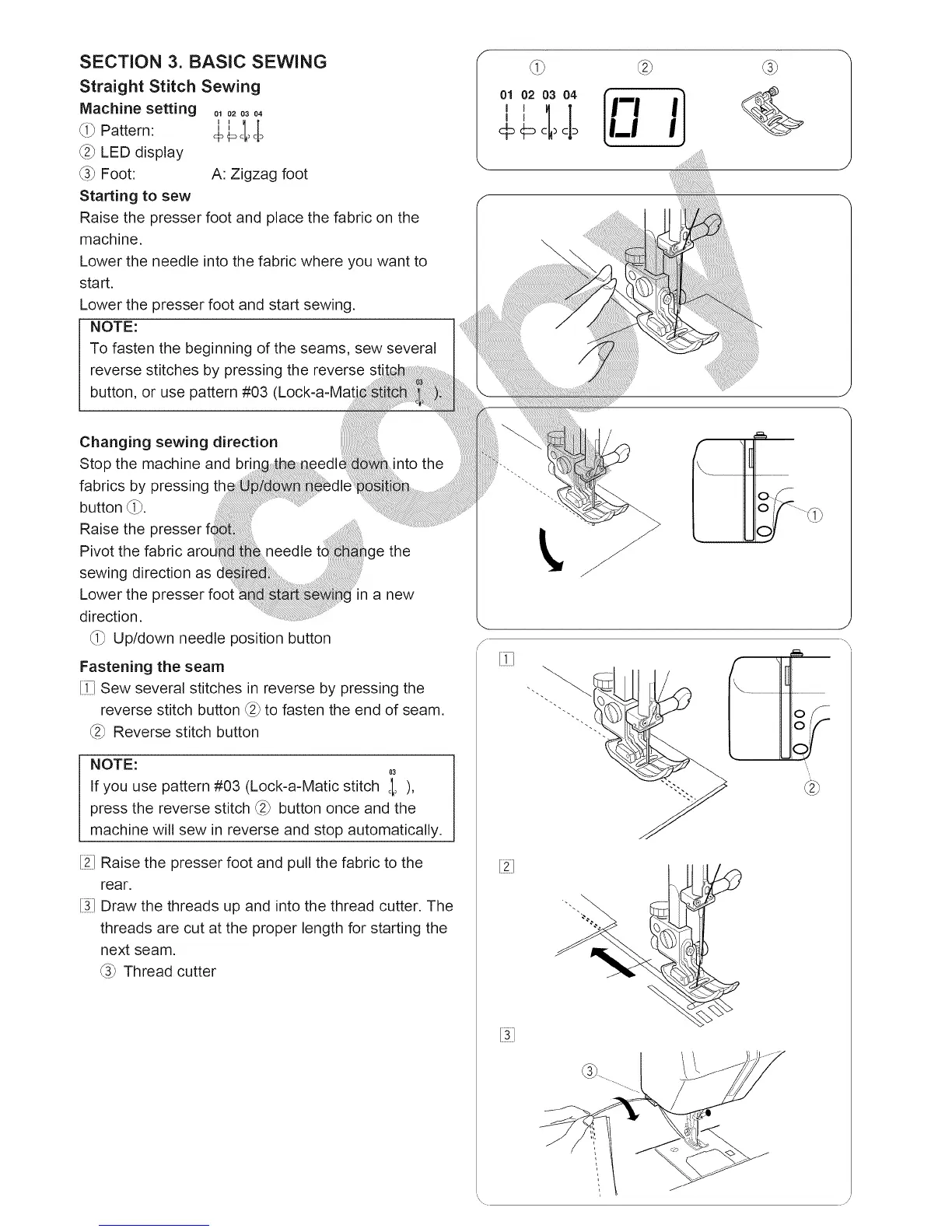
Machine setting ol020304
II
_i_ Pattern: + €_cl_old
_2_LED display
_3_Foot: A: Zigzag foot
Starting to sew
Raise the presser foot and place the fabric on the
machine.
Lower the needle into the fabric where you want to
start.
Lower the presser foot and start sewing.
NOTE:
To fasten the beginning of the seams, sew several
reverse stitches by pressing the reverse sti:
button, or use pattern #03 (Lock-a-Mat
Changing sewing direction
Stop the machine and the
fabrics by pressing
button _i_.
Raise the
Pivot the fabric ige the
sewing direction as
Lower the a new
direction.
_i_ Up/down needle position button
Fastening the seam
[i7 Sew several stitches in reverse by pressing the
reverse stitch button _2_to fasten the end of seam.
_2_Reverse stitch button
NOTE:
03
If you use pattern #03 (Lock-a-Matic stitch ¢I, ),
press the reverse stitch _2_button once and the
machine will sew in reverse and stop automatically.
[21Raise the presser foot and pull the fabric to the
rear.
[31Draw the threads up and into the thread cutter. The
threads are cut at the proper length for starting the
next seam.
_3_Thread cutter
0,?20304 ]
ILl I
J
\





 To Next Page