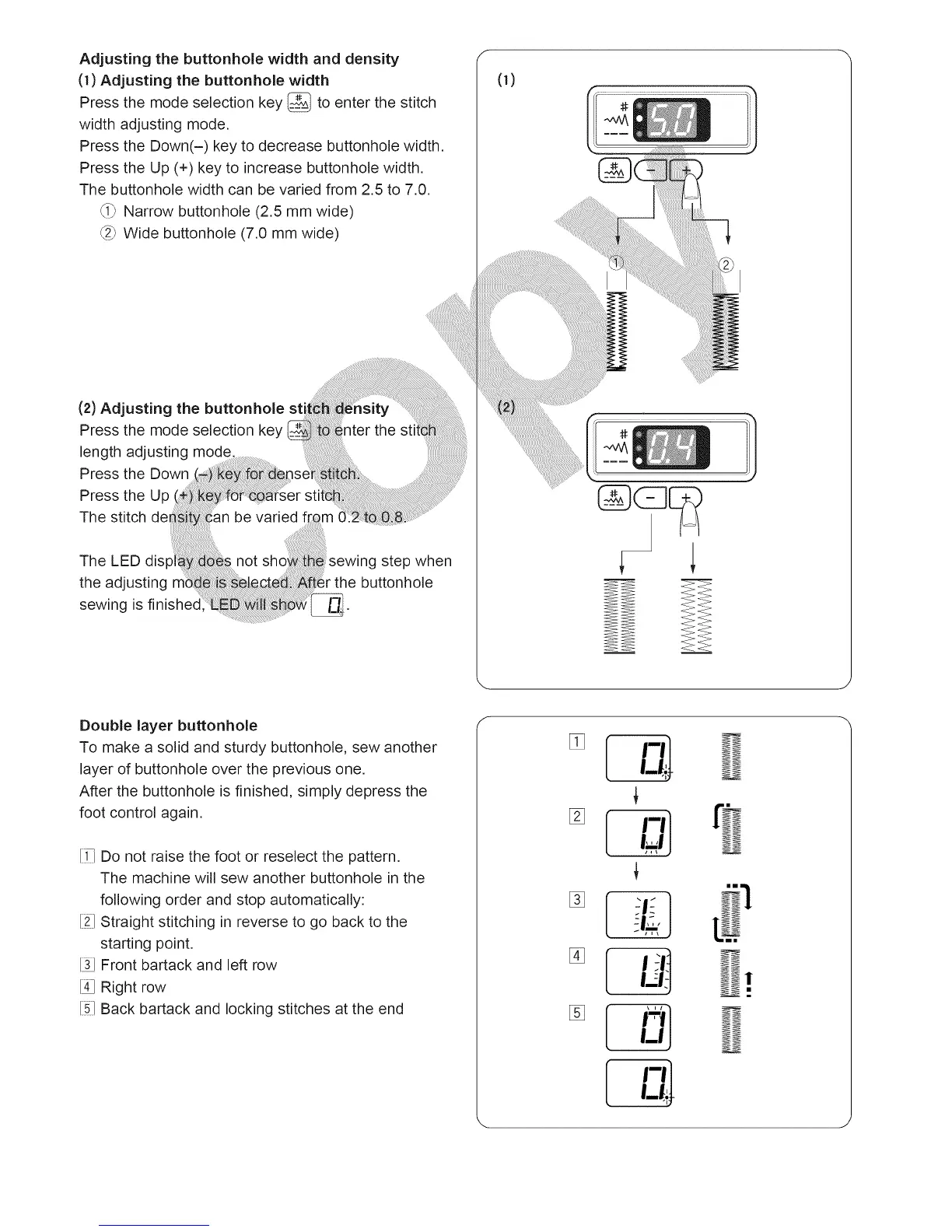
Adjusting the buttonhole width and density
(1) Adjusting the buttonhole width
Press the mode selection key _ to enter the stitch
width adjusting mode.
Press the Down(-) key to decrease buttonhole width,
Press the Up (+) key to increase buttonhole width,
The buttonhole width can be varied from 2.5 to 7.0.
_i_ Narrow buttonhole (2.5 mm wide)
_2_Wide buttonhole (7.0 mm wide)
Double layer buttonhole
To make a solid and sturdy buttonhole sew another
layer of buttonhole over the previous one.
After the buttonhole is finished, simply depress the
foot control again.
[i7 Do not raise the foot or reselect the pattern.
The machine will sew another buttonhole in the
following order and stop automatically:
[21Straight stitching in reverse to go back to the
starting point.
[3J Front bartack and left row
[4J Right row
[5] Back bartack and locking stitches at the end
ml
ml
L,'I
i_lj
[ '-'
"'l
!





 To Next Page