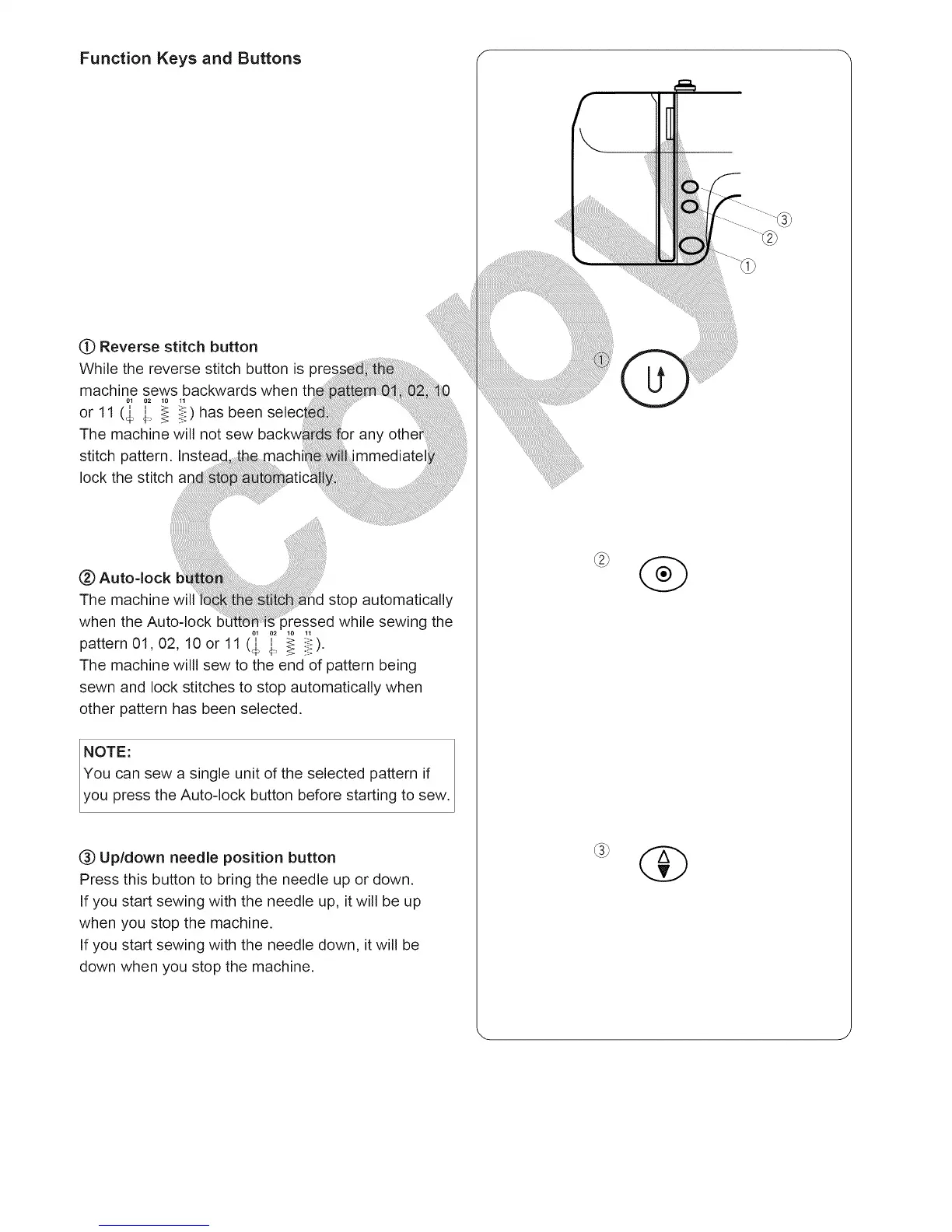
Function Keys and Buttons r
Q Reverse stitch button
While the reverse stitch button is pre
machine sews backwards when
or 11 (,_ i_ _ ii::) has been
The machine will not sew
stitch pattern. Insteaq
lock the stitch
Auto-lock
The machine will stop automatically
when the Auto-lock b )ressed while sewing the
0,1,_ ,_.)
pattern 01,02, 10 or 11 ($ 4, _ iF '
The machine willl sew to the end of pattern being
sewn and lock stitches to stop automatically when
other pattern has been selected.
NOTE:
You can sew a single unit of the selected pattern if
you press the Auto-lock button before starting to sew.
(_) Up/down needle position button
Press this button to bring the needle up or down.
If you start sewing with the needle up, it will be up
when you stop the machine.
If you start sewing with the needle down, it will be
down when you stop the machine.
@





 To Next Page