53210A Software Installation and Interface Configuration 2
Keysight 53210A User’s Guide 73
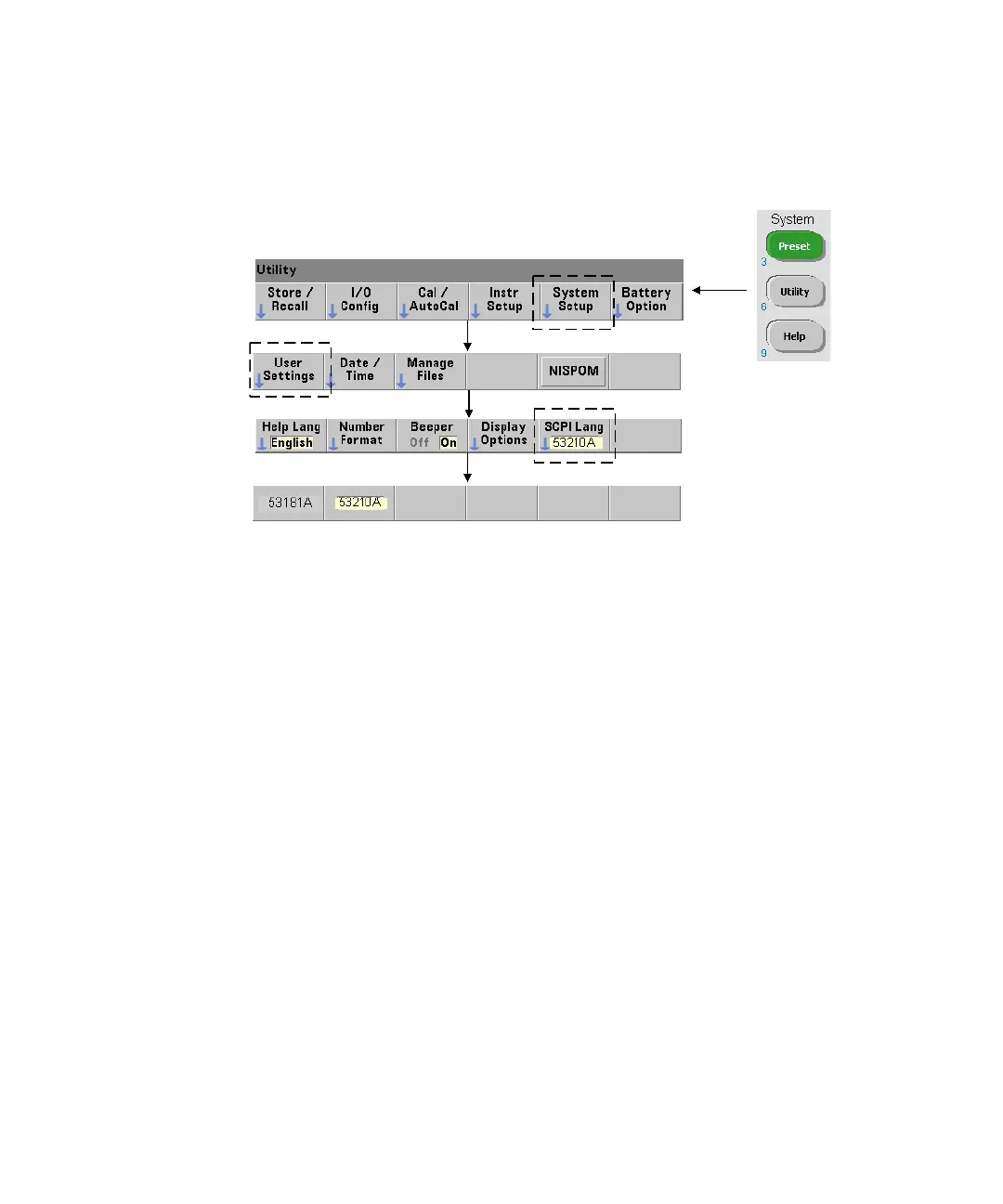
SCPI Language Emulation Mode
If the 53210A is sometimes used in 53181A SCPI language (emulation) mode, the
instrument must be returned to its original (53210A) mode before the firmware
can be updated.
Downloading and Installing the Update Utility
53210A firmware updates are installed in the instrument using the Keysight
firmware update utility. The utility and firmware update can be found on the Web
at:
www.keysight.com/find/53210A
Once this page is displayed, select the ‘Technical Support’ tab and then select
‘Drivers & Software’. Click on ‘532x0A Firmware Update’ and under ‘Documents &
Downloads’ select the utility:
53210A/53220A/53230A Firmware Update Utility
When prompted, select ‘Run’ to install the utility. The default installation directory
is C:\Program Files\Keysight\Firmware Update Utility Type 2. The utility will also
be added to the ‘start’ menu under “Keysight”.



 To Next Page