COMPACT AHU WITH HEAT RECOVERY EVO-T +
OPERATION AND MAINTENANCE MANUAL
104
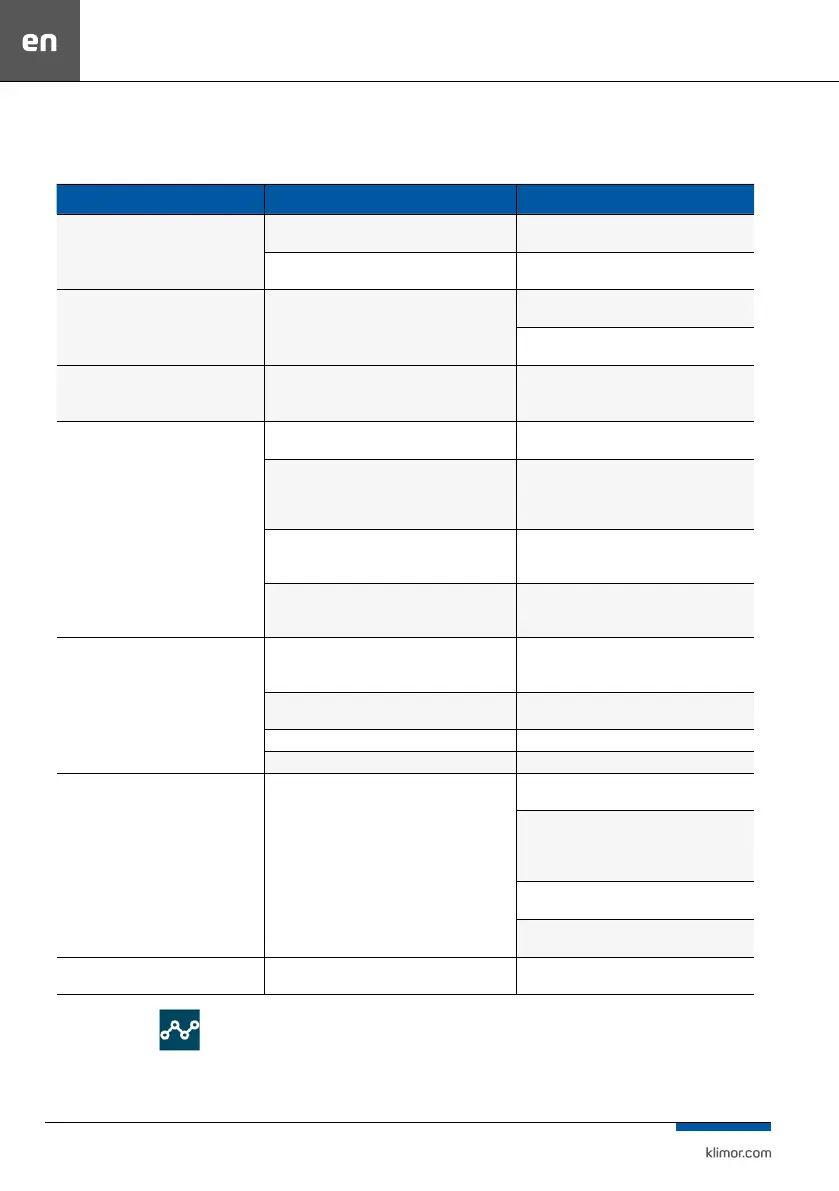
11.6 COMMON FAILURES
Table 22
SYMPTOMS CAUSE REMOVAL
The device cannot be activated – the display
screen is not highlighted
No power supply Connect the power supply cable correctly, check
the fuses
The control panel not connect- ed or connected
incorrectly
Double check and connect correctly
The device cannot be activated – the display
screen is not highlighted, no alarms
Check the fuses at the control system PCB and replace
blown ones
Check condition of the remote o input and re
protection input
The device cannot be activated- the display
screen is not highlighted alarms displayed on
the screen
Remove the cause of alarms according to Table 20
Too little air ow to all or some rooms – unit
supplies signicantly less air to all or some
rooms
dirty lters check dirt level of the air lters, replace if necessary,
set a new date for lter replacement
fouled heat recovery exchanger check heat exchanger cleanliness, clean it after 2 – 3
years of operation. Clean heat exchanger after 2 – 3
years of operation, proceed in accordance with point
8.6. 8.7
inappropriate calendar settings for current needs Check the calendar settings and fan outputs, and if
possible, increase them to required values
obstructed air distribution network, lack of network
adjustment
Check the network ow capacity and air distribution
and remove any obstacles, network adjustment
required
Too little air ow to all or some rooms – unit
supplies signicantly less air to all or some
rooms
inappropriate calendar settings for current needs Check the calendar settings and fan outputs, and if
possible, increase them to required values
lack of network adjustment check condition of distribution network, adjustment
required
wrong condition of the "sauna/replace" function check Settings of the "sauna/replace" function
wrong indication of the CO2 and/or humidity sensors check CO2 and/or humidity sensors
Overheating of the electric heater – "A ThHE"
alarm constantly present
too little air ow through the heater check dirt level of the air lters, replace if necessary,
set a new date for lter replacement
check heat exchanger cleanliness, clean it after 2 – 3
years of operation. Clean heat exchanger after 2 – 3
years of operation, proceed in accordance with point
8.6. 8.7
Check the calendar settings and fan outputs, and if
possible, increase them to required values
Check the network ow capacity and air distribution
and remove obstacles, if any
Temperature drop of the supply air below
the set value
System stopped, "A_LowTemp” alarm Turn on the device till the temperature in ventilated
rooms achieves level enabling operation of the device
11.7 CHART EDITOR
The editor is used for temperature trend analysis. The trend
line illustrates the change in temperature over time. Useful
tool to optimize the operation of the unit.



 To Next Page