COMPACT AHU WITH HEAT RECOVERY EVO-T +
OPERATION AND MAINTENANCE MANUAL
88
11. INSTRUCTION MANUAL
11.1 HMI graphic screens
When power is turned on for the rst time, the HMI down-
loads the current graphics from the controller, which may
take about 1 minute. Then the screen saver appears:
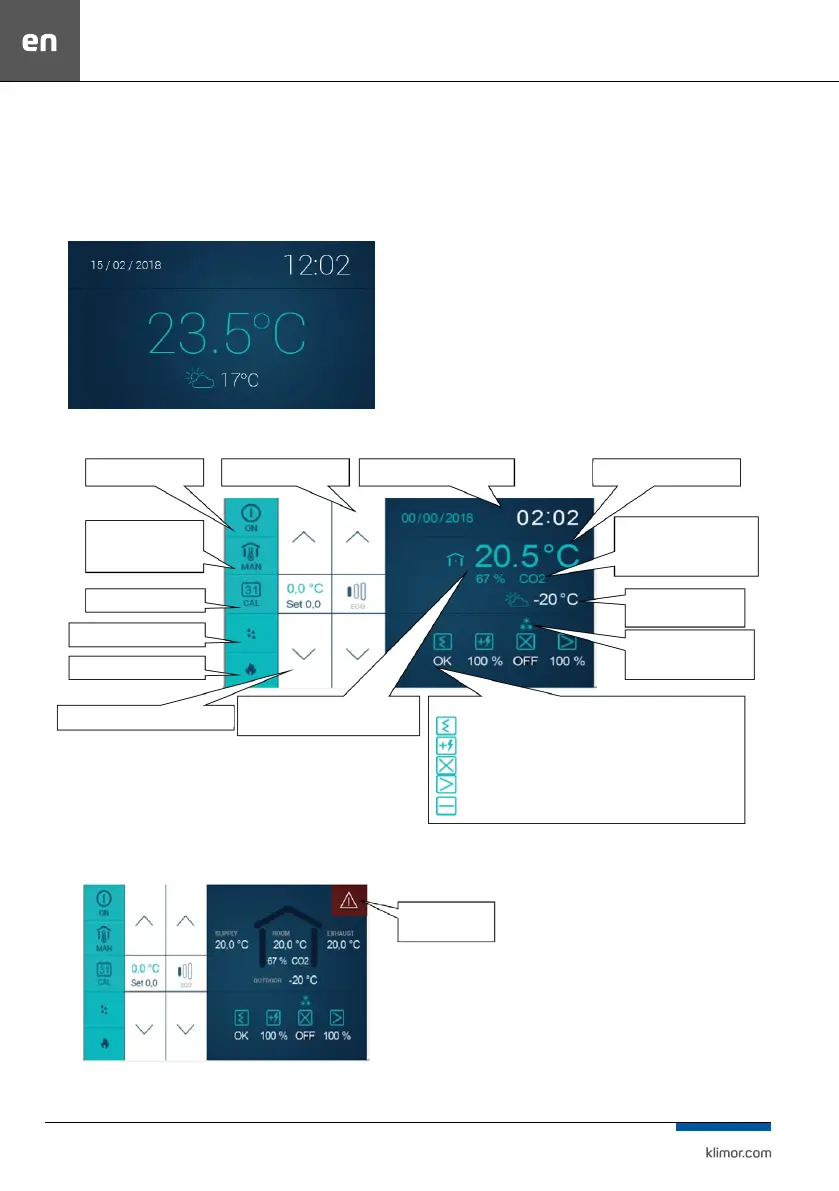
Fig. 21 Screensaver screen.
Sweep your nger to the left to move
to the next windows.
Fig. 22 Icons on the panel screen.
Fig. 23 Alarm indication.
On/o button
Status of system
Operating mode “Timer”
Operating mode “Sauna”
Operating mode “Fireplace”
Correction of temperature
components:
status of lter
Heater control status
Recovery status
fan control level
Selection of operating
mode
Current date and time Leading temperature
Operating mode
“Manual” (operation in
selected mode)
CO2 concentration
in extract air/room
Outdoor temperature
Alarm indication
Humidity of the air extracted from
a room
Active anti-freeze mode
of the heat recovery
section



 To Next Page