22
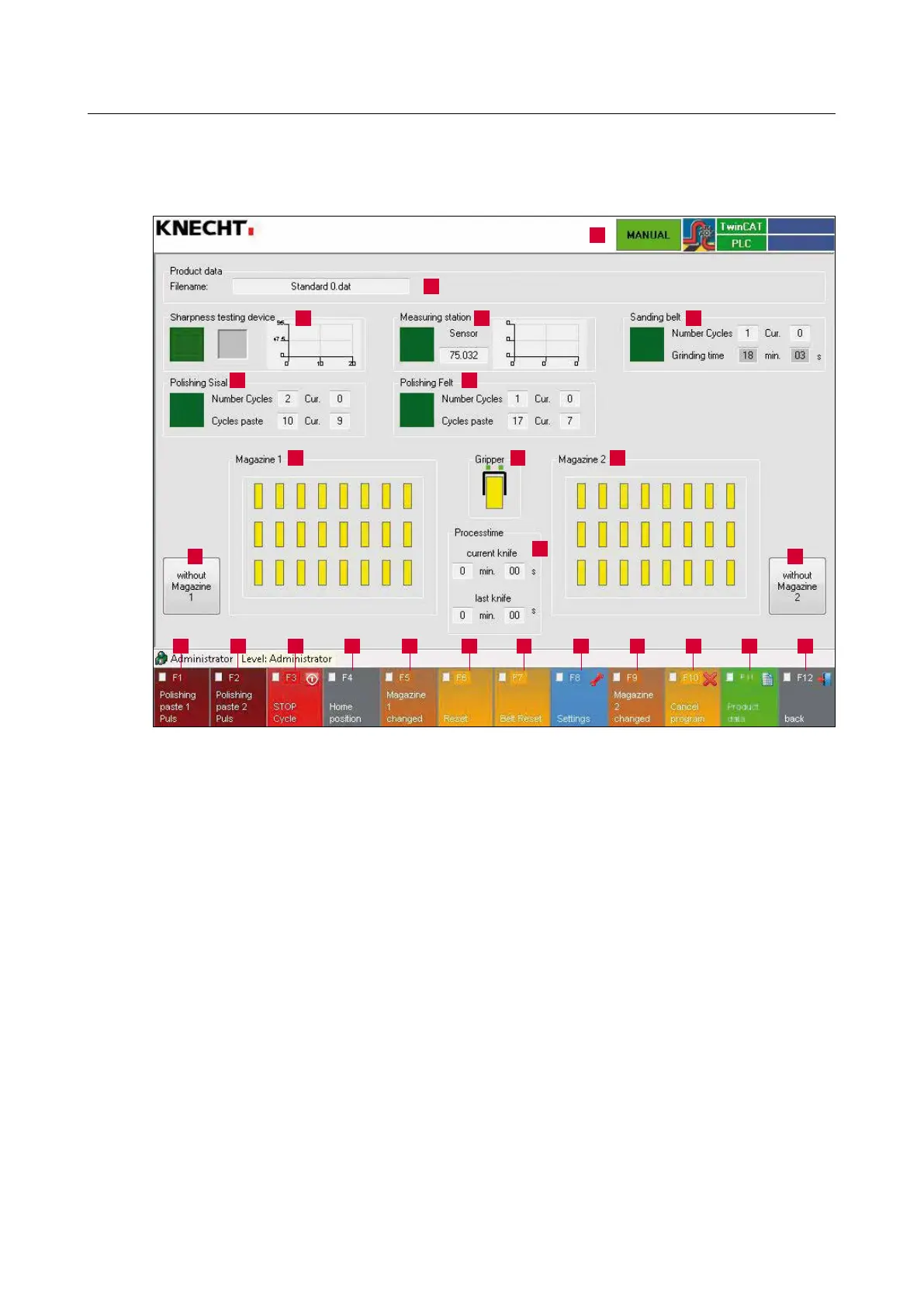
3.4.3 Layout of the user interface (main screen)
1 Fault messages
2 Product data (loaded product data)
3 Sharpness Testing Device
4 Contour holder
5 Grinding belt (number of cycles and grinding time, wet-grinding belt activated / deactivated)
6 Polishing with sisal (number of cycles and paste cycles, deburring unit activated / deactivated)
7 Polishing with felt (number of cycles and paste cycles, polishing unit activated / deactivated)
8 Magazine 1
9 “Gripper”: Tapping the gripper icon opens / closes the knife gripper arm
10 Magazine 2
11 Machining period (current and last knife)
12 “Magazine 1” Activate / deactivate knife magazine 1
13 “Magazine 2” Activate / deactivate knife magazine 2
14 “F1 Polishing paste 1 pulse”: Feed polishing paste 1 once
15 “F2 Polishing paste 2 pulses”: Feed polishing paste 2 once
16 “F3 STOP Cycle”: Stop machining after the currently active knife
17 “F4 home position”: Moves the cross table to home position
3. Description
Figure 3-6 Main screen
1
2
6 7
8
12 13
109
11
14 15 16 17 1918 20 21 22 23 24 25
43 5



 To Next Page