EasyManua.ls Logo

Kramer VP-440 - Page 60

Kramer VP-440
65 pages
Print Icon
To Next Page IconTo Next Page
To Previous Page IconTo Previous Page
Loading...
Kramer Electronics Ltd.
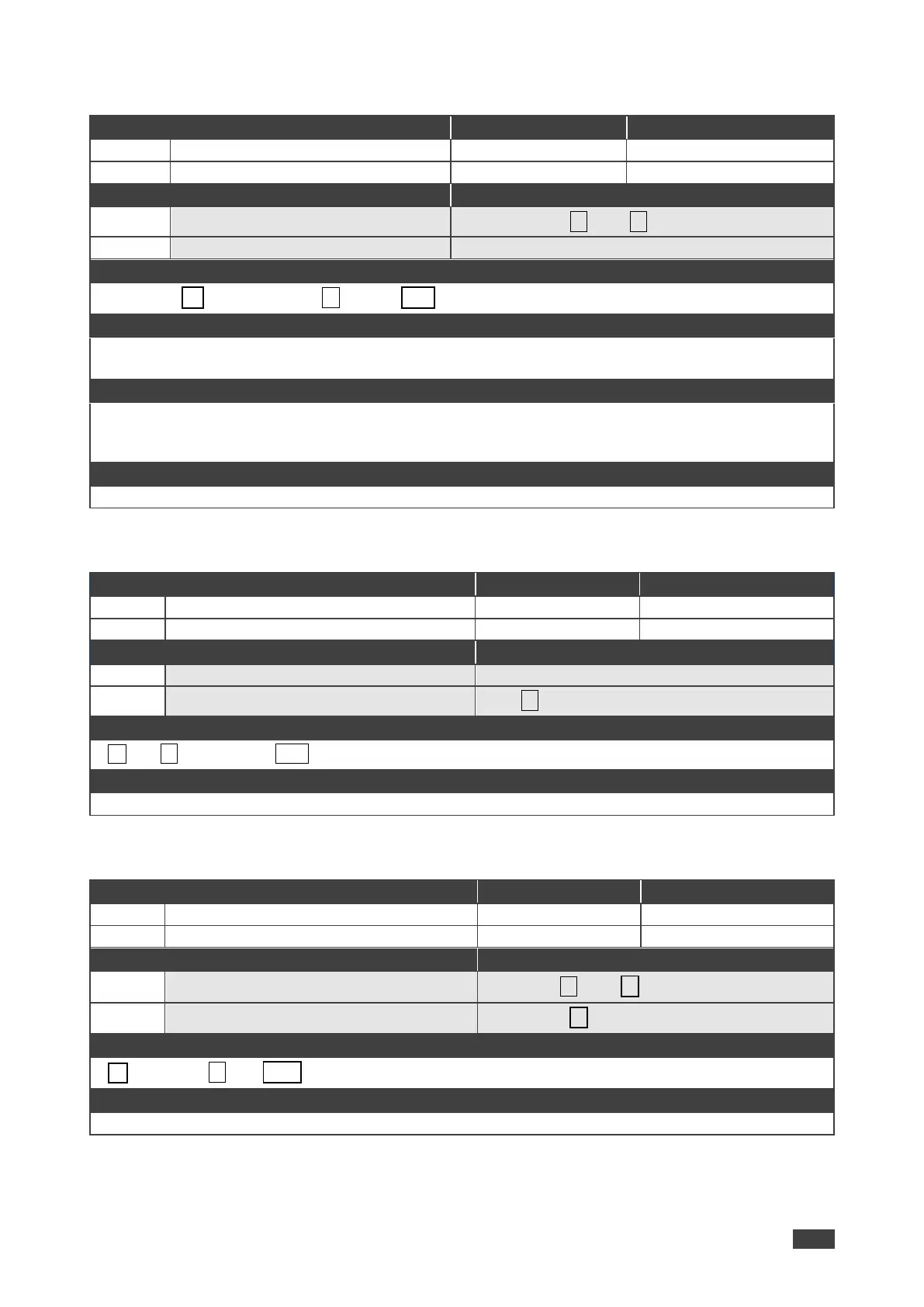
VP-440 Protocol 3000
58
SCLR-PCAUTO
Functions
Permission
Transparency
Set:
SCLR-PCAUTO
End User
Public
Get:
End User
Public
Description
Syntax
Set:
Set PC auto sync of scaler
#SCLR-PCAUTOP1,P2
Get:
Response
Set / Get: ~ nn@SCLR-PCAUTOP1,P2….␍␊
Parameters
P1 (Scaler number) 1=Scaler
P2 (Off/On) 1=Yes
Response triggers
Response is sent to the com port from which the Set (before execution) / Get command was received
After execution, response is sent to all com ports if CMD-NAME was set any other external control device
(button press, device menu and similar) or genlock status was changed
Notes
Sets the PC Auto sync of the selected scaler
SN?
Functions
Permission
Transparency
Set:
-
-
-
Get:
SN?
End User
Public
Description
Syntax
Set:
-
-
Get:
Get device serial number
#SN?
Response
~nn@SNserial_number␍␊
Parameters
serial_number - 14 decimal digits, factory assigned
STANDBY
Functions
Permission
Transparency
Set:
STANDBY
End User
Public
Get:
STANDBY?
End User
Public
Description
Syntax
Set:
Set Standby mode
#STANDBYon_off
Get:
Get Standby mode status
#STANDBY?
Response
~nn@STANDBYvalue␍␊
Parameters
on_off 0=Off; 1=On

Other manuals for Kramer VP-440

Related product manuals