Operation
83
Pos: 38.19.6 /Überschr iften/Überschr iften 3/A-E/B/Bei Ausführung elektrische K reiselhöhenverste llung @ 362\mod_1439554 944520_78.doc x @ 2670185 @ 3 @ 1
10.7.1 With Electrical Rotor Height Adjustment Version
Pos: 38.19.7 /BA/Bedi enung /Schwader/Kr eiselhöhe einstellen ( vorher: Arbeitstief e)/Einstellen der Kr eiselhöhe_elektr isch_Bild_Swadro TS 620 (Twin)_TS 680 (Twin)_ TS 740 (Tw @ 359\mod_1438940020 564_78.docx @ 2660538 @ @ 1
3
4
1
TS620-005_1
2
5
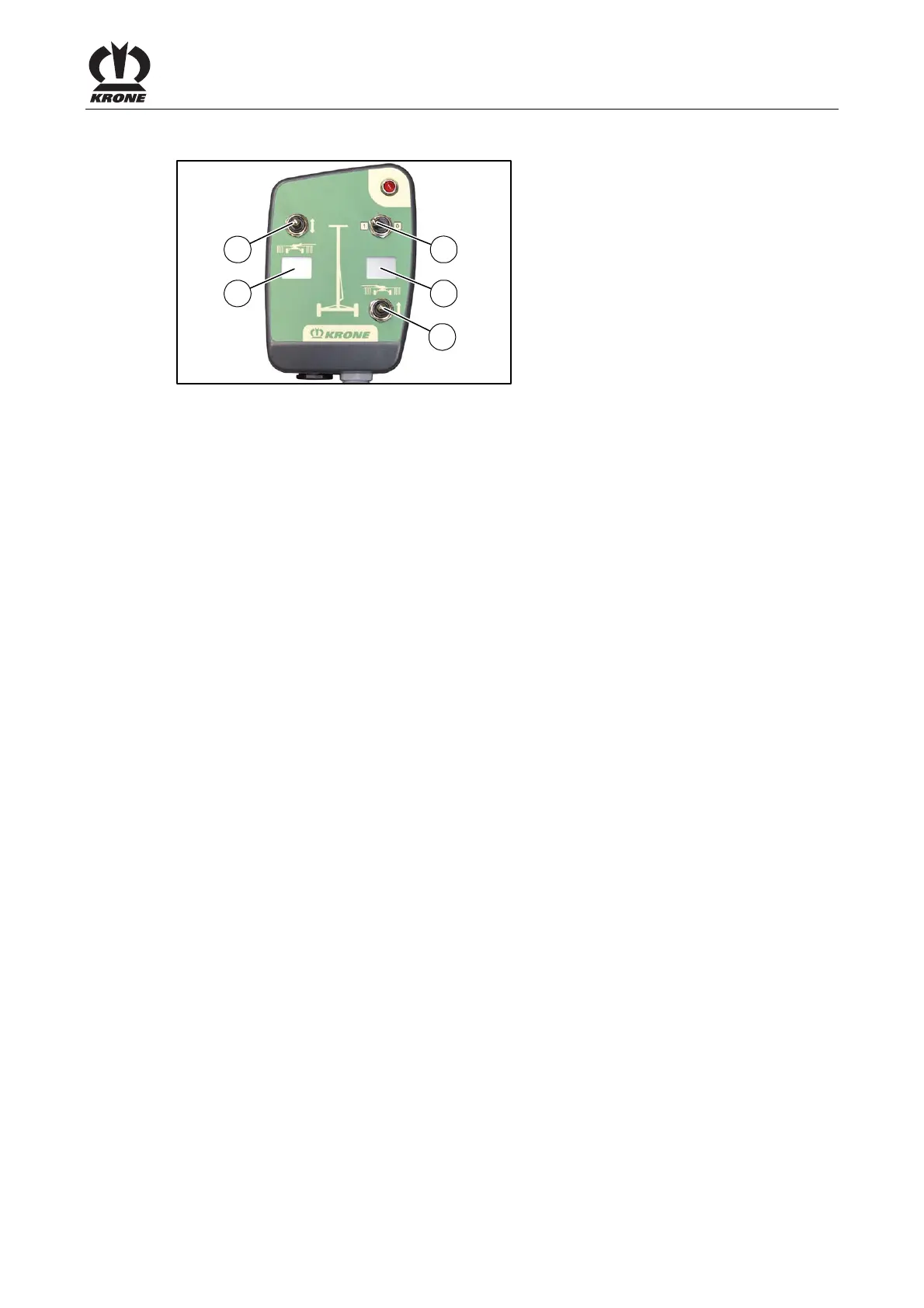
Fig. 46
Pos: 38.19.8 /BA/Bedi enung /Schwader/Kr eiselhöhe einstellen ( vorher: Arbeitstief e)Einstellen der Arbeitshöhe_elektri sch_Text_Swadro TS 620 (Twin)_TS 680 (Twin)_TS 740 ( Twin) @ 358\mod_14389301 30722_78.docx @ 2659785 @ @ 1
The working height can be adapted to crop and terrain while the machine is in operation or in
headland position.
To do this:
• Raise lower links until the lower link pinions are approx. 66 above the ground.
• Move outrigger arms to headland position or working position.
• To switch on the operation panel, move switch (1) to position 1.
Setting the working height on right rotor:
• Press switch (3) up to increase the spacing of the tines to the ground.
The value increases in digital display (2).
• Press switch (3) down to reduce the spacing of the tines to the ground.
The value decreases in digital display (2).
Setting the working height on left rotor:
• Press switch (5) up to increase the spacing of the tines to the ground.
The value increases in digital display (4).
• Press switch (5) down to reduce the spacing of the tines to the ground.
The value decreases in digital display (4).
Pos: 38.20 /Layout Module /---------------Seitenumbruch---------------- @ 0\mod_1196175311226_0. docx @ 4165 @ @ 1



 To Next Page
 Loading...